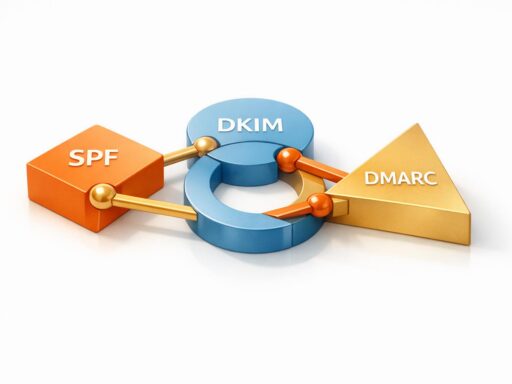
Automated domain masking helps businesses improve email deliverability by separating cold outreach campaigns from their primary domain. This shields the main domain from spam complaints and reputation issues, ensuring emails reach inboxes instead of spam folders.
Key points:
- Protects primary domain: Cold emails use secondary domains, isolating risks.
- Boosts efficiency: automation handles DNS setup, SSL certificates, and email authentication like SPF, DKIM, and DMARC.
- Improves deliverability: Reduces spam complaints and bounce rates, increasing inbox placement by up to 20%.
- Saves time: Manual setups take hours per domain; automation completes tasks in minutes.
- Supports compliance: Meets strict email standards like Gmail‘s 0.3% spam complaint limit.
we solved the biggest problem in cold emailing…
Research Findings on Automated Domain Masking
Email Deliverability Statistics: Impact of Automated Domain Masking
Higher Inbox Placement Rates
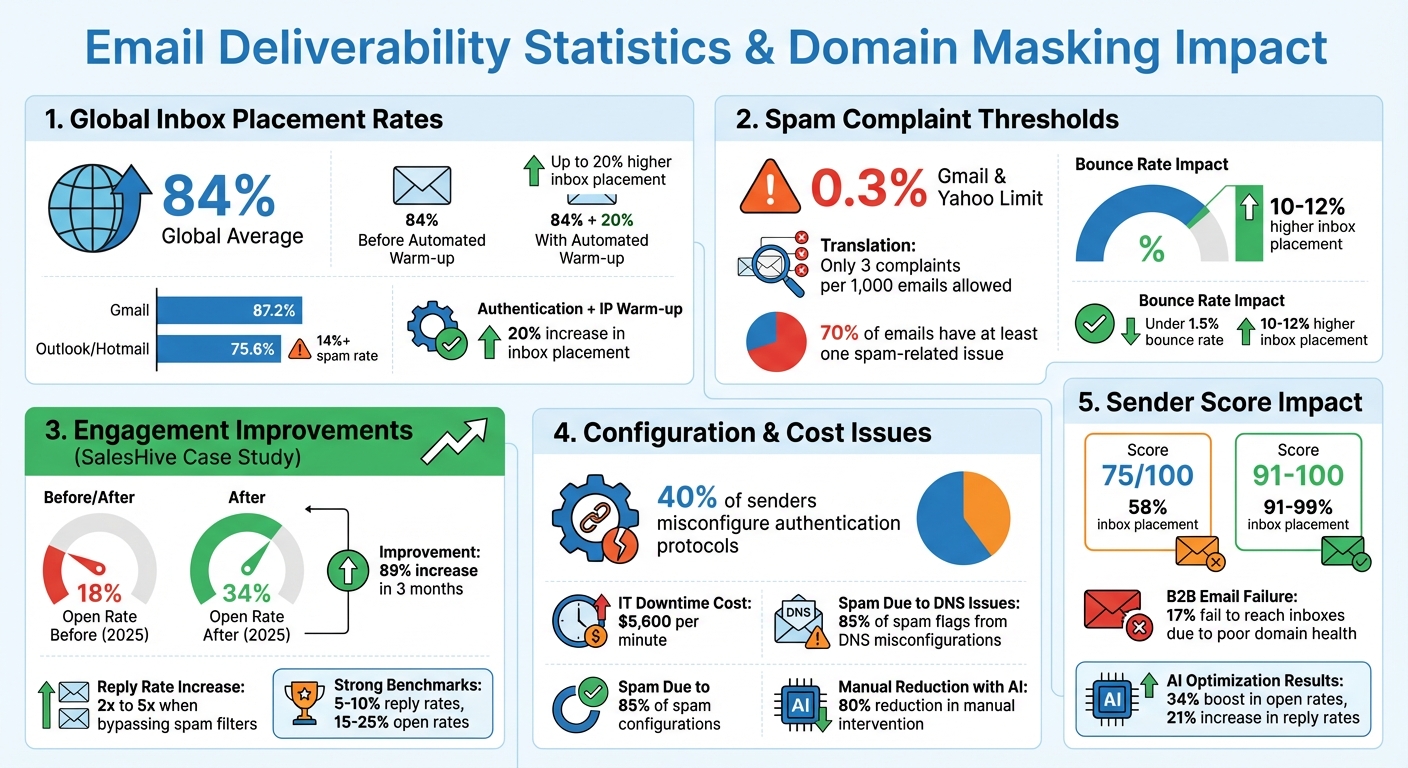
The global average inbox placement rate is 84%. While this might seem decent, it still leaves room for improvement, especially when outreach potential depends heavily on reaching inboxes rather than spam folders.
Using separate subdomains for outreach helps isolate sender reputation, which directly impacts inbox placement. This strategy has proven effective – senders using platforms with automated warm-up and volume control report up to 20% higher inbox placement rates compared to those without such tools.
Looking at specific email providers, the data is telling. Gmail users enjoy an inbox placement rate of 87.2%, while Microsoft Outlook/Hotmail lags behind at just 75.6%, with spam rates exceeding 14%. Clearly, email deliverability varies widely across platforms.
Authentication plays a pivotal role here. Combining proper authentication methods with IP warm-up increases inbox placement by 20%. Automated systems simplify this process by correctly configuring SPF, DKIM, and DMARC settings, which reduces the risk of manual errors that could trigger spam filters. Starting with a properly authenticated and masked domain gives your emails a better chance of landing where they should – in the inbox. This, in turn, helps minimize spam complaints and strengthens sender reputation.
Reduced Spam and Complaint Rates
Spam complaints can tank your sender reputation faster than you’d think. Gmail and Yahoo, for instance, enforce a strict 0.3% spam complaint threshold – just three complaints per 1,000 emails. Exceed that limit, and your emails are likely to be flagged as spam automatically.
Domain masking provides a safety net by isolating cold outreach activities on secondary domains. Any reputation damage is contained, protecting your primary domain.
The numbers are stark: 70% of emails have at least one spam-related issue. Automated domain masking helps sidestep many of these pitfalls. A case study from SalesHive illustrates the impact: after implementing domain masking protocols, their email open rates jumped from 18% to 34%, an 89% increase in engagement over just three months in 2025.
"You should NOT send cold emails from your primary domain. If you send cold emails from your primary domain, then you risk ‘burning’ (blacklisting) your domain." – George Wauchope, Founder, Emailchaser
Bounce rates are another critical factor. Keeping bounce rates under 1.5% can lead to 10-12% higher inbox placement. Automated systems track these metrics across all masked domains, enabling quick action to address any issues before they escalate. Lower spam complaints and bounce rates naturally lead to better engagement metrics, which we’ll explore next.
Better Open and Response Rates
Getting emails into inboxes is only part of the equation; the real goal is engagement.
SalesHive’s open rate improvement – from 18% to 34% – is a prime example of how effective domain masking goes beyond deliverability. It creates a foundation for better recipient engagement. Reply rates can increase by 2x to 5x when emails bypass corporate spam filters, thanks to proper domain masking.
Trust also plays a big role. Automated systems include SSL certificate installation, which displays security icons like the padlock symbol. These visual cues reassure recipients, reducing manual spam reports and fostering confidence in your emails.
Campaigns that effectively use domain masking often see reply rates between 5% and 10%, with open rates in the 15-25% range considered strong benchmarks. These figures reflect genuine engagement, not inflated metrics caused by features like Apple Mail Privacy Protection.
"After implementing and analyzing countless email marketing campaigns, I’ve observed that even minor improvements in deliverability rates can effectively increase email open and conversion rates." – Žilvinas Lešinskas, VP of Product, Omnisend
How Automated Domain Masking Protects Sender Reputation
Risk Isolation and Reputation Management
If your domain gets flagged for spam, it can disrupt crucial communications and damage your sender reputation. That’s where domain masking steps in. By routing cold outreach emails through secondary domains or subdomains, you create a buffer zone. This is a fundamental part of what cold email is in a modern, high-deliverability context. This way, even if a campaign runs into spam filters, your primary domain stays protected.
Here’s why this matters: reputation is evaluated at the domain level, not the company level. By assigning subdomains to different email streams, you prevent issues in one area from spilling over into others.
The consequences of poor reputation management can be severe. Exceeding spam thresholds can lead to permanent domain flagging or even suspension of critical accounts like Google Workspace or Microsoft 365. Secondary domains act as a safeguard, ensuring your core operations remain unaffected.
Once risks are isolated, the next step is securing your outbound emails with reliable authentication systems.
Email Authentication and Trust
Email authentication protocols like SPF, DKIM, and DMARC are essential for verifying sender legitimacy. Yet, studies reveal that nearly 40% of senders misconfigure these protocols. This is especially common when managing multiple domains, as manual DNS setup is prone to errors.
Automation simplifies this process. It ensures your "From" address matches the SPF and DKIM records, a critical requirement for passing DMARC checks. This alignment is now mandatory for high-volume senders (those sending over 5,000 messages daily) on platforms like Gmail and Yahoo.
SPF, however, has a technical limitation: it allows only 10 DNS lookups. Exceeding this cap results in failed authentication. Cold email outreach tools handle these complexities, ensuring proper configuration across all masked domains and reducing the chances of being flagged as spam.
"Email authentication lets mailbox providers know that you’re a trusted sender – that you are who you say you are." – Levi Trejo, Technical Account Manager, Sinch Mailgun
A smart approach to DMARC implementation starts with a p=none policy to monitor email traffic. Once your setup is fully optimized, you can gradually shift to a stricter p=reject policy. This phased rollout minimizes the risk of blocking legitimate emails.
Visual authentication also plays a key role in building trust. Research shows that 53% of consumers are hesitant to trust emails from brands that lack visual cues of legitimacy. Proper authentication not only reassures recipients but also reduces spam complaints.
Automating these processes ensures accuracy and strengthens your sender reputation.
Zapmail‘s Automated Domain Masking Features
Zapmail takes domain masking and email authentication to the next level with its automated tools, designed to simplify complex processes and improve deliverability.
The platform automates DNS configuration, setting up SPF, DKIM, and DMARC records correctly across all your domains. This eliminates the common errors that lead to authentication failures.
Zapmail also speeds up the reputation-building process. Unlike manual setups that require weeks of warming up, its mailboxes are ready to perform much faster. Additionally, it allows you to separate campaign types at the workspace level, ensuring that one client’s deliverability issues won’t impact another.
For added convenience, Zapmail’s AI-powered domain naming tool generates secondary domains that look authentic while maintaining brand consistency. Features like automated forwarding and masking enhance domain isolation, aligning with best practices.
Agencies managing multiple clients can benefit from Zapmail’s API access, available with the Pro plan ($299/month). This enables programmatic control over email infrastructure, allowing users to create new masked domains, configure authentication, and monitor reputation metrics – all while staying within industry spam complaint limits.
With Zapmail, you can automate the intricate details of DNS management and maintain a strong sender reputation effortlessly.
sbb-itb-36f7bf9
Scaling Automated Domain Masking for High-Volume Outreach
Problems with Manual Setup at Scale
When managing DNS records manually across numerous domains, mistakes and inefficiencies become almost inevitable. Around 40% of senders misconfigure critical authentication protocols, leading to issues like security vulnerabilities and delivery failures. On top of that, IT downtime caused by infrastructure errors can cost businesses a staggering $5,600 per minute. Each tracking link and masked domain requires its own SSL certificate, and handling this manually creates potential security risks. Add to this the need to rotate DKIM keys every six months and constantly monitor DNS propagation, and the process becomes a logistical headache. These challenges highlight why automation is such a game-changer for high-volume outreach.
Automation Benefits for High-Volume Campaigns
With automation, tasks that used to take hours – or even days – can now be completed in minutes. Bulk DNS configuration, SSL provisioning, and domain masking can all be handled simultaneously across hundreds of domains. When done right, these automated processes can achieve inbox placement rates as high as 98–99%. Standardized templates help eliminate the inconsistencies that plague manual setups, which is critical because 85% of emails are flagged as spam due to DNS misconfigurations.
Automation also simplifies inbox rotation by distributing email traffic across 20–25 Google mailboxes, ensuring spam complaint rates stay below the 0.1% threshold required by platforms like Gmail and Yahoo. This not only protects sender reputation but also ensures emails actually land in recipients’ inboxes.
| Feature | Manual Setup | Automated Setup |
|---|---|---|
| Setup Time | Hours to days for multiple domains | Minutes |
| Error Rate | High (40% misconfiguration rate) | Low (standardized templates) |
| SSL Management | Manual provisioning per domain | Automatic provisioning |
| Scalability | Limited by human resources | Virtually unlimited |
This streamlined automation creates a strong foundation for managing email infrastructure at scale. But when paired with AI, the potential for optimization grows even further.
AI and Automation for Cold Email Infrastructure
By integrating AI with automation, email infrastructure management becomes smarter and even more efficient. AI tools take over tasks like 24/7 monitoring, real-time adjustments, and domain configuration, reducing manual intervention by up to 80%. These systems track sender scores continuously – critical for maintaining deliverability. For instance, a sender score of 75/100 typically results in 58% inbox placement, while scores of 91–100 achieve a much higher placement rate of 91–99%.
AI also adds dynamic optimization, making sending patterns look more human. Automated mailbox rotation ensures no single sender exceeds safe volume limits, reducing the risk of triggering spam filters. If a domain starts showing signs of trouble, AI can automatically switch to backup infrastructure, keeping deliverability intact.
The benefits are clear: AI-powered optimization can boost open rates by 34% and increase reply rates by up to 21%. This is a major advantage, especially when 17% of B2B emails fail to reach inboxes due to poor domain health.
For agencies juggling multiple client campaigns, tools like Zapmail make scaling effortless. Zapmail’s API allows programmatic control over email infrastructure, enabling users to create masked domains, configure authentication, and monitor reputation metrics across hundreds of mailboxes. Plus, its workspace-level isolation ensures that one client’s issues won’t spill over to others, making it a reliable choice for agencies managing diverse campaigns.
Implementation Considerations and Best Practices
Potential Drawbacks and Solutions
Automated domain masking isn’t without its challenges. One major issue is the impact on SEO – while masking helps avoid penalties tied to redirected domains, it doesn’t carry the same SEO authority as a traditional 301 redirect. If search visibility is a priority for your masked domains, this is something to weigh carefully upfront.
Another common pitfall involves technical errors, like SSL misconfigurations or IP conflicts, which can trigger browser warnings and disrupt functionality. Overusing domain masking by pushing the same content across too many domains can also raise red flags, such as "snowshoeing" warnings. This is a tactic often associated with spammers trying to bypass filters. To avoid this, opt for branded subdomains and alternatives (e.g., email.brand.com) rather than entirely separate domains.
"While businesses use these methods for brand protection and deliverability, the same technology can be exploited by threat actors for phishing campaigns. It’s therefore crucial to implement proper authentication measures and maintain transparency with users." – Alex Lekander, Editor-in-Chief, Cyber Insider
Addressing these issues starts with proper SSL configurations to ensure secure connections for both masked and original domains. Avoid using "cousin" domains that could appear suspicious to users or email providers. Tackling these technical hurdles early is essential before moving on to compliance requirements, outlined below.
Regulatory and Compliance Guidelines
In the U.S., email regulations require strict adherence, especially when using automated domain masking. The CAN-SPAM Act mandates that every email includes a valid physical postal address and prohibits misleading subject lines or deceptive header information.
Looking ahead, stricter authentication rules from Microsoft, Google, and Yahoo will take effect on May 5, 2025. These providers now require bulk senders – those sending over 5,000 emails daily – to implement SPF, DKIM, and DMARC protocols. Additionally, senders must maintain a spam complaint rate below 0.3% to avoid being filtered or blocked. Other requirements include offering a one-click unsubscribe option (per RFC 8058) and ensuring sending IPs have valid forward and reverse DNS (PTR) records that match the hostname. Following these measures can improve email deliverability by as much as 10%.
By aligning with these compliance standards, you can reinforce your domain masking strategy and protect your sender reputation. Once regulatory requirements are in place, the next step is consistent monitoring to maintain performance.
Best Practices for Monitoring and Maintenance
Once your automated domain masking system is live, ongoing monitoring becomes critical to ensure smooth operations. Tools like Google Postmaster Tools and Microsoft SNDS can provide valuable insights into spam rates and sender reputation levels for your masked domains.
Key metrics to track include spam complaint rates (aim for below 0.1%) and hard bounce rates (keep it under 2%). High bounce rates often signal poor list hygiene and can quickly harm your sender score. Regularly check DNS-based Blackhole Lists to ensure your domains or IPs aren’t flagged.
"We often compare email sender reputation to credit scores. In both cases, one costly mistake can easily damage your credit score or your sender reputation, but they take time to build back up." – Ashley Rodriguez, Deliverability Engineer II, Sinch Mailgun
To stay ahead of issues, validate SSL certificates regularly, monitor complaint feedback loops, and address problems promptly. When introducing a new masked domain or IP, gradually increase your sending volume over several weeks to establish a trustworthy sending history. These proactive measures help maintain a strong sender reputation and ensure the long-term success of your email campaigns.
Conclusion
Automated domain masking serves as a safeguard for your primary domain, shielding it from blacklisting and reputation issues while still allowing the use of branded URLs that recipients recognize and trust.
Here’s a startling fact: about 20% of emails never make it to the inbox due to filtering and reputation problems. However, effective domain management can turn this around, boosting open rates from 18% to 34% – an impressive 89% improvement in just three months. With platforms like Gmail and Yahoo enforcing strict rules, including a 0.3% spam complaint threshold and full authentication for bulk senders, automated solutions have shifted from being optional to essential.
"Email deliverability isn’t simply a vanity metric and a pat on the back. It’s in fact a tangible revenue multiplier." – Roman Kozłowski, Email Marketing Expert, MessageFlow
The benefits of automation go beyond convenience. It simplifies the management of SPF, DKIM, DMARC, and SSL protocols across multiple domains. Automation also supports gradual warm-ups, real-time monitoring, and quick issue resolution – key strategies for keeping spam complaint rates below the sub-0.1% threshold that major providers now require. For teams looking to scale their outreach, Zapmail offers a streamlined solution with features like pre-warmed mailboxes, automated DNS setup, and domain isolation. These tools help maintain compliance and ensure reliable deliverability in an ever-tightening regulatory environment.
As 2025 approaches with stricter authentication requirements, automated domain masking is no longer just helpful – it’s critical for maintaining sustainable email deliverability.
FAQs
What is automated domain masking, and how does it improve email deliverability?
Automated domain masking is a smart way to improve email deliverability. By using a secondary domain for sending emails, it shields your primary domain’s reputation. If issues like spam complaints or blacklisting arise, they’re limited to the secondary domain, keeping your main domain safe and ensuring your emails continue to land in inboxes.
The automation process takes the hassle out of managing this setup. It handles tasks like provisioning the masked domain, setting up essential DNS records (SPF, DKIM, DMARC), and gradually warming up mailboxes. This approach minimizes errors, ensures proper email authentication, and makes it easier to scale your outreach. Tools such as Zapmail simplify these steps further, offering pre-warmed mailboxes and optimized domains, so you can focus on connecting with your audience without worrying about deliverability issues.
How does automated domain masking improve email deliverability?
Automated domain masking ensures your emails are properly authenticated with protocols like SPF, DKIM, and DMARC. Think of these protocols as your email’s verified ID – they confirm to email providers that your messages are legitimate. This reduces the chances of your emails being flagged as spam or phishing, ultimately improving your inbox placement rates and safeguarding your sender reputation.
One of the biggest advantages of automation is that it takes the hassle out of managing DNS records. No more manual setups or updates that can eat up time and lead to errors. Instead, automation handles the technical side, making it easier to scale your email outreach while staying compliant and secure. With these tools managing the backend, your team can focus on creating impactful campaigns, ensuring your emails land where they’re supposed to – right in front of your audience.
Why is it important to keep your spam complaint rate low in email campaigns?
Maintaining a low spam complaint rate is crucial for protecting your domain’s reputation and ensuring your emails actually make it to recipients’ inboxes. Email providers keep a close eye on complaint rates, and if yours gets too high, it can lead to serious consequences – like reduced deliverability or even having your domain blacklisted.
When you keep complaints to a minimum, you build trust with email providers, protect your sender reputation, and boost the chances that your campaigns will reach the people they’re meant for.