Email wasn’t designed with security in mind, leaving it vulnerable to spoofing and phishing attacks. Every day, 3.4 billion phishing emails are sent, and over 90% of email-based attacks involve spoofing. This happens because SMTP, the protocol that powers email, doesn’t verify the sender’s identity.
To combat this, SPF, DKIM, and DMARC work together to secure email communication:
- SPF: Confirms if the sending server is authorized via DNS records.
- DKIM: Verifies message integrity using cryptographic signatures.
- DMARC: Aligns SPF and DKIM results and enforces policies for handling invalid emails.
These protocols prevent spoofing, reduce phishing risks, and improve email deliverability. However, many organizations still struggle with proper implementation. For example, only 42.5% of senders used DMARC in 2023, and misconfigurations can lead to delivery failures.
The key takeaway: Implementing SPF, DKIM, and DMARC is critical for secure and reliable email communication. Start with monitoring (DMARC p=none), then move to enforcement (p=quarantine or p=reject) to protect your domain and inboxes.
1. SPF (Sender Policy Framework)
Primary Function
SPF enables domain owners to define which mail servers and IP addresses are allowed to send emails on their behalf. This information is stored as a TXT record in the domain’s DNS settings. By verifying the sender’s source against this list, SPF helps reduce the risk of spam and phishing attempts.
Verification Method
When an email is received, the server checks the Return-Path (also called the envelope sender or MAIL FROM) and performs a DNS query to retrieve the domain’s SPF record. The server then compares the sender’s IP address to the authorized list, resulting in one of seven possible outcomes:
| SPF Response | Meaning | Impact on Delivery |
|---|---|---|
| Pass | The server is authorized to send emails. | Message is accepted. |
| Fail (Hard Fail) | The server is not authorized. | Message is rejected. |
| Soft Fail | The server is likely unauthorized. | Message may be flagged as spam or suspicious. |
| Neutral | A record exists but makes no definitive assertion. | Delivery relies on other factors like DMARC. |
| None | No SPF record is found. | No sender authorization guidelines are provided. |
| Temp Error | A DNS timeout or technical issue occurred. | Delivery may be delayed. |
| Perm Error | The record is invalid or exceeds lookup limits. | Message fails SPF compliance. |
Dependencies
To implement SPF, you need administrative access to your domain’s DNS settings to publish TXT records. Additionally, the receiving email server must support SPF verification. While SPF can operate independently, it plays a crucial role in DMARC, which uses SPF results to enforce more comprehensive email security policies. Together, they form an essential layer in a robust email security strategy.
Limitations
SPF has some notable constraints. For instance, SPF records are capped at 10 DNS lookups. If this limit is exceeded, a Permanent Error occurs, and the authentication fails. Another issue arises with email forwarding, as the forwarding server’s IP address is usually not listed in the original sender’s SPF record, leading to potential failures. SPF also only validates the Return-Path domain, not the visible "From" address, which can be exploited by attackers. Moreover, subdomains don’t automatically inherit the parent domain’s SPF record, meaning each subdomain must be configured separately.
Reporting Capabilities
SPF itself does not provide reporting features, so domain owners don’t receive direct feedback on whether emails pass or fail authentication. Instead, DMARC consolidates SPF and DKIM results into actionable reports. According to a 2023 survey, only 55.4% of senders actively use SPF, leaving many organizations unaware of authentication problems.
2. DKIM (DomainKeys Identified Mail)
Primary Function
DKIM adds a layer of security to emails by using cryptographic signatures to confirm their origin and ensure they haven’t been tampered with. SMTP, the standard protocol for sending emails, doesn’t have built-in authentication, which makes it vulnerable to spoofing. DKIM addresses this issue by attaching a digital signature to outgoing emails, connecting them to your domain through public key cryptography.
Here’s how it works: when your mail server sends an email, it uses a private key to sign the message headers and body. The receiving server then retrieves the corresponding public key from your DNS records to verify the signature. If the signature matches, the email is validated as genuine and unaltered.
Verification Method
The verification process hinges on a private-public key pair. Your private key, stored securely on your mail server, generates the digital signature. The public key, meanwhile, is published as a TXT record in your domain’s DNS, allowing receiving servers to verify the email’s authenticity.
When an email arrives, the receiving server looks at the DKIM-Signature header to identify the signing domain (d=) and selector (s=). It then performs a DNS lookup for [selector]._domainkey.[domain] to retrieve the public key. Using that key, the server verifies the signature by comparing it to the hash of the message’s headers and body. If the values align, the email is authenticated.
The DKIM-Signature header includes several critical tags that enable this process:
| DKIM Header Tag | Description |
|---|---|
v= |
Version of DKIM being used |
a= |
Algorithm used to create the signature (e.g., rsa-sha256) |
d= |
Domain name of the sender |
s= |
Selector for locating the public key in DNS |
h= |
List of header fields included in the digital signature |
bh= |
Hash of the email body |
b= |
The digital signature itself |
A study conducted in 2024 revealed that 96.6% of DKIM records are valid, showcasing its widespread adoption. However, emails processed through mailing lists, which often alter content, see a drop in success rates to around 90.5%.
The effectiveness of this verification process depends on several key elements, which are outlined below.
Dependencies
DKIM relies heavily on DNS for distributing public keys via TXT records, meaning you’ll need administrative access to your domain’s DNS settings. Selectors allow you to manage multiple DKIM keys for different purposes or sending systems under the same domain. Additionally, canonicalization algorithms (either simple or relaxed) ensure that minor formatting changes during email transit don’t invalidate the signature.
Limitations
While DKIM confirms the domain in the signature, it doesn’t authenticate the visible "From" address. This loophole allows attackers to send phishing emails that appear legitimate, as long as they use a valid DKIM signature from another domain. Email forwarding can also pose challenges, as modifications like added footers or altered headers can break the signature.
Key strength is another critical factor. For instance, a 512-bit RSA key can be cracked in about 24 hours for around $70, while a 2048-bit key remains secure. Recognizing this, Google and Yahoo started requiring bulk senders (those sending more than 5,000 emails daily) to use DKIM authentication as of February 2024.
"DKIM is the first and most important thing you need to set up before beginning email sends from any email marketing automation platform. With DKIM properly configured, you put your authentic self forward: proving that only you can send emails using your domain."
– Al Iverson, Industry Research and Community Engagement Lead, Valimail
It’s also worth noting that DKIM does not encrypt email content. While it ensures the message hasn’t been altered, the content itself remains readable if intercepted.
Despite these limitations, DKIM can provide valuable insights when paired with external reporting tools.
Reporting Capabilities
DKIM doesn’t include built-in reporting features. While it adds authentication results to the Authentication-Results header, it doesn’t directly report failures. However, when combined with DMARC, DKIM results are included in aggregate (RUA) and forensic (RUF) reports. These reports help organizations track authentication issues and identify spoofing attempts.
Organizations that implement DKIM report about 75% fewer phishing attempts. On top of that, properly signed emails can improve deliverability rates by as much as 20%. Using DKIM alongside other protocols like SPF and DMARC can also enhance the performance of marketing campaigns, increasing delivery rates by 5% to 10%.
3. DMARC (Domain-based Message Authentication, Reporting, and Conformance)
Primary Function
DMARC works as a policy layer that dictates how receiving mail servers should handle emails that fail SPF or DKIM checks. Think of it as the missing enforcement tool for these protocols – it tells servers what to do with suspicious messages, such as marking them as spam or rejecting them outright.
It also acts as a safeguard against unauthorized use of your domain, ensuring that only trusted parties can send emails on your behalf. Currently, DMARC policies protect over 4.8 billion inboxes worldwide.
Verification Method
DMARC relies on a concept called "domain alignment" to verify emails. This means the domain in the visible "From" address must match the domain authenticated by SPF or DKIM. This alignment is what makes DMARC so effective at stopping email spoofing attempts.
There are two types of alignment DMARC can use:
- Relaxed alignment: Matches domains at the organizational level.
- Strict alignment: Requires an exact domain match.
When an email reaches a receiving server, the server checks whether the authenticated domain (from SPF’s Return-Path or DKIM’s signature) aligns with the domain in the "From" header. If the alignment passes and the DMARC policy is satisfied, the email is delivered normally. This alignment process is the foundation for DMARC’s enforcement policies.
| DMARC Policy | Action Taken by Receiving Server | Use Case |
|---|---|---|
| p=none | Email is delivered without any action. | Ideal for initial setup, monitoring, and gathering data. |
| p=quarantine | Email is sent to the spam or junk folder. | Used as an intermediate step to reduce spoofing risks. |
| p=reject | Email is blocked and not delivered. | Provides the highest level of protection against spoofing. |
"DMARC is the only protocol that tells inboxes what to do with failed messages and gives you visibility through reports." – Valimail
Dependencies
DMARC depends on proper configuration to work effectively. It cannot function independently and requires SPF and/or DKIM to be set up first. Essentially, it builds on these protocols, using their authentication results to apply its policies.
Limitations
While DMARC is excellent at stopping direct domain spoofing, it has its blind spots. For example, it doesn’t guard against "cousin domain" attacks, where attackers use similar-looking domains (like "g00gle.com" instead of "google.com") or manipulate display names.
Another challenge is email forwarding and mailing lists. These can break DMARC validation because legitimate intermediaries often modify message headers, which can invalidate DKIM signatures or fail SPF checks. To address this, implementing Authenticated Received Chain (ARC) can help preserve the original authentication results.
Interestingly, around 75% to 80% of domains with a DMARC record stick to the p=none policy, which is purely for monitoring and doesn’t enforce protection. However, organizations that move to enforcement policies (p=quarantine or p=reject) often see a 5% to 10% improvement in email delivery rates for marketing campaigns.
Reporting Capabilities
DMARC offers domain owners valuable insights through two types of reports:
- Aggregate reports (RUA): These daily XML files provide a summary of all email traffic claiming to come from your domain. They include details like source IP addresses, message counts, and authentication results.
- Forensic reports (RUF): These are real-time, redacted copies of individual emails that failed authentication. They include headers and subject lines, helping pinpoint specific spoofing attempts.
These reports are incredibly useful for identifying legitimate third-party senders (like Mailchimp or Salesforce) that use your domain. By analyzing this data, organizations can confidently transition from monitoring (p=none) to enforcement (p=quarantine or p=reject) for stronger email security.
Email DNS Master Course | SPF + DKIM + DMARC Explained
sbb-itb-36f7bf9
Pros and Cons
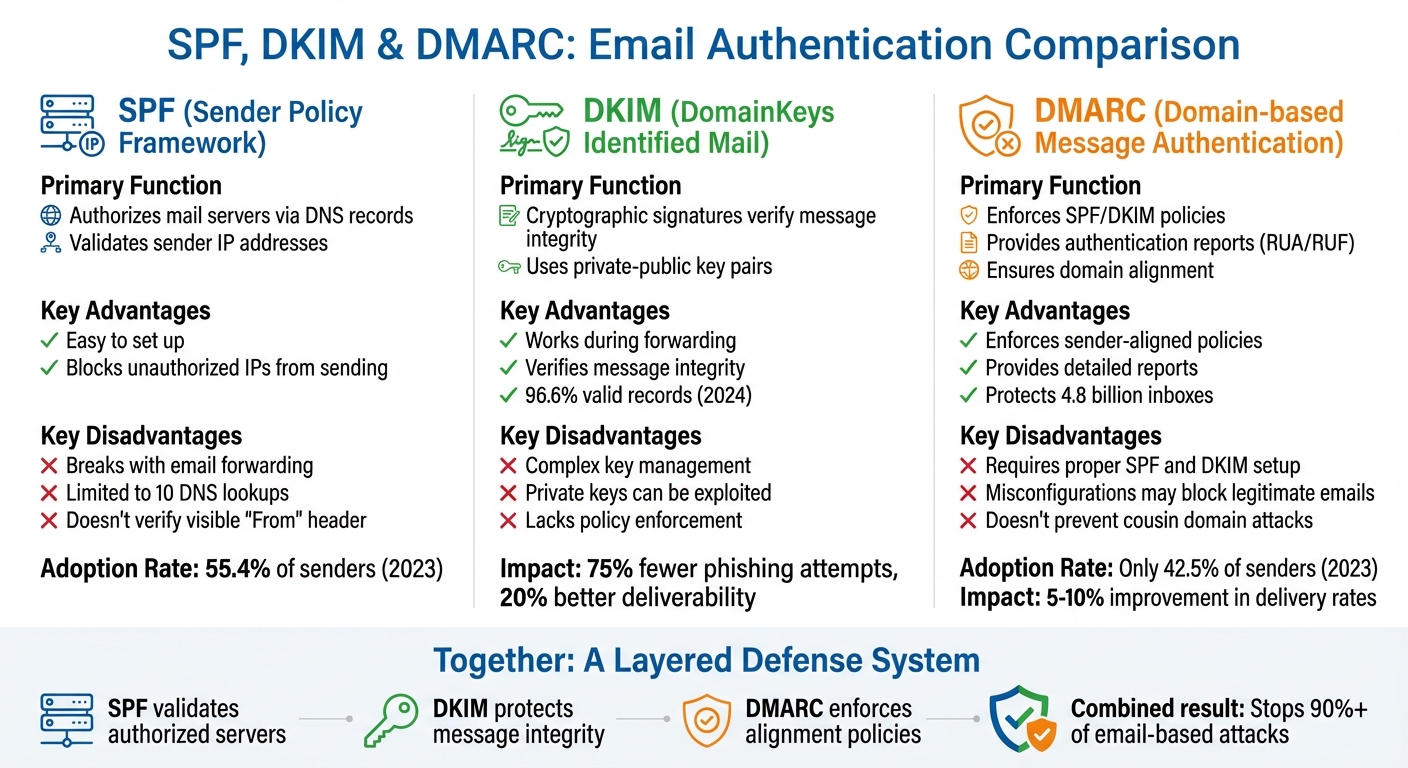
SPF vs DKIM vs DMARC Email Authentication Protocols Comparison
SPF, DKIM, and DMARC each play a unique role in email authentication, offering both benefits and limitations.
SPF is straightforward to implement since it only requires listing authorized IP addresses in your DNS records. However, it has its challenges. SPF can fail when emails are forwarded and is constrained by a limit of 10 DNS lookups, which can lead to authentication errors.
DKIM introduces cryptographic security by attaching a digital signature to your emails, ensuring the message stays intact even during forwarding. But it’s not without its drawbacks. Managing cryptographic keys can be tricky, and if a private key is compromised, attackers can forge signatures. Additionally, DKIM doesn’t enforce policies for failed signatures, as mentioned earlier.
DMARC acts as the glue that ties SPF and DKIM together. It enforces policies and provides detailed authentication reports, letting receiving servers decide whether to deliver, quarantine, or reject emails that fail SPF or DKIM checks. That said, DMARC relies on properly configured SPF and DKIM, which many organizations find challenging. In fact, only 42.5% of senders actively use DMARC, and over 30% are unsure about their configurations.
Here’s a quick comparison of the key advantages and drawbacks of each protocol:
| Protocol | Key Advantages | Key Disadvantages |
|---|---|---|
| SPF | Easy to set up; blocks unauthorized IPs from sending | Breaks with email forwarding; limited to 10 DNS lookups; doesn’t verify the visible "From" header |
| DKIM | Works during forwarding; verifies message integrity with cryptography | Managing keys is complex; private keys can be exploited; lacks policy enforcement |
| DMARC | Enforces sender-aligned policies; provides detailed reports (RUA/RUF) | Requires proper SPF and DKIM setup; misconfigurations may block legitimate emails |
Together, these protocols tackle different aspects of email security. SPF ensures only authorized servers can send emails, DKIM protects the integrity of the message, and DMARC enforces policies to align sender identity. When used together, they create a layered defense system that can improve email delivery rates by 5% to 10%.
How SPF, DKIM, and DMARC Work Together
SPF, DKIM, and DMARC form a layered defense system to tackle email vulnerabilities. Each protocol plays a unique role: SPF identifies the servers allowed to send emails on behalf of a domain, DKIM adds a digital signature to verify that the message hasn’t been altered, and DMARC provides instructions for handling emails that fail SPF or DKIM checks.
Together, these protocols create a safety net. For example, SPF can fail when emails are forwarded, as the forwarding server isn’t included in the authorized list. However, DKIM signatures stay intact during forwarding because they’re embedded directly into the message. This balance ensures that even when one protocol falters, the others can step in to maintain security.
"SPF, DKIM and DMARC work together to defeat spammers and email spoofing attacks." – Peter Loshin, Former Senior Technology Editor, TechTarget
DMARC adds another layer by enforcing domain alignment, ensuring the "From" address matches authenticated domains. Without this alignment, emails might still be flagged as suspicious – even if they pass SPF and DKIM checks.
To achieve reliable protection, all three protocols must be configured correctly. Many major providers, including Google, Yahoo, and Microsoft, now require bulk senders to implement SPF, DKIM, and DMARC to ensure emails reach inboxes. However, manual DNS setup can lead to syntax errors or issues like exceeding SPF’s 10-lookup limit, which might result in delivery failures. Tools like Zapmail simplify this process by automating DNS setup for SPF, DKIM, and DMARC, reducing errors and building a strong authentication system from the start.
Conclusion
Email spoofing plays a significant role in business email compromise, which has cost U.S. businesses a staggering $55 billion. Shockingly, it’s involved in over 90% of email-based attacks.
To tackle these risks, a three-layer defense is essential. SPF, DKIM, and DMARC work together to protect your domain. SPF ensures the sending server is authorized, DKIM guarantees the integrity of your messages, and DMARC enforces sender policies for unauthenticated emails. Without implementing all three, your domain remains exposed to impersonation, and even legitimate emails could end up in spam folders.
Interestingly, between 75%–80% of domains with DMARC are still in the monitoring phase. Shifting to a stricter p=reject policy can improve email deliverability by more than 10%. The recommended approach is to start with p=none to monitor email traffic, then move to p=quarantine, and finally implement p=reject once all legitimate senders are verified.
Manually configuring DNS records can lead to costly syntax errors or exceed SPF’s 10 DNS lookup limit. Automation tools like Zapmail simplify this process by accurately creating DNS records and continuously monitoring your email authentication setup.
A strong email authentication strategy not only protects your domain from impersonation but also ensures your emails land in the right inbox. By combining SPF, DKIM, and DMARC with automation tools, you can safeguard your brand, avoid blacklisting, and maintain reliable email delivery. Don’t wait – secure your email infrastructure today by fully integrating these protocols.
FAQs
How do SPF, DKIM, and DMARC work together to stop email spoofing?
Email authentication can be tricky, but understanding the basics makes it easier to grasp how it works. Here’s a breakdown of three key protocols:
SPF (Sender Policy Framework) checks whether an email is sent from an authorized server. It does this by comparing the sender’s server to the domain’s SPF record in the DNS. If the server isn’t listed, the email might be flagged as suspicious.
DKIM (DomainKeys Identified Mail) ensures the integrity of an email by using a digital signature. The sender’s server adds a signature to the email using a private key. On the recipient’s end, this signature is verified against a public key stored in the DNS, confirming the message hasn’t been altered during transit.
DMARC (Domain-based Message Authentication, Reporting & Conformance) ties SPF and DKIM together. It requires that the domain in the From address matches the domains verified by SPF or DKIM. DMARC also allows domain owners to define policies, such as rejecting or quarantining emails that fail authentication, and provides reports to help monitor misuse or abuse.
With Zapmail, this entire process is simplified. It automatically configures SPF, DKIM, and DMARC records for pre-warmed mailboxes, ensuring emails are authenticated properly and improving deliverability from the start.
What challenges do organizations face when implementing DMARC policies?
Implementing DMARC policies can be tricky, and there are a few common hurdles that organizations often face. One major issue is dealing with misconfigured DNS records for DMARC, SPF, and DKIM. Even small mistakes – like typos or forgetting to include certain sending IPs – can result in legitimate emails failing authentication, which could lead to them being marked as spam or outright rejected.
Another challenge comes with the complexity of SPF records. As businesses rely on multiple third-party senders and add more mechanisms, SPF records can hit the 10-lookup limit. This makes it harder to manage an accurate list of authorized email sources. On top of that, ensuring domain alignment – where the "From" address domain matches the domains used in SPF and DKIM – can lead to further complications if not set up correctly.
Lastly, interpreting DMARC reports and gradually tightening enforcement policies (like transitioning from p=none to p=reject) requires consistent monitoring and expertise. This process can be time-consuming and resource-heavy, but it’s a critical step to safeguard your brand and boost email deliverability.
Why should you upgrade your DMARC policy from ‘p=none’ to ‘p=reject’?
Upgrading your DMARC policy from ‘p=none’ to ‘p=reject’ plays a crucial role in tightening email security. A ‘p=none’ policy acts as a monitoring tool, keeping an eye on email activity without taking direct action. On the other hand, a ‘p=reject’ policy steps up the game by actively blocking unauthorized emails, stopping them from ever reaching your recipients. This shift helps prevent domain spoofing, curbs phishing attempts, and protects your brand’s reputation from being tarnished.
With a ‘p=reject’ policy in place, only authenticated emails make it to inboxes. This not only builds trust with recipients but also enhances the chances of your legitimate emails landing where they should. Moving to this stricter policy is a smart, proactive measure to safeguard your domain and ensure secure email communication.