Email bounce codes tell you why emails fail to reach recipients. These codes fall into two types: hard bounces (permanent issues like invalid addresses, marked by 5.X.X codes) and soft bounces (temporary problems like full inboxes, marked by 4.X.X codes). Ignoring them can harm your sender reputation, leading to blocked emails or blacklisting.
Key Takeaways:
- Common Hard Bounce Codes:
5.1.1: Email account doesn’t exist.5.7.1: Blocked by spam filters.5.7.26: Authentication issues (SPF/DKIM/DMARC).5.2.2: Mailbox size limit exceeded.
- Common Soft Bounce Codes:
4.2.2: Inbox full.421: Server temporarily unavailable.450: Rate-limiting by recipient server.
Solutions:
- For Hard Bounces: Remove invalid addresses immediately. Use email verification tools and a double opt-in process to validate new contacts.
- For Soft Bounces: Retry sending later or monitor if issues persist. Remove addresses that repeatedly bounce.
- Authentication Errors: Ensure SPF, DKIM, and DMARC records are correctly set up.
Keep bounce rates below 2% to maintain a strong sender reputation. Regularly clean your email list, fix technical issues, and monitor trends to avoid delivery problems.
What Is Email Bounce Rate & How to Avoid High Bounce Rates with Infobip
Common Email Bounce Codes and Their Causes
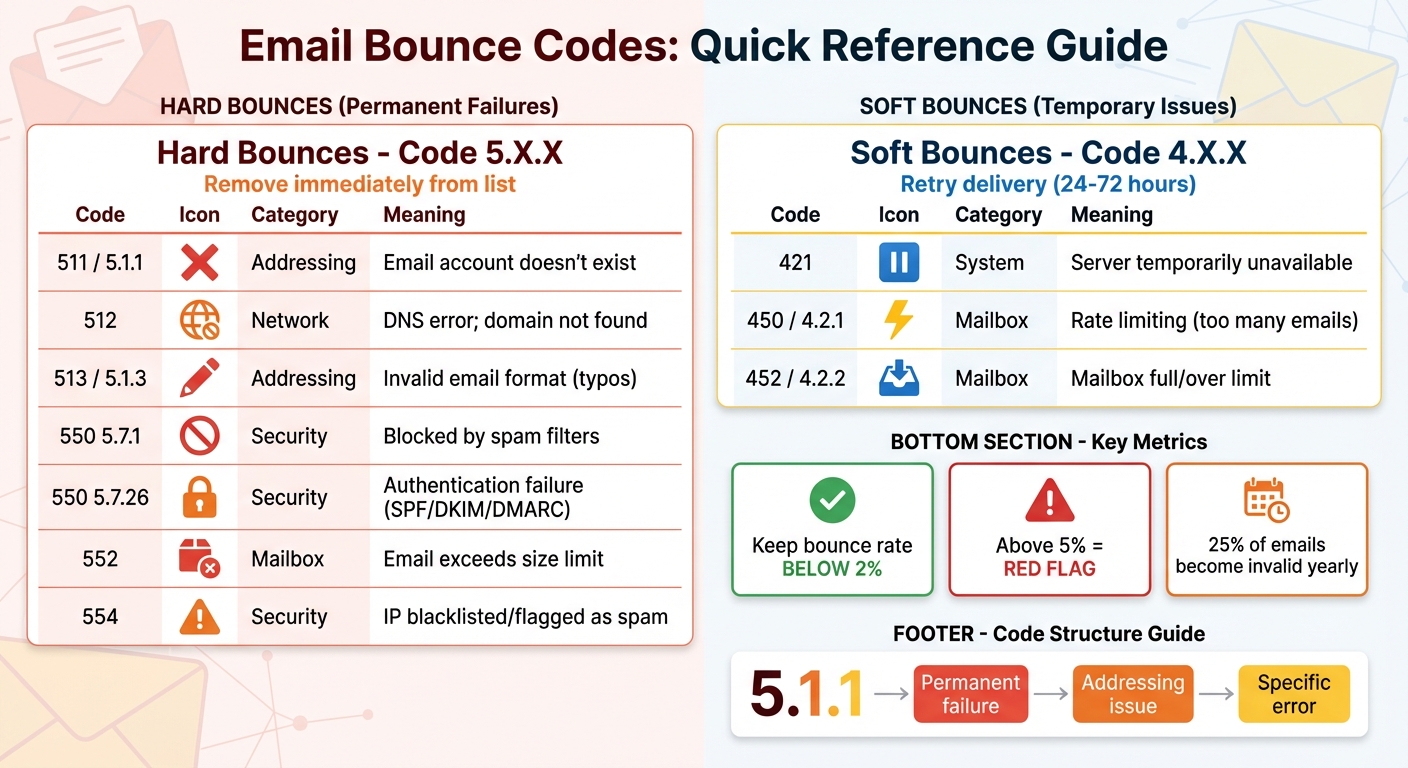
Email Bounce Codes Quick Reference Guide: Hard vs Soft Bounces
Knowing what email bounce codes mean can help you understand why your emails aren’t reaching their destination. Email systems use two types of codes: three-digit codes (like 550) and enhanced codes (like 5.1.1). The first digit tells you the severity – 4 indicates a temporary issue (soft bounce), while 5 points to a permanent failure (hard bounce). Enhanced codes go further, with the second digit clarifying the problem, such as addressing issues (.1), mailbox problems (.2), or security-related errors (.5).
Here’s a quick breakdown of some common bounce codes and their meanings:
| Code | Type | Category | What It Means |
|---|---|---|---|
| 421 | Soft | System | Receiving server is temporarily unavailable or overloaded |
| 450 | Soft | Mailbox | Recipient is getting emails too quickly (rate limiting) |
| 452 4.2.2 | Soft | Mailbox | Recipient’s mailbox is full or over its limit |
| 511 / 5.1.1 | Hard | Addressing | Email account doesn’t exist |
| 512 | Hard | Network | DNS error; domain not found |
| 513 5.1.3 | Hard | Addressing | Invalid email address format (e.g., typos) |
| 550 5.7.1 | Hard | Security | Blocked by spam filters or security rules |
| 550 5.7.26 | Hard | Security | Authentication failure (SPF/DKIM/DMARC issues) |
| 552 | Hard | Mailbox | Email exceeds recipient’s size limit |
| 554 | Hard | Security | IP blacklisted or flagged as spam |
Invalid Recipient or Mailbox Issues
Hard bounces often stem from problems with the recipient’s address. For instance, code 5.1.1 indicates that the email account doesn’t exist, which is why keeping your email list up-to-date is vital for maintaining a good sender reputation.
Errors like 5.1.3 occur when email addresses are incorrectly formatted – missing an "@" symbol, containing typos, or including invalid characters like commas. These mistakes are common when contacts are manually entered or imported. Using a double opt-in process can help catch these issues before they disrupt your campaigns.
Mailbox-specific problems can also lead to bounces. For example, code 5.2.1 occurs when an account exists but is disabled, while 5.1.6 indicates that a mailbox has moved without forwarding. On the softer side, code 4.2.2 signals that the recipient’s inbox is full and can’t accept more emails until space is cleared.
DNS and Domain Configuration Failures
DNS-related issues can prevent emails from being delivered altogether. A simple typo in the domain name – like typing "gmaill.com" instead of "gmail.com" – can result in a DNS error (code 512). Missing or misconfigured MX records, which tell servers where to route emails, can also block delivery. Code 5.4.1 highlights cases where the recipient’s server isn’t responding.
Authentication settings are equally critical. Without properly configured SPF, DKIM, or DMARC records, your emails may fail security checks, especially with providers like Gmail and Yahoo, which enforce strict authentication for high-volume senders.
Temporary Failures (Soft Bounces)
Soft bounces are temporary and often resolve on their own. For example, code 4.2.2 appears when a recipient’s inbox is full. While this is less common with services offering large storage capacities – like Yahoo’s 1 TB or Gmail’s 15 GB – it can still happen.
Rate limiting (code 450 4.2.1) occurs when you exceed the recipient server’s email limits. For example, Gmail restricts users to 60 emails per minute, 3,600 per hour, or 86,400 per day. Another common soft bounce, code 421, happens when the recipient’s server is overloaded or temporarily unavailable. Greylisting is another factor; it delays emails from unknown senders, expecting retries from legitimate servers. Most email providers retry soft bounces for up to 72 hours before marking them as permanent failures.
Authentication Errors
Authentication problems often lead to security-related bounces. Codes in the 5.7.X range indicate that your email failed authentication checks or violated recipient policies. For instance, code 5.7.1 means your email was blocked by spam filters, while 5.7.26 points directly to SPF, DKIM, or DMARC failures. These protocols confirm that your domain is authorized to send emails. Without proper setup, your emails might be flagged as spam or phishing attempts.
Code 554 is another common issue, marking your IP address as blacklisted. This results in outright rejection of your emails. Additionally, code 552 5.2.3 appears when your message exceeds the recipient’s size limit – usually around 25 MB for services like Gmail and Outlook.
"SMTP provides about 12 useful codes for delivery reports… each of the 12 useful codes are overloaded to indicate several error conditions." – IETF (as cited by GMass)
To maintain a healthy email list, remove addresses that hard bounce immediately. For soft bounces, monitor them closely – if an address keeps bouncing across multiple campaigns, it’s likely inactive and should be removed.
How to Diagnose Email Bounce Codes
Understanding how to diagnose email bounce codes starts with knowing where to find them and interpreting what they mean. This process builds on the basics of bounce codes and helps pinpoint the root cause of delivery issues. The key is to review the full SMTP response from the recipient’s server – not just the numerical code, but the entire error message. This deeper look provides clarity and helps guide your next steps.
Reviewing SMTP Responses
SMTP responses come with two parts: a numerical code and a descriptive message. The first digit of the code tells you the type of issue: 4 means a temporary issue (soft bounce), while 5 indicates a permanent failure (hard bounce). Enhanced codes, like 5.1.1, offer more detail. The second digit specifies the error category (e.g., 1 for addressing issues, 2 for mailbox problems, 7 for security), and the third digit narrows it down further.
Don’t skip over the full error message – it often provides essential context. For example, Gmail bounce messages may include a URL explaining why an email was blocked. A message like "Service unavailable – try again later" suggests that retrying might work, while "User unknown" clearly means you should remove the email address from your list.
Using ESP Dashboards
Most modern email service providers (ESPs) log the full SMTP conversation between servers, making it easier to identify issues. Check your ESP’s activity logs if you notice a spike in bounces. For instance, if providers like Gmail or Yahoo show an increase in bounces, it could signal reputation issues or rate limiting. Platforms like Postmark, GMass, and Mailtrap provide detailed error messages and categorize bounces as hard or soft. Once you confirm the bounce type, keep an eye on overall trends to detect recurring problems.
Monitoring Bounce Rate Trends
Tracking your bounce rate over time can reveal patterns that help you address issues before they escalate. To calculate your bounce rate, use this formula:
(Total Bounces / Total Emails Sent) × 100.
A healthy bounce rate is usually below 2%. If it climbs above 10%, it’s time to investigate.
"Start by tagging subscribers that you gain through each of your audience acquisition sources. You’ll likely find that one or two of your acquisition sources account for a large portion of your spam complaints, hard bounces, and inactivity." – Chad White, Head of Research, Oracle Marketing Cloud Consulting
Tagging subscribers based on how they joined your list – whether through webinars, website forms, or purchased lists – can reveal which channels are causing the most bounce issues. Also, keep an eye out for sudden increases in soft bounces. If you see errors like "server busy" or "suspicious content", it could mean your email triggered a spam filter or ended up on a blocklist. These insights can guide you toward effective solutions for reducing bounces and improving deliverability.
sbb-itb-36f7bf9
Solutions for Resolving Email Bounce Issues
Email bounce issues can disrupt your campaigns and harm your sender reputation if not addressed promptly. Each type of bounce requires a tailored solution, ranging from immediate fixes to preventive measures that enhance your email-sending practices.
Table: Common Bounce Issues and Solutions
| Bounce Type | Common Codes | Immediate Action | Prevention |
|---|---|---|---|
| Invalid Recipient | 550, 5.1.1, 511 | Remove immediately; check for typos. | Use real-time email verification and double opt-in. |
| Invalid Domain | 550, 5.1.2, 553 | Verify domain spelling; check MX records. | Validate domain existence during lead capture. |
| Mailbox Full | 422, 4.2.2, 452 | Retry later; remove if it persists. | Monitor engagement; remove inactive accounts. |
| Authentication Failure | 5.7.26, 550, 5.7.1 | Check SPF, DKIM, and DMARC records for errors. | Use automated DNS configuration tools. |
| Policy/Spam Block | 554, 5.7.1, 421 | Review content for spam triggers; check blacklists. | Warm up domains; use content variation tools. |
Below, we dive into actionable solutions for each type of bounce.
Fixing Invalid Recipient and Domain Errors
Invalid recipient errors (e.g., 550, 511) often stem from simple typos, like "joohn@example.com" instead of "john@example.com." These hard bounces need immediate removal to protect your sender reputation. Similarly, invalid domain errors (e.g., 550, 553) indicate issues like a nonexistent or misspelled domain.
To prevent these errors:
- Use email verification tools to catch invalid addresses before sending campaigns.
- Implement a double opt-in process to ensure subscribers provide valid, active email addresses.
- Regularly update suppression lists to block addresses that have previously hard-bounced.
For example, services like Zapmail offer pre-warmed mailboxes and domain isolation, which help safeguard your infrastructure from invalid addresses.
Handling Temporary Bounces
Soft bounces (codes starting with 4) are temporary and may result from full mailboxes, server overloads, or rate limits. Most email platforms automatically retry delivery within 24–72 hours.
To address these:
- If you encounter a 421 error (rate limit exceeded), pause sending and retry after 24 hours.
- Batch your emails instead of sending to your entire list at once, reducing the likelihood of server overload.
- Keep email sizes within provider limits to avoid delivery issues.
If a mailbox remains full across multiple campaigns, it’s likely abandoned and should be removed from your list to maintain a clean database.
Resolving Authentication Failures
Authentication errors (e.g., 550 5.7.26, 5.7.1) indicate problems with your SPF, DKIM, or DMARC records. As of February 2024, major providers like Google and Yahoo require all three protocols for bulk senders.
Steps to resolve these issues:
- Audit your DNS records with tools like MXToolbox to ensure proper configuration.
- Use only one SPF record per domain to avoid conflicts.
- Rotate DKIM keys every six months to maintain encryption security.
- Start with a DMARC policy of
p=noneto monitor email traffic, then gradually move to stricter policies likep=quarantineandp=rejectonce you confirm authentication is working.
"Only one SPF record per domain name is valid – having more than 1 for the same domain will cause conflicts" – Groove Knowledge Base
Zapmail simplifies this process with automated DNS configuration, ensuring your records are correctly set up from the start.
Addressing Policy and Relaying Errors
Policy-related bounces (e.g., 554, 5.7.1) often arise from sender reputation issues or spam-triggering content. If you’re using a new domain or IP address, gradually increase your sending volume to build trust with mailbox providers.
To reduce policy-related bounces:
- Avoid spam triggers in your content, such as excessive images, link shorteners, or overly promotional language.
- Use tools like Spintax to vary email content and avoid repetitive phrasing that might flag spam filters.
For example, a SaaS company reduced their hard bounce rate from 6–7% to under 1% by implementing strict list verification and enforcing DMARC policies. These measures not only stabilized their bounce rates but also improved inbox placement for major providers like Gmail and Outlook. Zapmail’s workspace management and aged domains provide a solid foundation for maintaining a strong sender reputation.
Best Practices to Prevent Future Email Bounces
Keeping email bounces to a minimum is essential for maintaining a strong sender reputation. While understanding bounce codes is helpful, avoiding them in the first place is even better. Since about 25% of email addresses become invalid each year, even the cleanest email lists need regular upkeep to stay effective.
Maintaining a Clean Email List
Start by implementing a double opt-in process. When new subscribers confirm their email address via a verification link, you can catch typos and ensure the address is valid and actively monitored. Combine this with real-time APIs to check for issues with syntax, domain, or mailbox validity.
Make it a habit to clean your email list every quarter. Use bulk verification tools to remove outdated addresses and hard bounces quickly.
Set clear guidelines for inactivity. For outbound campaigns, consider removing contacts after 60–90 days of no engagement. For newsletters, you might extend this window to 90–180 days. Before cutting inactive subscribers, run re-engagement campaigns to give them a chance to stay on your list. Keeping your bounce rate below 2% is critical – anything over 5% is a red flag for Internet Service Providers (ISPs). Regular maintenance like this ensures your list remains active and improves overall deliverability.
Optimizing Email Campaigns for Deliverability
Authentication protocols like SPF, DKIM, and DMARC are no longer optional – they’re required by top providers such as Google and Yahoo. Another smart move is to use domain isolation, where you assign subdomains for different types of emails (e.g., marketing vs. transactional). This way, if one stream gets flagged for spam, it won’t affect the reputation of your entire domain.
"Mailbox providers need ways to identify who a sender really is. Without email authentication, it’s hard to tell where email traffic is really coming from."
- Nick Schafer, Manager of Deliverability & Compliance, Mailgun
Your email content also plays a big role. Avoid spammy language, limit the number of links, and keep attachments under 20–25MB. Using Spintax – a technique that creates slight variations in your messages – can improve reply rates by 17% to 28%, as it makes emails appear unique to spam filters. Timing matters too. Schedule emails for the early part of the week and use geo-location data to ensure they arrive at the best local times.
If you’re using tools like Zapmail, their pre-warmed mailboxes and automated DNS configuration can simplify the technical side. They ensure your authentication records are set up correctly and help establish trust with ISPs before you send out your first campaign.
Using Scalable Email Infrastructure
Pair these strategies with a strong, scalable infrastructure to maintain high deliverability during large campaigns. Account rotation helps spread out email volume, avoiding the spikes that can trigger spam filters. Platforms like Zapmail use authenticated account rotation to stay within daily sending limits.
Automated warm-up processes are another must. Gradually increasing email volume on new domains or IPs helps build trust with ISPs, avoiding rejections from "cold" IPs. Advanced systems can achieve deliverability rates of up to 97% by creating a strong sender history before scaling up.
Zapmail also offers integrations with over 50 outreach platforms and automates mailbox setups, reducing manual configuration errors that could lead to authentication issues. With features like workspace-level domain isolation and dynamic IP allocation (available on the Pro plan for $299/month), agencies can run multiple client campaigns without risking cross-contamination. These tools ensure smooth operations, even at scale, while minimizing the risk of a single blacklisted IP disrupting your outreach.
Conclusion
Understanding and managing email bounce codes is crucial for safeguarding your sender reputation and ensuring your messages reach inboxes. Ignoring bounces can send the wrong message to ISPs like Gmail and Yahoo, making it appear as though you’re neglecting list hygiene or engaging in spam-like behavior.
As Bettina Specht from Postmark explains:
"Bounces can be early indicators of larger reputation issues or bad list-building practices, and if you don’t take them seriously, ISPs will take notice – and might block your email altogether."
- Bettina Specht, Postmark
To keep your bounce rate in check – ideally under 2% – you should take proactive steps. Remove hard bounces promptly, fix authentication errors, validate email addresses, and monitor trends to address potential problems before they escalate.
Zapmail makes this process easier with tools designed to optimize deliverability. From pre-warmed mailboxes to automated DNS configurations for SPF, DKIM, and DMARC, Zapmail integrates with over 50 outreach platforms to streamline your efforts. Features like domain isolation help protect your reputation when running multiple campaigns, while workspace management tools allow agencies to scale without risking cross-contamination. Whether you’re a freelancer on the Starter plan ($39/month) or managing clients on the Pro plan ($299/month), Zapmail equips you with the infrastructure to ensure your emails land where they belong – in the inbox.
Email deliverability isn’t something you fix once and forget. It’s an ongoing process that requires clean lists, proper authentication, and reliable infrastructure. By staying vigilant and following these principles, you can build trust with ISPs and ensure the success of your campaigns.
FAQs
What steps can I take to lower my email bounce rate and protect my sender reputation?
To keep your email bounce rate low and protect your sender reputation, start by maintaining a clean and permission-based email list. Use double opt-in forms to confirm email addresses and an email verification service to catch typos or invalid entries. Regularly clean your list by removing inactive or bouncing contacts, and segment your audience to deliver content that’s relevant and engaging.
Make sure your email authentication is set up correctly. This includes configuring SPF, DKIM, and DMARC records – misconfigured DNS settings can cause soft bounces and damage your reputation. If you’re using new domains or IPs, warm them up gradually to build credibility. Also, avoid sending emails repeatedly to addresses that have already bounced, as this can trigger spam filters and even lead to blacklisting.
For an efficient way to manage this, Zapmail provides pre-warmed Google and Microsoft mailboxes with built-in authentication and DNS management. By combining solid list hygiene, proper authentication, and Zapmail’s optimized infrastructure, you can reduce bounce rates and maintain a strong sender reputation.
How can I fix email authentication issues like SPF, DKIM, and DMARC errors?
To fix email authentication problems, begin by reviewing your domain’s DNS records to confirm the correct setup of SPF, DKIM, and DMARC entries. For SPF, make sure all authorized sending IPs and services are included in a single TXT record. When setting up DKIM, generate a selector and public key in your email platform, then add the corresponding TXT record to your DNS without any mistakes. Start your DMARC policy with "none" to monitor activity, and over time, adjust it to "quarantine" or "reject" based on insights from reports.
Use tools like MXToolbox to check that SPF is valid, DKIM signatures are verified, and DMARC configurations align properly. Regularly review DMARC reports to spot and fix issues, such as unauthorized IPs or incorrect DKIM selectors. If you’d like to simplify the process, tools like Zapmail can automate the configuration of SPF, DKIM, and DMARC, making email deliverability easier to manage with less manual effort.
How can I identify and resolve invalid recipient errors in my email campaigns?
Invalid recipient errors, such as hard bounces with messages like "mailbox doesn’t exist" or "domain not found", can be resolved by taking a few straightforward steps:
- Review bounce reports: Check the bounce logs or SMTP responses from your email provider. Look for error codes like
550 5.1.1, which typically signal invalid email addresses. - Verify flagged addresses: Use an email verification tool to check if the addresses are truly invalid, contain typos, or are blocked. For example, if someone entered "gnail.com" instead of "gmail.com", correct the mistake and update your list.
- Remove undeliverable contacts: Permanently delete email addresses that are confirmed as invalid to safeguard your sender reputation and boost future email deliverability.
To keep bounce rates low, make it a habit to clean your email list regularly. You might also want to use pre-warmed mailboxes, like those offered by Zapmail, to maintain strong deliverability and a good domain reputation.