Domain masking is a method to safeguard your main domain when running cold email campaigns. Instead of sending emails from your primary domain (e.g., company.com), you use secondary domains (e.g., trycompany.com) to protect your brand’s reputation and email deliverability. This approach minimizes risks like blacklisting, spam complaints, and poor engagement metrics that can harm critical communications, such as transactional emails or customer updates.
Key Benefits:
- Protects your primary domain from being blacklisted or flagged as spam.
- Improves email deliverability by isolating risky activities to secondary domains.
- Reduces financial and operational risks, ensuring uninterrupted communication.
- Maintains user trust by using branded secondary domains with proper authentication.
How It Works:
- Configure DNS records (SPF, DKIM, DMARC) for authentication.
- Use proxy servers or HTML techniques like iframes for content redirection.
- Follow email best practices: limit sending volume, monitor bounce rates, and maintain compliance with email regulations like CAN-SPAM.
Tools to Simplify Setup:
Platforms like Zapmail automate DNS configurations, manage domain isolation, and provide pre-warmed mailboxes to streamline the process and enhance email performance.
Bottom Line: Domain masking is a practical solution to protect your brand, improve email performance, and maintain a strong sender reputation.
This one simple change will fix your cold emails…
How Domain Masking Works
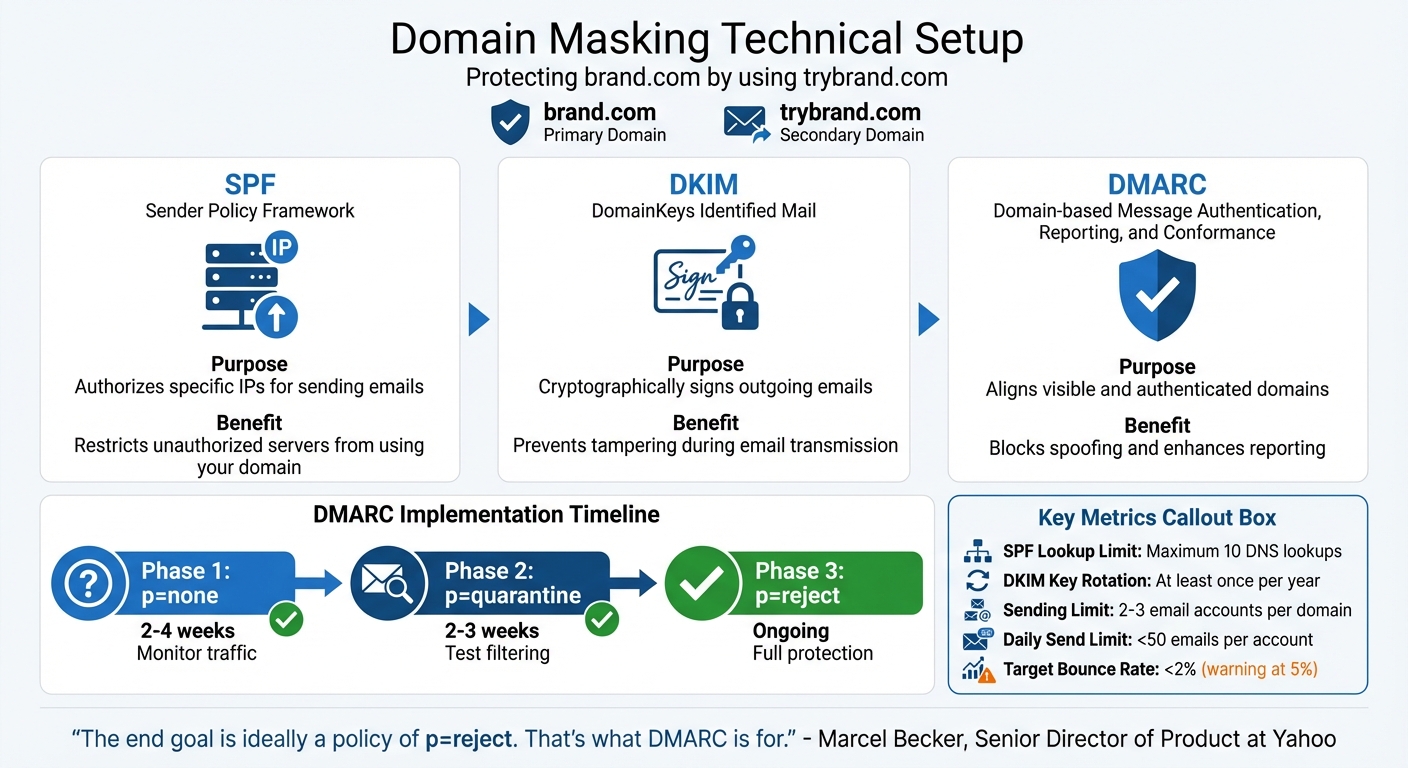
How Domain Masking Works: DNS Authentication Setup Process
The Technical Setup Behind Domain Masking
Domain masking acts as a protective shield for your primary domain during outreach efforts. By using a secondary domain (like trybrand.com instead of brand.com) for sending emails, you create a safety net that keeps your main domain secure. This setup is the backbone of effective domain protection, as explained below.
The process depends on three key DNS records: SPF, DKIM, and DMARC. Here’s how they function:
- SPF: Specifies which IP addresses are allowed to send emails on behalf of your domain.
- DKIM: Adds a digital signature to your email headers, ensuring message integrity with a public key stored in your DNS records.
- DMARC: Directs receiving servers on how to handle emails that fail authentication checks and provides detailed reporting.
These records work together to minimize risks:
| Authentication Method | Purpose | Risk Reduction Benefit |
|---|---|---|
| SPF | Authorizes specific IPs for sending emails | Restricts unauthorized servers from using your domain |
| DKIM | Cryptographically signs outgoing emails | Prevents tampering during email transmission |
| DMARC | Aligns visible and authenticated domains | Blocks spoofing and enhances reporting |
Additionally, proxy servers and custom IPs redirect traffic from the masked domain to your main site while concealing the true URL. Techniques such as frame masking (using HTML iframes), server-side scripting (e.g., PHP/ASP), or URL rewriting via .htaccess files are commonly used for this purpose.
It’s also essential to install SSL certificates on both the primary and masked domains. Without SSL, users may encounter "Not Secure" warnings, which can harm trust and reduce email deliverability.
Configuration Best Practices for Masked Domains
To ensure strong deliverability, proper configuration is critical. For instance, major email providers like Google and Yahoo require bulk senders (sending over 5,000 emails daily) to use SPF, DKIM, and DMARC authentication.
A phased approach to DMARC implementation is recommended:
- Start with a
p=nonepolicy for 2–4 weeks to monitor traffic. - Transition to
p=quarantinefor 2–3 weeks. - Finally, move to
p=rejectonce all legitimate senders are verified.
Marcel Becker, Senior Director of Product at Yahoo, highlights the importance of this process:
"The end goal is ideally a policy of p=reject. That’s what DMARC is for. Ensuring that your domain cannot be spoofed and protecting our mutual customers from abuse."
Keep an eye on SPF lookup limits – the standard allows for a maximum of 10 DNS lookups. Exceeding this limit can cause authentication failures. Simplify your SPF records by avoiding nested "include" statements, and for domains that don’t send emails, publish a v=spf1 -all record to block spoofing attempts.
DKIM keys should be rotated at least once a year, or more frequently for domains handling high email volumes.
To maintain a natural sending pattern, limit each domain to 2–3 email accounts, with each account sending fewer than 50 emails per day. Also, aim for a bounce rate below 2%, as rates above 5% may trigger email providers to pause your sending activity.
How Zapmail Simplifies Domain Masking
Manually configuring DNS records can be tricky, and even minor errors – like a misconfigured SPF record or an incorrect DKIM setup – can hurt your email deliverability. Zapmail solves this problem with automated DNS management, taking care of SPF, DKIM, and DMARC setup for you.
Zapmail also offers pre-warmed Google and Microsoft mailboxes, allowing you to quickly establish a strong sender reputation. This is especially helpful since nearly 40% of senders struggle with proper SPF and DKIM implementation.
With domain isolation at the workspace level, Zapmail ensures that any issues with one masked domain won’t impact your main domain or other campaigns. The platform also includes features like AI-driven domain and mailbox naming, automated DKIM key rotation, and integrations with over 50 outreach tools. These capabilities make it easy to manage domain masking across your entire workflow.
Benefits of Domain Masking for Primary Domain Protection
Better Deliverability and Sender Reputation
Domain masking acts as a shield for your primary domain’s reputation during outreach campaigns. By using secondary domains like "trybrand.com" for high-volume email sending, you can keep harmful signals – such as spam complaints, high bounce rates, or poor engagement – away from your main "brand.com" domain.
Rotating these domains can significantly improve email performance metrics: inbox placement can rise by up to 25%, open rates by 15–20%, and bounce rates can drop by nearly 30%. Engagement plays a critical role here. As Lauren Meyer, CMO at SocketLabs, explains, email providers monitor how users interact with your messages – if recipients engage positively, your emails stay in their inboxes; if not, they may be flagged as spam.
Google sets strict standards for bulk senders, requiring a spam complaint rate below 0.3% to avoid permanent filtering. Meanwhile, Yahoo blocks over 90% of incoming emails outright as spam or malicious. By distributing your email volume across multiple domains, domain masking helps avoid overwhelming any single domain and triggering spam filters. These improvements in deliverability also lower the risk of landing on blacklists.
Reducing Blacklist Risk
If one of your masked domains gets flagged or blacklisted, the damage is contained. Your primary domain remains untouched, ensuring that critical emails – like internal communications or client messages – continue to flow without disruption. This strategy of isolating auxiliary domains is key to protecting your primary domain from potential fallout.
Email providers handle blacklists differently. For example, Google Workspace relies on internal machine learning and engagement signals, while Microsoft 365 and Yahoo Mail use external blacklists like Spamhaus ZEN to block emails at the SMTP level. Domain masking ensures that if one domain is blocked, others remain unaffected, preserving essential communication channels.
This isolation strategy is invaluable. If an auxiliary domain faces issues, you can simply replace it with another and keep operations running smoothly. Your primary domain – used for customer support, invoices, and other critical functions – stays secure and unaffected by aggressive outreach efforts.
Protecting Brand Safety and User Trust
Domain masking isn’t just about technical performance; it also influences how recipients perceive your brand. Using branded masked domains creates a sense of trust. Instead of seeing unfamiliar, complicated tracking URLs or generic redirect links, recipients encounter recognizable, branded addresses that appear legitimate and reliable.
These branded domains encourage higher click-through rates and reduce spam complaints. Adding SSL certificates to your masked domains enhances trust further by displaying the padlock icon in browsers, avoiding "Not Secure" warnings.
However, it’s essential to implement domain masking responsibly. Alex Lekander, Editor-in-Chief at Cyber Insider, cautions:
"While businesses use these methods for brand protection and deliverability, the same technology can be exploited by threat actors for phishing campaigns. It’s therefore crucial to implement proper authentication measures and maintain transparency with users."
To maintain user trust, ensure that your masked domains clearly relate to your primary brand, deliver consistent content, and follow ethical practices. Many financial and government organizations have successfully used this approach to guide users to legitimate landing pages while minimizing phishing risks.
With Zapmail’s workspace-level domain isolation, you can manage multiple masked domains without worrying about cross-contamination. If one campaign underperforms, your other domains and primary brand remain secure, providing an added layer of protection for your primary domain and reinforcing overall domain safety.
sbb-itb-36f7bf9
Challenges and Limitations of Domain Masking
Common Configuration Mistakes
Setting up domain masking requires precise technical adjustments, and even small missteps can lead to major issues. One frequent error is improper authentication. For instance, failing to align SPF, DKIM, and DMARC records can cause authentication failures. To pass DMARC checks, the domain in your "From" header must match either the SPF or DKIM authenticated domain. Ignoring these details can weaken your outreach efforts.
SPF configuration errors are especially common. A typical mistake is creating multiple SPF records for a single domain – this is not allowed. Additionally, exceeding the 10 DNS lookup limit, often caused by nested or overly complex SPF records, results in a PermError, disrupting authentication. Using overly broad mechanisms like "+all" can also leave your domain vulnerable to unauthorized use.
DKIM issues often stem from selector mismatches. If the selector published in your DNS doesn’t match the one used by your sending platform, signature verification fails silently. This is more common than you might think – over 20,000 of the top 1 million websites have invalid SPF setups.
Poor branding choices can also hurt user trust. For example, using HTML iframes for domain masking locks the URL, making it static during navigation. This prevents users from bookmarking specific pages and can erode confidence in your site. It may also lead to duplicate content penalties from search engines by splitting link equity and page authority. Avoiding these technical and branding missteps is key to safeguarding your domain’s reputation.
Scaling Multiple Masked Domains
Managing domain masking becomes even trickier when dealing with multiple domains. Configuring SPF, DKIM, and DMARC records across dozens – or even hundreds – of domains is not only time-consuming but also prone to human error. Simple mistakes, like a missing space or semicolon, can completely break authentication.
The SPF lookup limit adds another layer of difficulty. Since only 10 DNS lookups are allowed per check, integrating multiple third-party services can easily exceed this limit, resulting in a PermError that flags emails as spam. Additionally, each domain requires its own SSL certificate to maintain user trust.
Reputation management is another challenge. A single listing on a major blacklist, such as Spamhaus, can have a ripple effect, severely impacting email deliverability across your entire system.
To simplify these challenges, tools like Zapmail offer centralized solutions. With Zapmail, you can manage DNS configurations for all your masked domains from a single dashboard. Automated setup reduces manual errors, while built-in validation checks ensure that issues are caught early, improving overall email deliverability.
Compliance and Regulatory Requirements
Technical hurdles aside, domain masking must also meet various regulatory standards. For example, U.S. laws like CAN-SPAM require that every commercial email includes a valid physical address and avoids misleading header information. Bulk senders – those sending 5,000 or more emails daily – must implement SPF and DKIM and publish a DMARC policy, even if it’s set to "p=none", to reach inboxes at major providers like Gmail and Yahoo. Surprisingly, about 40% of senders either fail to implement or are unsure about implementing both SPF and DKIM.
Compliance also mandates a functional one-click unsubscribe option. Emails must include a "list-unsubscribe" header and process opt-out requests within two days, even though CAN-SPAM allows up to 10 business days for this. Keeping spam complaint rates below 0.3% is crucial. Using double opt-in methods not only verifies consent but also provides legal proof during audits, reducing the risk of compliance violations.
Conclusion
Key Takeaways
To wrap things up, let’s highlight the main benefits of domain masking and why it’s a smart move for protecting your brand.
Domain masking acts as a shield for your primary domain’s reputation. By using secondary domains to handle riskier activities, you ensure that issues like blacklisting or spam flags don’t harm your core brand’s credibility.
Here’s a quick rundown of the main perks:
- Better email deliverability by using separate sending infrastructures.
- Stronger sender reputation by keeping outreach activities separate from essential communications.
- Scalable email campaigns without jeopardizing your entire email system.
- Increased user trust with clean, branded URLs instead of generic redirects.
On top of that, keeping spam rates under 0.3% and bounce rates below 2% helps maintain good standing with major email providers like Gmail and Yahoo.
"If you are still sending from one domain and praying it lands… You’re not running a system. You’re rolling the dice." – Robert Bradley, Founder, Korus GTM
Getting Started with Domain Masking
Now that the benefits are clear, let’s talk about how to get started with domain masking.
Setting it up manually can be a hassle and prone to mistakes. That’s where automation comes in handy. Tools like Zapmail simplify the process by automating DNS, SSL, and authentication setups. They also provide pre-warmed mailboxes, ensuring your outreach is secure while keeping your primary domain safe.
With workspace-level isolation, every domain operates independently, so if one domain runs into trouble, your primary domain and other secondary domains remain unaffected. Zapmail offers plans starting at $39 per month for 10 Google mailboxes, with additional mailboxes available for $3.50 each. With over 330,000 domains managed, more than 1 million mailboxes established, and a 4.5/5 TrustPilot rating, it’s a reliable choice.
Take the step today – use Zapmail’s automated tools to implement domain masking and protect your sender reputation. It’s a simple way to safeguard your brand and improve your email strategy.
FAQs
Why is domain masking important for protecting your primary domain in email campaigns?
Domain masking plays a crucial role in protecting your primary domain during email campaigns. Without this safeguard, your main domain could face the risk of being blacklisted, which can damage your brand’s reputation. Worse, it might cause your emails to end up in spam folders, leading to lower open rates, reduced engagement, and even a decline in overall email deliverability and sales.
By separating your primary domain from outreach activities, domain masking helps preserve its credibility. This ensures your email campaigns stay professional and effective, without compromising your brand’s trustworthiness.
How do SPF, DKIM, and DMARC work together to secure my domain?
SPF, DKIM, and DMARC are powerful email authentication tools designed to safeguard your domain against spoofing, phishing attempts, and blacklisting.
- SPF (Sender Policy Framework): This protocol ensures that only approved mail servers can send emails on behalf of your domain. It works by checking the sender’s IP address against the DNS records you’ve set up.
- DKIM (DomainKeys Identified Mail): DKIM adds a cryptographic signature to your emails. This signature acts as proof that the email hasn’t been altered during transit and confirms it originated from your domain.
- DMARC (Domain-based Message Authentication, Reporting & Conformance): DMARC ties SPF and DKIM together, enforcing alignment between the two. It lets you decide how emails failing authentication should be handled – whether to reject, quarantine, or allow them. Plus, it provides detailed reports to help you track and analyze any unauthorized activity.
When combined, these protocols form a robust shield against email fraud. Tools like Zapmail make implementing them straightforward by automating the DNS setup, keeping your domain secure while ensuring smooth email delivery.
What mistakes should I avoid when setting up domain masking?
When setting up domain masking, there are a few common pitfalls that can disrupt functionality, compromise security, or even hurt your SEO. For instance, misconfiguring DNS records – like pointing the CNAME to the wrong host or forgetting to publish the record – can stop the masked domain from working altogether. Another mistake? Over-requesting an SSL certificate, which can trigger rate limits and leave your site without HTTPS, leading to those dreaded browser security warnings. And let’s not forget the SEO risks: skipping proper redirects or canonical tags can result in duplicate content, which search engines don’t take kindly to.
To steer clear of these problems, double-check that your DNS records are set up correctly, secure your SSL certificate before going live, and implement canonical tags or 301/302 redirects to guide search engines effectively. Don’t skip testing – hidden errors like broken links or traffic routing issues can sneak through unnoticed. Tools like Zapmail can make life easier by automating DNS configuration, SSL setup, and ensuring your domain masking meets security and SEO best practices.