Sending thousands of cold emails from a single domain is risky. It can harm your email deliverability, damage your sender reputation, and even blacklist your primary domain. The solution? Domain isolation. By spreading email activity across multiple domains, you protect your main domain and improve outreach performance.
Here’s what you need to know:
- Why it matters: Using your main domain for outreach can lead to up to a 50% drop in deliverability and a 30% decline in open rates. Isolated domains reduce these risks.
- How it works: Use separate domains for outreach, with 1–3 email accounts per domain. This mimics natural email behavior and keeps sending volumes safe.
- Setup challenges: Configuring DNS (SPF, DKIM, DMARC) manually takes time and expertise, but tools like Zapmail automate this in minutes.
- Scaling safely: Start small with 20–30 emails per day per inbox, then gradually increase. Rotate domains to distribute volume and avoid triggering spam filters.
Domain isolation is a simple yet effective strategy to scale email outreach while protecting your business’s core operations.
Cold Outreach Infrastructure: Step-By-Step Tutorial
Why Domain Isolation Matters for High-Volume Email Outreach
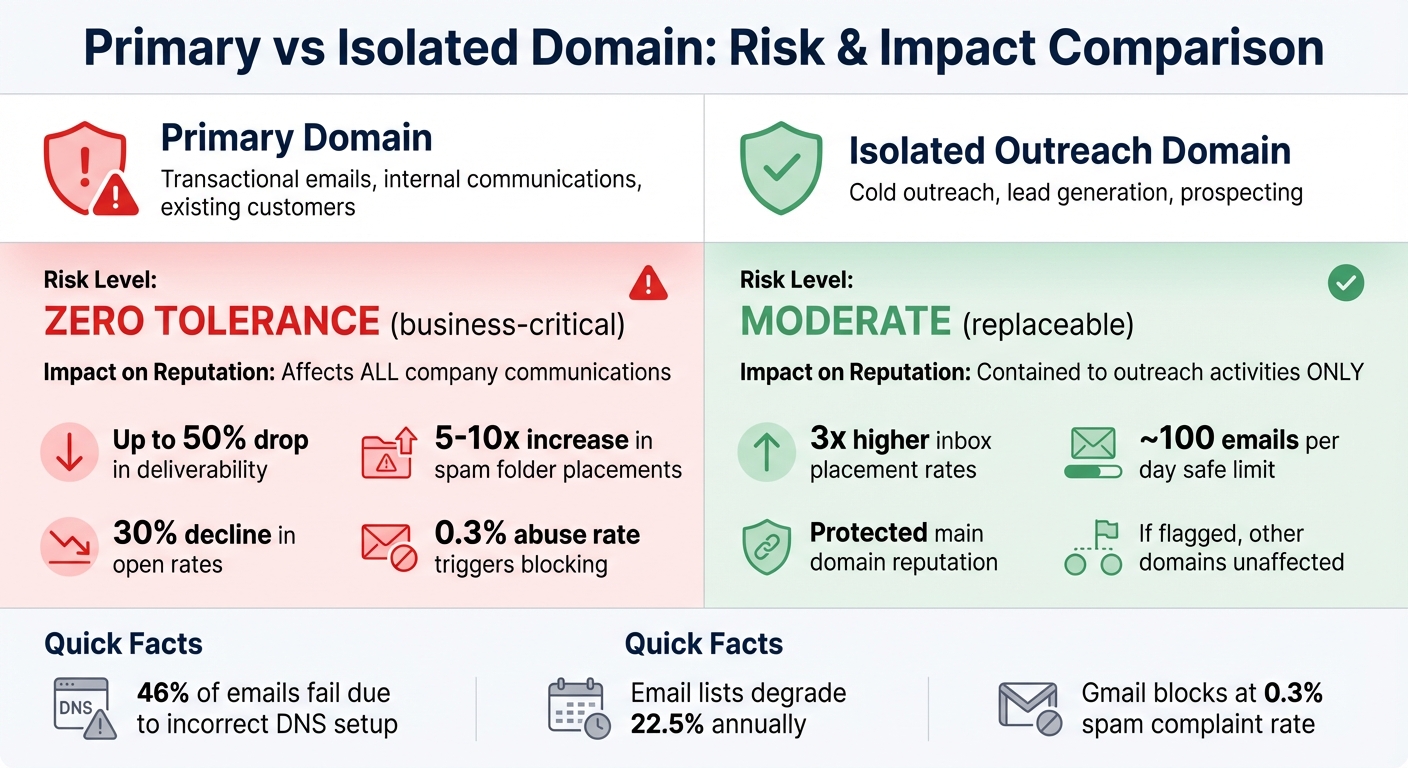
Primary vs Isolated Domain Risk Comparison for Email Outreach
Risks of Using a Single Domain for Outreach
Using your main business domain for cold email outreach can jeopardize your entire email operation. When both outreach efforts and critical business communications share the same domain, even a single spam complaint can wreak havoc on your deliverability.
Cold emails sent from a primary domain can lead to serious consequences: up to a 50% drop in overall deliverability, a 5–10x increase in spam folder placements, and a 30% decline in open rates for regular communications. Providers like Gmail and Yahoo monitor email activity closely and will block messages if they detect an abuse rate of 0.3% or higher. Recovering a blacklisted primary domain is not only challenging but also expensive. By contrast, registering a new domain specifically for outreach is a much simpler and cost-effective solution .
| Domain Type | Primary Use | Risk Level | Impact on Reputation |
|---|---|---|---|
| Primary Domain | Transactional emails, internal communications, existing customers | Zero tolerance (business-critical) | Affects all company communications |
| Isolated Outreach Domain | Cold outreach, lead generation, prospecting | Moderate (replaceable) | Contained to outreach activities only |
By isolating your outreach domains, you reduce these risks and improve the overall performance of your email campaigns.
How Domain Isolation Improves Deliverability
Domain isolation serves as a protective barrier, separating outreach activities from your essential business communications . Dedicated outreach domains can achieve up to three times higher inbox placement rates compared to domains used for both outreach and transactional emails. Why? Because isolated domains typically stay within safe sending limits – around 100 emails per day per account – which aligns with what email providers consider normal human behavior.
This approach also spreads high email volumes across multiple domains, helping you avoid triggering spam filters. If one outreach domain gets flagged, the others remain unaffected, ensuring your primary domain stays secure. Isolating domains not only safeguards your core operations but also allows you to test different messaging strategies and adjust sending frequencies without putting your main email infrastructure at risk. It’s a smart way to maintain flexibility while protecting your reputation.
Setting Up and Managing Isolated Domains
Choosing and Registering New Domains
When selecting domains for isolation, aim for names that align with your brand. Options like variations of your primary domain – such as company.com, getcompany.com, or companyhq.io – are great choices. Stick to widely recognized extensions like .com, .co, or .io, as these are trusted and commonly used (over 50% of websites use .com alone). It’s also a good idea to use domains that are at least a year old, as spam filters are often skeptical of newly registered ones. If you’re considering a second-hand domain, check its reputation first with tools like Talos or MX Toolbox. Avoid domains with hyphens or numbers, as these can raise red flags with spam filters.
Once you’ve chosen your domains, ensure they’re secured with proper DNS configurations.
DNS Configuration for Isolated Domains
A solid DNS setup is essential after registering your domains. You’ll need to configure three key authentication records: SPF, DKIM, and DMARC.
- SPF (Sender Policy Framework): This TXT record lists which mail servers can send emails on your domain’s behalf. Keep in mind that a domain can only have one SPF record, and you should limit SPF lookups to fewer than 10 to prevent authentication failures.
- DKIM (DomainKeys Identified Mail): DKIM ensures your emails haven’t been tampered with during transit by adding a digital signature. Your email provider will generate a public key, which you’ll add as a TXT or CNAME record in your DNS settings.
- DMARC (Domain-based Message Authentication, Reporting, and Conformance): This policy guides receiving servers on how to handle emails that fail SPF or DKIM checks. Start with a
p=nonepolicy to monitor email performance before moving to stricter enforcement. Shockingly, as of early 2025, 84.24% of domains still don’t have a DMARC record.
Additionally, set up MX records (e.g., for Google Workspace, point to smtp.google.com with priority 1) and create a custom Return-Path to help establish your domain’s reputation. To ensure brand consistency, you can also implement a 301 redirect on your outreach domain to direct visitors to your main website.
Using Zapmail for Automated Domain Setup
Manually configuring DNS can take over 24 hours and requires technical expertise. Zapmail simplifies this process by automating DNS configurations for SPF, DKIM, DMARC, and custom tracking domains in as little as 10 minutes.
Zapmail’s Instant Domain Genie uses AI to generate domain names based on your keywords, providing a curated list of available options. You can purchase domains directly through the platform or link existing ones. Once your domains are selected, Zapmail handles all the DNS configurations automatically, sparing you from manual setup. The Smart Mailbox Namer also creates professional email handles that align with your brand, avoiding generic addresses that could harm your email deliverability.
"Zapmail for Gmail/M365: Instant email infra setup (SPF/DKIM/DMARC, routing, masking) zero human error, all done by software."
– Enoch Chang, Co-Founder, Cymate
Zapmail enforces a strict "one domain per workspace" policy to minimize risk. This means that if one domain runs into issues, the rest of your workspaces remain unaffected. For example, in 2025, Mohan Muthoo, Founder of Spring Drive, used this feature to maintain stable deliverability for large-scale projects, even as others faced widespread bans.
To date, Zapmail has managed over 330,000 domains and set up more than 1 million mailboxes, with average setup times of just 5–10 minutes. Once configured, these mailboxes can be exported to more than 50 integrated outreach platforms, removing the need for manual IMAP/SMTP settings. By combining proper setup with automation, you can achieve scalable and secure email outreach effortlessly.
Scaling Email Outreach Safely with Domain Isolation
Domain Warm-Up Strategies
When introducing new domains, it’s crucial to build trust with ISPs gradually. Start by sending just 20–30 emails per day from each inbox, and then increase the volume slowly – by 10–20 emails every few days. This process, known as warming up, typically takes at least two weeks, though many deliverability experts suggest extending it to 2–4 weeks for better results with platforms like Google and Microsoft.
But warming up isn’t just about sending more emails over time. It’s about creating engagement. Positive interactions, like email opens and replies, signal trustworthiness to ISPs. Some advanced tools even simulate human behavior – like scrolling through emails – to mimic natural engagement and strengthen these trust signals.
Another key tip: give your domains time to mature before scaling aggressively. Let them sit for 30–90 days before ramping up email volume. This aging period helps establish credibility with spam filters, which are often wary of newly registered domains. Also, keep your spam complaint rate below 0.1%, as Gmail may not intervene if user-reported spam exceeds 0.3%. Hard bounce rates should also stay at or below 1–2% to maintain a good reputation.
Once your domains are warmed up, the next step is to distribute your email volume effectively.
Rotating Domains to Distribute Email Volume
To protect your sending reputation, avoid overloading a single domain. Instead, rotate your outreach across multiple domains. This approach not only keeps your activity under the radar but also boosts inbox placement rates – rotated domains can achieve up to 25% higher inbox success. Plus, domain rotation can reduce bounce rates by about 30%. For cold outreach, the safe limit is around 20–25 emails per day per account. Scaling efficiently means using multiple domains and inboxes, with each domain supporting only 1–3 email accounts to maintain its reputation.
Take Mike Black, Founder of Talent Stream, as an example. In late 2025, he scaled his investor outreach by purchasing 24 domains and 72 inboxes via Zapmail, spending $527 in total. By spreading his email activity across these assets and following a two-week warm-up period, he increased his daily outreach capacity from 270 to 1,350 contacts.
Another case is Enoch Chang, Co-Founder of Cymate, who manages a massive cold email system. His setup sends 2 million emails monthly using over 5,000 accounts across Google, Microsoft 365, and SMTP services. By leveraging Zapmail to create one Google Workspace per domain and diversifying his infrastructure (50% Google, 40% Outlook, 10% SMTP), his agency maintains an impressive 95% deliverability rate.
"If your entire GTM engine is riding on one setup, you’re exposed. Diversify your sending split."
– Robert Bradley, Founder, Korus GTM
Zapmail’s Workspace-Level Domain Isolation Features
Zapmail takes domain rotation a step further by ensuring each workspace operates in a fully isolated domain environment. Their strict "one domain per workspace" policy minimizes risk, so if one domain runs into trouble, the rest of your setup remains unaffected.
Zapmail’s plans start at $39/month for 10 Google mailboxes, with additional mailboxes costing $3.00–$3.50 each, depending on your plan. Domain costs range from $8–$15 annually, making it cost-effective to build a secure and scalable infrastructure while avoiding costly deliverability issues.
The platform also supports multi-workspace management, allowing you to scale effortlessly across dozens – or even hundreds – of isolated environments without manual setup. Once configured, mailboxes can be exported to over 50 integrated outreach platforms, eliminating the hassle of manual IMAP/SMTP configurations.
sbb-itb-36f7bf9
Monitoring and Optimizing Domain Performance
Tracking Domain Reputation Metrics
Once you’ve set up isolated domains and scaled your outreach, keeping an eye on performance is crucial to maintain deliverability. One of the most important metrics to track is your spam complaint rate. Both Google and Yahoo enforce a strict threshold of 0.3%, but aiming for less than 0.1% is ideal to stay in good standing.
Another key factor is your bounce rate. Hard bounces should be kept below 2%; anything higher than 5% sends a red flag to ISPs, signaling poor list hygiene and potentially harming your reputation. Beyond delivery rates, you’ll want to focus on your Inbox Placement Rate (IPR) – this tells you how many emails actually land in recipients’ primary inboxes rather than their spam folders. A healthy IPR should be 95% or higher.
You should also monitor your sender reputation scores for both your domain and IP address. These scores are used by ISPs to determine whether your emails can be trusted. Lastly, ensure your SPF, DKIM, and DMARC records are properly configured to avoid authentication issues.
| Metric | Healthy Range | Warning Signs |
|---|---|---|
| Bounce Rate | Under 2% | Above 5% |
| Spam Complaint Rate | Under 0.1% | Above 0.3% |
| Inbox Placement Rate | Above 95% | Below 90% |
| Engagement Rate | Above 20% | Below 10% |
"If you don’t know your Google Postmaster score, go look it up – don’t assume that somebody is monitoring it."
– Dave Rigotti, Cofounder, Inflection.io
To make this process easier, consider automating your monitoring efforts.
Using Zapmail for Automated Monitoring
Tracking performance across multiple domains can be overwhelming, but Zapmail simplifies this with automated tools. One standout feature is its Placement Test, which shows exactly where your emails land – Inbox or Spam – across various providers.
Zapmail also continuously checks your DNS records (SPF, DKIM, DMARC) to ensure they’re correctly configured. Misconfigured records are a common cause of deliverability issues, but with automated monitoring, you can catch and fix these problems before they escalate.
The platform’s workspace-level isolation allows you to monitor each domain’s performance separately. This way, if one domain starts underperforming, it won’t affect the rest of your infrastructure. You can even set up real-time alerts to flag spikes in bounce rates or spam complaints, giving you the chance to act quickly and prevent further damage.
Adjusting Strategies Based on Performance
Once you’ve got monitoring in place, it’s important to adjust your strategies based on the data. If deliverability starts to drop, reduce your sending volume by 25–30%. Don’t wait for a domain’s reputation to completely crash – rotate domains proactively when you notice engagement rates slipping.
Make it a habit to clean your email lists every six months to remove inactive addresses. Email lists naturally degrade by about 22.5% each year, so regular maintenance is essential to keep your campaigns effective.
When scaling up, do so gradually. Increase your daily sending volume by no more than 20% every few days to maintain ISP trust. If a domain is underperforming, consider switching to plain-text emails – they often perform better since they resemble personal, one-on-one messages.
"Deliverability is a measure of the health of your email marketing program, so it’s important to do regular check-ups on your domain, IP, and authentication."
– Carin Slater, Email Marketing Specialist, Litmus
Common Mistakes and Best Practices in Domain Isolation
Mistakes to Avoid in Domain Isolation
One of the biggest missteps is sending cold outreach emails from your primary business domain. This can jeopardize your entire organization’s reputation. If your main domain gets flagged, it could mean trouble for all your emails – whether they’re for customer support, internal communication, or anything else. Worst case? You might lose access to your Google Workspace or Microsoft 365 account entirely.
Another frequent error is the subdomain misconception. Many assume subdomains offer true isolation, but that’s not the case. Subdomains inherit the reputation of the parent domain, so they don’t provide the security you might think.
Skipping proper DNS authentication is another major pitfall. Did you know that 46% of emails fail to reach inboxes because their DNS records – SPF, DKIM, and DMARC – aren’t set up correctly? Even something as small as a trailing space in a DNS record can cause authentication failures.
Rushing the domain warm-up process is another surefire way to get flagged by spam filters. Building trust with ISPs takes time – usually 4 to 8 weeks – and requires a gradual increase in email volume.
Another mistake? Failing to set up 301 redirects from your isolated domains to your main website. Without these redirects, your domains might appear suspicious to recipients, undermining trust. And finally, poor list hygiene is a silent killer. Email lists naturally degrade by about 22.5% each year, so neglecting regular cleaning can lead to high bounce rates and signal spam-like behavior to email service providers (ESPs).
"If your emails aren’t getting delivered, the problem isn’t your copy, it’s your infrastructure."
– Iga Wójtowicz, Mailforge.ai
Avoiding these common errors is the first step toward a successful domain isolation strategy.
Best Practices for Long-Term Success
Adopting the right practices can help you steer clear of problems and strengthen your domain isolation setup.
First, purchase adjacent domains – like "company-outreach.com" – instead of relying on subdomains. Stick to trusted extensions like .com, .net, or .io. Avoid extensions like .xyz or .free, as they’re often linked to spam.
Follow the "3-2-1" rule: set up 3 inboxes per domain, and limit each inbox to sending 20–50 cold emails per day. This mimics natural human behavior and helps you stay under the radar. When scaling up, increase your email volume gradually. Start with 10–20 emails per day and grow by 20–50% daily over a 30-day period.
Keep your bounce rate between 0.5% and 2% by using email verification tools before sending. Clean your email lists every 30 days to remove inactive addresses and maintain strong engagement rates. Proper DNS authentication – ensuring your SPF, DKIM, and DMARC records are correctly configured – can boost your delivery rates by as much as 25%. Automated tools can make this process easier.
Even after launching your campaigns, don’t neglect warm-up tools. Maintaining positive engagement levels can help offset potential spam complaints. Also, ensure your warm-up emails are sent from the same IP address you’ll use for outreach. Switching IPs mid-campaign can look suspicious to email providers.
| Best Practice | Implementation | Expected Outcome |
|---|---|---|
| Domain Selection | Use .com, .net, or .io extensions | Higher trust scores |
| Volume Distribution | 3 inboxes per domain, 20–50 emails/day | Mimics human behavior |
| Warm-up Schedule | Start with 10–20 emails/day, increase 20–50% daily | Builds ISP trust |
| List Verification | Clean lists every 30 days | Bounce rate < 2% |
Lastly, stick to plain-text emails instead of heavily formatted HTML emails with links or attachments. Plain-text emails feel more personal and are less likely to trigger spam filters. A great example of the power of good list hygiene: In early 2024, Brian Dean from Backlinko boosted his email open rate from 19.9% to 28.3% simply by removing inactive subscribers. This shows how much of a difference regular list cleaning can make.
Conclusion
Domain isolation isn’t just another technical precaution – it’s the backbone of any scalable email outreach strategy. By keeping your cold email campaigns separate from your primary business domain, you safeguard your company’s essential communications while gaining the capacity to connect with tens of thousands of prospects every month. This separation is crucial, especially when you consider that 77% of deliverability issues are tied to poor domain health.
Traditional setups often demand manual DNS configurations, lengthy warm-up periods, and constant oversight across multiple domains. That’s where Zapmail steps in to simplify the process. With features like automated DNS setups, workspace-level isolation, and mailboxes that are ready to use right away, Zapmail eliminates the technical hurdles that once made domain isolation a challenge for smaller teams. This automation not only makes the process easier but also ensures a solid foundation for consistent and scalable email outreach.
"Only 1 domain per workspace gives us absolute risk control and this is the best way to segment a large infra."
– Mohan Muthoo, Founder, Spring Drive
Zapmail’s infrastructure is built for scale. With over 330,000 domains managed and more than 1 million mailboxes configured, it provides the tools you need to distribute email volume, reduce risk, and maintain a clean sender reputation.
FAQs
How does using domain isolation help improve email deliverability?
Domain isolation helps improve email deliverability by using secondary domains for outreach emails, protecting the reputation of your primary domain. This method supports dedicated authentication with protocols like SPF, DKIM, and DMARC, while also allowing a controlled warm-up process for new domains.
By separating outreach activities, domain isolation minimizes the chances of spam complaints or blacklisting impacting your main domain. The result? Better inbox placement and increased engagement rates.
How can I configure DNS settings to optimize email outreach with domain isolation?
To get your DNS settings right for an isolated domain and boost email deliverability, here’s what you need to do:
- Use a dedicated domain: Register a separate domain specifically for sending emails. This keeps your primary domain safe from any potential reputation issues.
- Set up SPF, DKIM, and DMARC records: These are essential for email authentication. SPF verifies your sending servers, DKIM adds a digital signature to your emails, and DMARC tells email providers how to handle unauthorized messages. Together, they help prevent spoofing and build trust.
- Add MX and CNAME records if necessary: MX records are useful if you plan to receive replies or need mailbox warming. CNAME records, on the other hand, are great for setting up branded tracking links if you’re using outreach tools.
- Validate your setup: Before sending emails, double-check everything with DNS lookup tools or your email platform’s built-in features. This ensures all records are correctly configured.
By nailing these steps, you’ll protect your sender reputation, improve deliverability, and keep your email campaigns on track.
Why is warming up a domain important, and how can it be done effectively?
Warming up a domain is a crucial step to establish a solid sender reputation and achieve reliable email deliverability. When a new or unused domain begins sending emails, email providers don’t have enough data to decide if the activity is genuine or spam. By gradually increasing the number of emails sent, you give providers time to recognize consistent sending behavior, low bounce rates, and positive engagement. This method improves the chances of landing in inboxes instead of spam folders and minimizes the risk of blacklisting.
To warm up your domain effectively, start small – send about 20–40 emails per inbox each day – and slowly increase the volume over 2–4 weeks. Aim to keep bounce rates below 0.5% and spam complaints under 0.3%. Authenticate your domain using SPF, DKIM, and DMARC protocols to build trust with email providers. If you’re scaling up, consider using secondary or isolated domains to safeguard your primary domain. Tools like Zapmail can streamline the process by offering pre-warmed mailboxes, automated DNS configurations, and domain management, allowing you to focus on outreach while maintaining strong deliverability.