Managing multiple email domains is tricky, especially when reputation is on the line. This article breaks down three key strategies to improve email deliverability while scaling email operations:
- Single Workspace with Shared Domains: Convenient but risky. A single mistake can harm all domains in the setup.
- Separate Workspaces Per Client or Unit: Strong isolation, but higher costs and management effort.
- Tiered Domain Isolation by Risk: Balances protection and scalability by categorizing domains into low, medium, and high-risk tiers.
Each method has trade-offs in cost, complexity, and scalability. Tools like Zapmail simplify implementation, offering pre-warmed mailboxes and automated DNS setups. Choosing the right strategy depends on your email volume, team size, and risk tolerance.
Top 5 Email Hacks for 2025 – Never Land in Spam Again
1. Single Workspace with Shared Domains
Managing multiple sending addresses under one admin panel is a common setup in platforms like Google Workspace or Microsoft 365. This approach allows outreach teams, multiple brands, or client campaigns to operate within the same tenant, sharing global settings, security policies, and billing.
From a technical perspective, DNS records like SPF, DKIM, and DMARC are all managed from a centralized location. User provisioning becomes more efficient, IT teams can oversee everything from a single admin panel, and organizations might even qualify for higher volume discounts.
However, this convenience comes with notable risks. When multiple domains share the same infrastructure and IP pools, a single misstep – like a poorly configured mailbox or a problematic campaign – can jeopardize deliverability for all domains. This is because mailbox providers evaluate the overall behavior of the shared tenant. So, if one domain generates high bounce rates or spam complaints, emails from other domains could also end up flagged as spam.
"If your entire GTM engine is riding on one setup, you’re exposed." – Robert Bradley, Founder, Korus GTM
To mitigate these risks while maintaining the benefits of a shared workspace, teams often implement strategies like assigning separate sending subdomains with unique DNS records for each brand or risk category. Other measures include enforcing strict sending limits and setting up targeted routing rules for high-risk senders. Tools like Zapmail can also play a role by offering pre-warmed mailboxes, automated DNS configuration, and logical domain isolation within shared environments.
Although a single workspace provides operational ease, it requires strict governance, well-defined permissions, and constant monitoring to ensure that one domain’s issues don’t impact the reputation of the entire setup.
2. Separate Workspace Per Client or Business Unit
Instead of grouping multiple clients or departments under one tenant, this approach creates a dedicated Google Workspace or Microsoft 365 environment for each client. Each setup includes custom domains, DNS records, users, and security policies, ensuring complete isolation. Compared to shared domain environments, this model significantly reduces reputation risks.
Reputation isolation is the standout advantage here. If one client’s cold outreach campaign generates spam complaints or lands on a blocklist, the issue remains confined to their workspace. For example, a healthcare client’s email program won’t suffer, even if another client experiments with higher-volume sending strategies. This separation simplifies DNS management and strengthens security controls.
With this setup, DNS configuration becomes more secure and manageable. Each workspace operates independently, so there’s no risk of cross-domain issues. You can start with a p=none DMARC policy for monitoring and gradually tighten alignment without worrying about breaking authentication for other clients. Rotating DKIM keys for each workspace is also straightforward, avoiding disruptions across your infrastructure.
Access control sees a natural boost as well. Admins, users, and data for one client remain fully segregated. Each workspace can enforce its own security measures, such as multi-factor authentication, custom password policies, and role definitions that align with the client’s specific needs. For agencies working with clients in regulated industries – like healthcare under HIPAA or financial services under GLBA – this separation simplifies compliance audits and ensures data residency requirements are met.
That said, this model does come with added management challenges. Handling multiple tenants means monitoring more DNS zones, juggling additional billing accounts, and managing complex user provisioning. Cold email outreach tools are key to keeping things efficient. For instance, Zapmail can set up a new client workspace – complete with pre-warmed mailboxes, automated DNS, and domain isolation – in just 10 minutes. Without automation, the same process could take up to 48 hours, making scaling much harder for agencies.
sbb-itb-36f7bf9
3. Tiered Domain Isolation by Risk Level
Instead of treating all domains equally, a tiered isolation strategy organizes them into different risk levels – typically low, medium, and high – based on their usage intensity and importance to your business. For example, low-risk tiers might include key corporate domains used for executive communications, billing, and customer support. Medium-risk tiers could handle branded emails for newsletters and customer lifecycle campaigns. Meanwhile, high-risk tiers are reserved for cold outreach and experimental campaigns, where there’s a higher chance of spam complaints. This approach allows for tailored authentication, volume control, and security measures to match the specific needs of each tier.
The biggest advantage here is protecting your email reputation. By isolating high-volume cold outreach to its own tier, any blacklist issues or spam flags are contained within that tier, safeguarding your primary business email operations from collateral damage.
Custom Authentication for Each Tier
Authentication protocols are adjusted based on the risk level. For low-risk domains, strict DMARC policies (like setting p=reject) are essential to protect your brand identity. In contrast, high-risk domains might start with a p=none policy for monitoring purposes, gradually transitioning to quarantine after 30–60 days once sending patterns stabilize. Unique DKIM selectors and return-path domains can also be assigned to each tier, ensuring that bounce rates and reputation signals remain isolated.
Managing Email Volume
Volume control also follows this tiered logic. Low-risk domains typically maintain steady and predictable email traffic. On the other hand, high-risk domains require a cautious warm-up process, starting with just 25–50 emails per day per mailbox. Strict volume limits are crucial to avoid triggering ISP filters and improving email deliverability rates. Distributing email traffic across multiple high-risk domains helps prevent overloading any single domain. Tools like Zapmail simplify this process by automating warm-up schedules and enforcing safe sending limits, which is particularly useful when managing a large number of outreach domains.
Scaled Security Measures
Security measures are tailored to the risk level as well. Low-risk domains benefit from advanced protections like hardware security keys and phishing-resistant multi-factor authentication. For high-risk domains, the focus shifts to shorter session lifetimes, IP restrictions, and rapid token revocation when anomalies are detected. If a high-risk account is compromised, only the tokens and DKIM keys for that tier are rotated, leaving your primary email operations untouched.
Advantages and Disadvantages
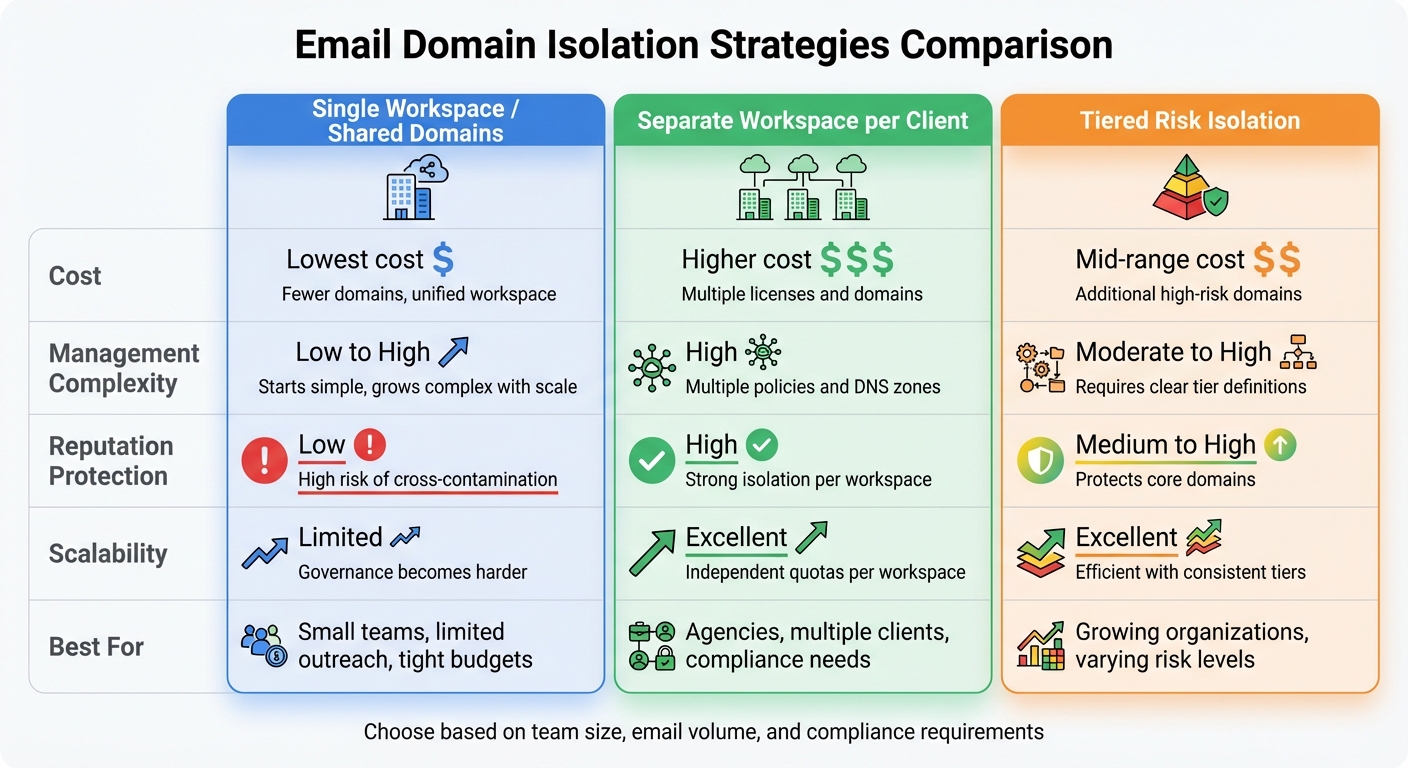
Email Domain Isolation Strategies: Cost, Complexity, and Protection Comparison
Every isolation strategy comes with its own set of trade-offs involving costs, administrative complexity, reputation management, and scalability. Here’s a breakdown of these trade-offs for each approach:
Single workspace with shared domains is cost-effective upfront and simplifies DNS management. Unified policies and configurations make administration easier. However, there’s a significant downside: a single mistake can impact all domains. For instance, a poorly executed campaign or a compromised account could harm the sender reputation across the board. As organizations grow, managing governance in this shared setup becomes increasingly difficult.
Separate workspaces per client or business unit provide strong isolation, limiting issues to individual workspaces. This makes it an excellent choice for agencies handling multiple clients or organizations with strict compliance needs. The downside? Higher costs due to additional licenses and domains, plus the added complexity of managing separate policies and DNS zones. That said, tools like Zapmail can simplify the process – its 10-minute setup for client workspaces is a game-changer compared to manual setups that take up to 48 hours.
Tiered domain isolation by risk level strikes a balance between cost and protection. High-risk outreach is isolated, while low-risk transactional emails can be consolidated. Defining and enforcing risk tiers adds moderate-to-high complexity, but the approach scales well. By reusing a small number of predefined tiers (e.g., transactional, marketing, cold outreach), organizations can maintain efficiency. Costs depend on the number of domains required for high-risk tiers, but the core infrastructure remains streamlined.
The table below summarizes the trade-offs for these strategies:
| Strategy | Cost | Management Complexity | Reputation Protection | Scalability |
|---|---|---|---|---|
| Single Workspace / Shared Domains | Lowest cost with fewer domains and unified workspace | Starts simple but grows complex as the organization scales | Higher risk of cross-contamination across domains | Technically scalable, but governance becomes harder |
| Separate Workspace per Client | Higher cost due to multiple licenses and domains | High; requires managing separate policies and DNS zones | Strong isolation; issues confined to individual workspaces | Scales well with independent quotas |
| Tiered Risk Isolation | Mid-range cost with additional high-risk domains | Moderate-to-high; requires clear tier definitions | Protects core domains by isolating risky traffic | Scales efficiently with consistent tier structures |
For businesses aiming to scale their outreach, balancing these factors is crucial. A real-world example: In 2025, Mike Black, founder of Talent Stream, invested $527 to purchase 24 domains and 72 inboxes through Zapmail. This setup allowed him to scale his outreach from 270 to 1,350 daily contacts after just a two-week warmup period. Zapmail’s workspace-level isolation is particularly effective for tiered setups and managing multiple client workspaces, offering both scalability and enhanced protection. Choosing the right strategy is essential to maintaining strong deliverability and a solid sender reputation.
Conclusion
The best isolation strategy for your email operations hinges on factors like team size, email volume, and compliance needs. For smaller teams handling limited outreach, a single workspace with shared domains offers a straightforward and budget-friendly solution. As your organization grows or manages multiple clients, setting up separate workspaces for each client or business unit ensures better reputation management and tighter access controls. If your organization faces varying levels of risk, a tiered domain isolation approach can help safeguard your core transactional emails while keeping higher-risk campaigns contained.
Start with a simple setup and introduce isolation measures only when your scale or risk level makes it necessary. Keep a close eye on deliverability metrics and make adjustments as needed to maintain a strong sender reputation. A successful isolation strategy also requires reliable tools to support deliverability.
With Zapmail, you can simplify DNS configuration with automated DKIM, SPF, and DMARC setup and streamline workspace management. Its one-domain-per-workspace model, combined with a quick 10-minute setup, makes it easy to create dedicated workspaces for clients or implement tiered domains based on risk. Plus, Zapmail’s centralized dashboard and pre-warmed mailboxes help you maintain high deliverability while minimizing administrative workload, turning email outreach into a scalable and efficient growth channel.
FAQs
What are the benefits of using tiered domain isolation based on risk levels?
Using tiered domain isolation based on risk levels offers several advantages. By separating higher-risk domains from your primary ones, you can better shield your main domains from potential deliverability problems or reputational harm. This separation acts as a safeguard, ensuring that issues in one domain don’t spill over into others.
It also strengthens email security by confining potential threats, reducing their ability to disrupt your entire workspace. Plus, this method lowers the chances of bans or penalties. By keeping high-risk activities away from your core domains, you protect your email outreach and maintain a solid sender reputation.
Why is it beneficial to use separate workspaces for each client to protect domain reputation?
Using dedicated workspaces for each client is a smart way to safeguard domain reputation. By keeping email activities separate, any problems like spam complaints or blacklisting on one domain won’t spill over and affect others. Plus, this setup makes it easier to manage each client’s domain individually, ensuring top-notch email deliverability and security for every account.
What risks should I be aware of when managing multiple domains in a single workspace?
Managing several domains within one workspace comes with its own set of hurdles. For instance, using shared IPs can lead to deliverability problems – if one domain underperforms, it can drag down the reputation of all the others. Similarly, if one domain gets flagged for spam or other violations, the domain reputation for the entire workspace can take a hit.
Another concern is centralized admin access. While it simplifies management, it can also create security risks, making it easier for unauthorized users to compromise multiple domains at once. To avoid these pitfalls, it’s wise to isolate domains. This approach helps maintain tighter control and protects the reputation of each domain individually.