When emails don’t reach inboxes, your campaigns fail. About 15% of emails miss the inbox entirely, often landing in spam. Deliverability APIs solve this by monitoring email performance and sender reputation in real time, ensuring your messages reach their destination.
Here’s what you need to know:
- What it does: Tracks delivery rates, spam complaints, and sender reputation. Uses tools like Google Postmaster to identify inbox placement issues.
- Why it matters: Poor deliverability (spam complaint rates over 0.3%) can lead to email rejection by providers like Gmail and Yahoo.
- Key features: Real-time monitoring, inbox placement testing, and SPF/DKIM/DMARC validation to prevent spoofing and improve reputation.
- Business fit: High-volume senders (over 5,000 emails/day) need strict compliance with authentication protocols. Cold outreach teams should focus on spam trap rates and list hygiene.
- Technical must-haves: APIs should support webhooks, integrate with existing tools, and offer fast response times (under 300ms).
For example, tools like Zapmail automate mailbox setup, DNS configurations, and warm-up processes. This helps you avoid manual errors and maintain a strong sender reputation.
Choosing the right API ensures your emails land where they should – boosting open rates and conversions. Let’s break down how to pick one that fits your needs.
Which Email API Works Best for High Volume Senders?
Identify Your Business Requirements
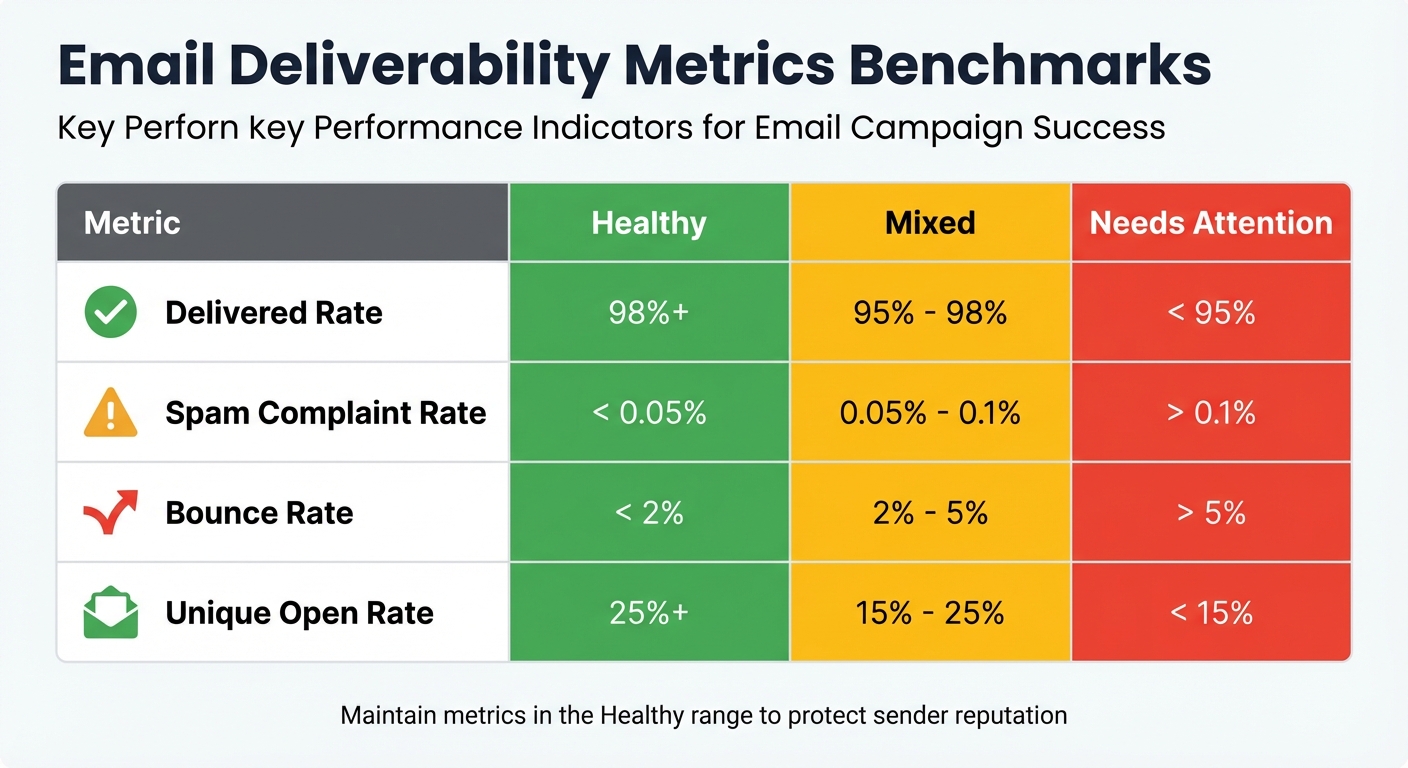
Email Deliverability Metrics: Healthy vs Needs Attention Benchmarks
Understanding your business needs starts with assessing daily email volume, key metrics, and the level of infrastructure visibility required. By focusing on the essentials of email deliverability, you can outline your operational priorities and streamline your API selection process.
Calculate Email Volume and Scale
The number of emails you send daily determines the type of email APIs that can meet your needs – and the sender requirements you’ll need to follow. For instance, as of May 5, 2025, platforms like Google, Yahoo, and Outlook consider anyone sending over 5,000 emails per day a bulk sender. If you fall into this category, you must ensure strict compliance with SPF, DKIM, and DMARC authentication protocols, and maintain spam complaint rates below 0.3%.
For sales campaigns or cold outreach, it’s best to keep individual accounts under 50 emails per day to mimic natural sending behavior. Let’s say you’re planning to send 1,000 emails daily – you’d need around 20 accounts spread across 7–10 domains to avoid triggering spam filters. For high-volume senders handling over 100,000 emails, gradually warming up your sending reputation is essential to prevent ISP throttling.
Choose Which Metrics to Track
Not all metrics carry the same weight for every business. Start by focusing on the basics:
- Delivery rate: Aim for 98% or higher.
- Bounce rate: Keep it below 2%.
- Spam complaint rate: Healthy rates are under 0.05%.
These metrics are key indicators of whether your emails are being successfully delivered and how they’re being received by recipients.
| Deliverability Metric | Healthy | Mixed | Needs Attention |
|---|---|---|---|
| Delivered Rate | 98%+ | 95% – 98% | < 95% |
| Spam Complaint Rate | < 0.05% | 0.05% – 0.1% | > 0.1% |
| Bounces | < 2% | 2% – 5% | > 5% |
| Unique Open Rate | 25%+ | 15% – 25% | < 15% |
For cold outreach teams, tracking spam trap rates is especially important to identify and fix list hygiene problems early. By keeping a close eye on these metrics, you’ll gain valuable insights into your email performance and sender reputation.
Determine Infrastructure Visibility Needs
The level of visibility you require depends on how you send emails. For high-volume senders, domain-level monitoring is invaluable. It provides an overview of your brand’s reputation across major providers like Gmail, Outlook, and Yahoo. On the other hand, mailbox-level monitoring is crucial for sales teams, as it tracks the performance of individual accounts and personalized outreach efforts.
Agencies and enterprises often need multi-workspace visibility to keep campaigns or client data separate. For those using dedicated email infrastructure, IP-level monitoring is essential for tracking blocklist status and diagnosing SMTP errors quickly.
Additionally, real-time monitoring of authentication protocols like SPF, DKIM, and DMARC is critical to prevent spoofing and email rejections. With nearly half (45.6%) of global emails landing in spam folders in 2023, maintaining proper authentication is a key safeguard for protecting your sender reputation. By aligning your email volume, key metrics, and infrastructure visibility needs, you can fully leverage real-time monitoring to improve deliverability and performance.
Assess Technical Features and Integration
Once you’ve outlined your requirements, the next step is to evaluate how well the deliverability API performs in practical use and how smoothly it integrates with your existing tools. These technical and integration checks ensure the API runs efficiently while fitting effortlessly into your existing workflows.
Check API Performance and Design
The API should respond in under 300 milliseconds and handle throughput of up to 15 million emails per hour .
Real-time monitoring is crucial, so prioritize APIs that support webhooks. These webhooks send HTTP POST callbacks for key events like deliveries, opens, clicks, bounces, and spam complaints. Additionally, the API should come with thorough documentation, using standard response formats like OpenAPI/OAS 3.1. Dashboards are another must-have – look for ones that offer both an overarching view and the ability to drill down by mailbox provider and sending stream. These features ensure the API meets your scalability and monitoring needs.
Verify Integration with Your Tools
To ensure smooth operations, confirm the API integrates seamlessly with your current outreach platforms. Native integrations with major Sales Engagement Platforms are a plus, and you should prioritize OAuth-based connections for quick and automated setup. If custom integrations are necessary, look for SDKs in various programming languages and detailed error code documentation. For internal dashboards or CRM workflows, the API should return machine-readable JSON error structures (e.g., "RATE_LIMIT_EXCEEDED") to help your systems manage errors effectively.
Caching error messages like "invalid syntax" or "disposable domain" for 7 to 30 days can help reduce redundant lookups. Also, using idempotency keys (a combination of email, source, and timestamp) can prevent duplicate charges or conflicting actions caused by network retries.
Review Infrastructure Management Features
Beyond performance, high-quality APIs help manage your email infrastructure by automating configurations and provisioning mailboxes. Look for solutions that automate DNS configurations, ensuring new sending domains are ready to go without delays and minimizing common authentication errors.
APIs that support programmatic mailbox and domain provisioning can save significant time. For example, Zapmail streamlines this process by automating mailbox setup with affordable Google Workspace and Microsoft accounts optimized for deliverability. It handles DNS configurations automatically, offers AI-powered tools for naming domains and mailboxes, and integrates with over 50 outreach platforms. Zapmail can set up mailboxes in about 5 minutes, eliminating manual tasks. It also supports domain isolation at the workspace level, so issues with one campaign don’t affect others.
For troubleshooting, advanced APIs provide bounce classification by domain and provider, helping you pinpoint whether issues stem from content, reputation, or technical blocks. Integration with tools like Google Postmaster and Microsoft SNDS offers direct insights into how major ISPs view your sending infrastructure.
"80% of deliverability issues come from your email infrastructure, not your copy." – Thibault Garcia, Founder, Reachly
When reviewing infrastructure features, focus on APIs that minimize manual work through automation while still offering precise control over reputation management and troubleshooting.
Check Scalability, Reliability, and Security
Once you’ve tackled technical integration, it’s time to ensure the API can handle growth, maintain consistent performance, and protect sensitive data. These aspects are critical to supporting long-term business goals without creating obstacles.
Test Scalability for High-Volume Campaigns
It’s important to assess whether the API can manage both your current email volume and any growth you anticipate in the future. Look for features like support for dedicated IPs and automated IP warmup, which are essential for avoiding issues with mailbox providers when sending large volumes of emails.
Another key capability is event webhooks, which allow you to stream raw delivery and engagement data directly to your own systems. Many providers only store this data for 30 days, so having real-time access ensures you can perform historical analysis and create custom reports. Additionally, confirm that the API supports subaccount management, which is crucial for segmenting campaigns and maintaining a strong sender reputation.
Verify Uptime and Reliability
After scalability, the next focus should be the API’s ability to perform reliably, even during high-demand periods.
For critical campaigns, near-perfect uptime is non-negotiable. Look for providers offering at least a 99.9% uptime SLA, backed by redundant infrastructure. Some APIs even achieve 99.99% uptime, which can make a big difference when reliability is a priority.
The API should also handle sudden spikes in email volume through effective rate management. Features like real-time monitoring dashboards are invaluable, as they can alert you to unexpected drops in delivery metrics. To further protect your operations, consider using multiple sending services like Zapmail. This distributed approach reduces the risk of a single point of failure and helps maintain your domain’s reputation.
Review Data Privacy and Security
Once you’ve confirmed the API’s performance and scalability, shift your attention to safeguarding data privacy and security. This is vital for protecting your campaigns and the personal information of your recipients.
Make sure the provider complies with SOC2 and ISO27001 standards, ensuring customer data is handled securely and meets U.S. regulations. The API should also support automated checks for SPF, DKIM, and DMARC authentication protocols, which are critical for email security. Notably, as of May 5, 2025, Microsoft Outlook, Google, and Yahoo will require these protocols for domains sending over 5,000 emails daily.
Granular access controls are another must-have. These allow you to manage API keys and user permissions, limiting access to sensitive data. Additionally, confirm that the API includes webhook security features and valid reverse DNS (PTR records) to protect your infrastructure. For signup forms, ensure CAPTCHA or reCAPTCHA is supported to prevent bots from abusing your system. Major providers like Google and Yahoo enforce strict spam thresholds (0.3%), and exceeding these limits can lead to immediate blocking.
| Security Component | Key Features to Look For |
|---|---|
| Authentication | SPF, DKIM, DMARC, Valid Reverse DNS (PTR) |
| Compliance | SOC2, ISO27001, U.S. Privacy Standards |
| Access Control | Granular Permissions, Private/Public API Keys |
| Reliability | 99.9%–99.99% Uptime SLAs, Redundant Infrastructure |
| Monitoring | Real-time Webhooks, Blocklist Alerts, Spam Trap Detection |
sbb-itb-36f7bf9
Compare Pricing and Total Costs
Once you’ve addressed the technical and security requirements, it’s time to assess whether the pricing aligns with your budget and growth objectives. This step connects technical capability with financial efficiency, ensuring your investment delivers measurable results.
Understand Common Pricing Factors
Deliverability APIs typically use volume-based pricing tiers. However, costs can also be affected by factors like log retention, dedicated IPs, and optional add-ons such as reputation monitoring. For example, log retention can vary from 1 to 30 days. Entry-level plans often include shared IPs, but dedicated IPs – critical for maintaining a strong sender reputation – generally cost about $59 per month per IP. Additional features, like inbox placement testing, reputation monitoring, and email validation, can increase costs by roughly 20%.
Estimate Costs for Your Use Case
To get a clear picture of your total costs, start by auditing your email volume. Make sure to include all types of emails to avoid overage charges, which can range from $1.10 to $1.80 per 1,000 extra emails.
Consider your needs for log retention and email validation. If reducing bounce rates through validation is a priority, check whether your plan includes a monthly validation quota or if it’s billed separately.
Real-world examples can help illustrate how these costs translate into actionable results. In May 2024, Mike Black, Founder of Talent Stream, calculated the costs for an investor outreach campaign targeting 20,000 contacts. He spent $527 upfront, which included $311 for 24 domains and $216 for 72 inboxes through Zapmail. After a two-week warm-up period, his setup allowed him to scale from 270 to 1,350 contacts per day.
"I spent a total of $311 on domains, and $216 on new emails – $527 total… I like Zapmail because the inboxes are only $3 per inbox, but also because they handle all the configuration."
- Mike Black, Founder, Talent Stream
Similarly, Tim Scheuer, Co-Founder of Prospera AI, shared that his monthly outreach to 30,000 contacts required an investment of $1,000–$1,200. This included using 50 inboxes across 13–25 domains. He highlighted Zapmail’s $99 monthly plan for 30 inboxes as a cost-efficient option for his needs.
Zapmail’s Pricing and Features
Zapmail offers a unique pricing structure centered around pre-warmed mailbox infrastructure rather than traditional email volume tiers. This approach complements its robust infrastructure and real-time monitoring features. The platform provides three main pricing plans tailored to different scales:
- Starter Plan: $39 per month, includes 10 Google mailboxes with US/EU IP accounts and standard support. Additional mailboxes cost $3.50 each.
- Growth Plan: $99 per month for 30 mailboxes, with additional mailboxes priced at $3.25 each.
- Pro Plan: $299 per month for 100 mailboxes, designed for agencies managing multiple clients. It includes priority support and API access, with additional mailboxes at $3.00 each.
What sets these plans apart is what they include. Every plan comes with over 12 weeks of warm-up history, automated setup of SPF, DKIM, and DMARC, as well as workspace-level domain isolation. This automation allows for immediate deployment, avoiding delays caused by manual setup.
For added domain protection, Zapmail offers Zap Shield at $3 per domain per month, which strengthens reputation safeguards. The platform also provides AI-powered tools like "Instant Domain Genie" and "Smart Mailbox Namer" to simplify the creation of new sending identities.
When considering the total cost of ownership, Zapmail’s pre-warmed accounts provide immediate value, enabling full-volume sending from day one without the need for a warm-up period. Users have also reported an impressive 95% average deliverability rate by leveraging diversified, US-based Google and Microsoft accounts.
Selection and Implementation Checklist
Once you’ve decided on an Email API based on pricing and features, the next step is putting it to work. This stage is all about testing the API within your existing setup to ensure it delivers the results you need.
Audit Your Current Setup
Start by evaluating your current email configuration. Check your SPF, DKIM, and DMARC settings through your DNS provider and monitoring tools. Aim for these benchmarks: a delivery rate of 95% or higher, a bounce rate below 2%, and a spam complaint rate under 0.1%.
Tools like Google Postmaster Tools and Microsoft SNDS can help you determine if your domain is blacklisted or flagged.
"If your messages don’t land where they’re supposed to, your hard work might never even get seen."
- Izabela Harbarczyk, Author, Bouncer
These metrics will serve as a baseline for evaluating the API’s performance during your testing phase.
Run a Proof of Concept
Test the API with a seed list of at least 50 email addresses, ensuring you include major providers like Gmail, Outlook, and Yahoo. This will reveal how well the API performs against various spam filters and algorithms.
Set up real-time webhook notifications to track delivery events and compare the API’s data with your internal logs. Also, test the API’s response times during high-volume sends to confirm it can handle peak loads without delays.
A great example: In 2025, AcreValue boosted its email open rates from 5% to 70%. Their Marketing Director, Ethan Rodriguez, identified issues with their domain and IP reputations, then implemented proper authentication (SPF, DKIM, DMARC), improved segmentation, and automated the removal of unengaged contacts.
Use these insights to integrate the results into your infrastructure, focusing on list hygiene and improving delivery performance.
Connect Monitoring with Infrastructure Tools
After reviewing your API integration, configure event webhooks and use subdomain isolation to maintain consistent email performance. If you’re a Zapmail user, take advantage of its automated DNS setup and pre-warmed accounts.
Set up webhooks to automate list hygiene. For instance, when the API detects a bounce or spam complaint, it should automatically remove that address from your active sending list to protect your domain reputation.
Subdomain isolation is another critical step. Use separate subdomains for different email types – like news.yourdomain.com for newsletters and service.yourdomain.com for transactional emails (e.g., password resets). This prevents issues with marketing campaigns from affecting essential emails.
In 2025, Shopify achieved a 99.5% delivery rate and a 91.3% inbox placement rate for 1.7 million merchants. They used an Email API with automated retries and custom mailbox relays, reducing transactional email delivery times to under 4 seconds.
Finally, ensure your click-tracking domain matches your sending domain to build trust with inbox providers. Also, store API keys in environment variables instead of hardcoding them to protect access to your infrastructure.
Conclusion
Picking the right deliverability API is crucial for safeguarding your sender reputation and ensuring your emails actually make it to the inbox. In fact, about 70% of email success hinges on having the correct configuration in place.
Core elements like SPF, DKIM, and DMARC are non-negotiable. For bulk senders, adhering to strict authentication standards is now a must.
"If you focus on optimizing for delivery, you inherently maximize your opportunities for ROI."
- Tim Kauble, Senior Director of Deliverability & Compliance Operations, Salesforce
These rigorous standards highlight the importance of choosing an API that not only meets technical requirements but also adapts to your business as it grows. A good API should integrate effortlessly with your existing tools, handle high volumes, and offer real-time insights into delivery performance. Whether you’re sending 1,000 emails a month or scaling up to 1 million, your infrastructure needs to support that growth while maintaining top-notch delivery. Remember, email marketing only delivers strong ROI when your emails actually reach the inbox.
FAQs
What should I look for when choosing a deliverability API for my business?
When choosing a deliverability API, it’s crucial to ensure it can handle your email volume both now and as your needs grow. A scalable solution will prevent performance hiccups as your business expands. Also, check for integration capabilities that allow the API to work smoothly with your CRM, outreach tools, or marketing platforms. This can simplify tasks like DNS setup and managing your sender reputation.
Pay close attention to the pricing model – a transparent and flexible structure can help you control costs without sacrificing quality. Key features to look for include real-time validation, bounce monitoring, and tools powered by AI to keep your email deliverability rates high. Lastly, reliability and compliance are non-negotiable. Opt for APIs with a strong record of uptime, detailed documentation, and built-in compliance with regulations like GDPR and CAN-SPAM. The right API can make a big difference in how well your emails perform and land in inboxes.
How can I make sure my email campaigns meet SPF, DKIM, and DMARC authentication standards?
To make sure your email campaigns meet authentication standards, you’ll need to set up SPF, DKIM, and DMARC records in your domain’s DNS. Here’s a quick breakdown of each:
- SPF: Add a TXT record to your DNS that lists all the servers or services allowed to send emails on your behalf. For example:
v=spf1 include:example.com -all. - DKIM: Generate a key pair, publish the public key as a TXT record in your DNS, and configure your email platform to sign outgoing emails with the private key.
- DMARC: Add a DMARC record to your DNS to specify how unauthenticated emails should be handled and where reports should be sent. An example record might look like this:
v=DMARC1; p=reject; rua=mailto:reports@yourdomain.com; pct=100.
If this sounds complicated, tools like Zapmail can make it easier. Zapmail automates much of this process by creating pre-warmed mailboxes, generating SPF and DKIM records, and applying recommended DMARC policies. Its AI-powered features and built-in DNS management help you update or verify records with ease, cutting down on mistakes and keeping your email authentication on track as your business grows.
By combining manual oversight with Zapmail’s automation, you can safeguard your brand, prevent spoofing attacks, and boost email deliverability for all your campaigns.
What key features should I look for when integrating a deliverability API with my tools?
When adding a deliverability API to your setup, it’s important to focus on features that work seamlessly with your current tools and processes. Opt for RESTful APIs with JSON support, as they’re compatible with most programming languages and frameworks. To keep your data and API calls secure, ensure the API offers secure authentication options like API keys or OAuth.
Developer-friendly resources can make integration much easier. Tools such as sample code snippets, SDKs, and Postman collections simplify testing and implementation. Additionally, features like webhooks or batch-processing endpoints are incredibly useful for automating tasks like email verification or tracking deliverability in real time.
To maintain performance and scalability, look for operational features such as rate-limit headers, pagination, and webhook callbacks. These functionalities are crucial for handling high-volume operations efficiently and ensuring the API remains dependable within your system.