Want your emails to land in the inbox, not the spam folder? Aged domains might be the solution. These are domains that have been registered for years, building trust and reputation with email providers. Here’s why they matter:
- Better Email Deliverability: Older domains are seen as reliable, helping your emails avoid spam filters.
- Faster Campaign Scaling: Unlike new domains, aged ones don’t need a long warm-up period, saving weeks of effort.
- Stronger Sender Reputation: A clean history boosts your chances of inbox placement, even with high email volumes.
Using tools like Zapmail, you can easily leverage aged domains with pre-warmed mailboxes and automated setups for SPF, DKIM, and DMARC. This means less hassle and better results for your email campaigns. Ready to dive in? Keep reading to learn how aged domains can transform your email outreach.
Domain Age: What It Means and Why It Matters
Problems with New Domains
Before exploring why aged domains can be advantageous, it’s important to first grasp the challenges that come with using new domains.
Spam Filters Target New Domains
Email providers often view new domains with skepticism, treating them as unproven and potentially risky. This suspicion isn’t unwarranted – spammers frequently exploit new domains using "churn and burn" tactics, where they register fresh domains, send out large volumes of emails, and abandon them before they’re blacklisted. Because of this, some security services automatically place newly registered domains on temporary blacklists for 7–14 days.
"Mailbox providers view email from a new domain as suspicious until the new address establishes a positive sending reputation." – Microsoft Learn
Even once the initial blacklist period passes, new domains face additional hurdles like limited sending capacities. For instance, while Google Workspace technically allows up to 2,000 emails per day, new domains rarely start with this limit. Instead, email service providers (ESPs) impose strict sending restrictions during an observation period. Unlike aged domains, new ones can’t rely on an established reputation to earn immediate trust.
Long Warm-Up Requirements
Getting a new domain ready for email outreach isn’t a quick process. Warming up a domain – essentially building its reputation – typically takes 8 to 12 weeks to achieve optimal deliverability. This process starts small, with just 5–10 emails per day, and requires a gradual increase in volume while closely monitoring recipient engagement. Ramping up too quickly can trigger spam filters, derailing the entire effort.
"The first rule of deliverability: never scale before warming up." – Smartlead
Mistakes during the warm-up period, like spam complaints or high bounce rates, can severely harm your sender reputation. In some cases, these issues may force you to start over from scratch. The extended time and effort required for warming up make new domains especially vulnerable to early reputation setbacks.
Poor Early Metrics Damage Reputation
New domains start with zero reputation, which means they have no buffer to absorb early mistakes. This lack of reputation capital can turn even minor missteps into major problems. For example, Google requires bulk senders to maintain spam complaint rates below 0.3% – that’s fewer than 3 complaints per 1,000 emails – or risk emails being flagged as spam permanently.
Low engagement rates signal to ESPs that your emails aren’t wanted, which can quickly spiral into a negative feedback loop. Hard bounce rates above 0.5% further indicate to ESPs that your domain may not be legitimate. Even worse, encountering a single spam trap can result in immediate blacklisting. Without a positive sending history to counterbalance these issues, early reputation damage can have long-lasting effects. These challenges underscore why aged domains tend to perform better when it comes to email deliverability.
How Aged Domains Improve Email Deliverability
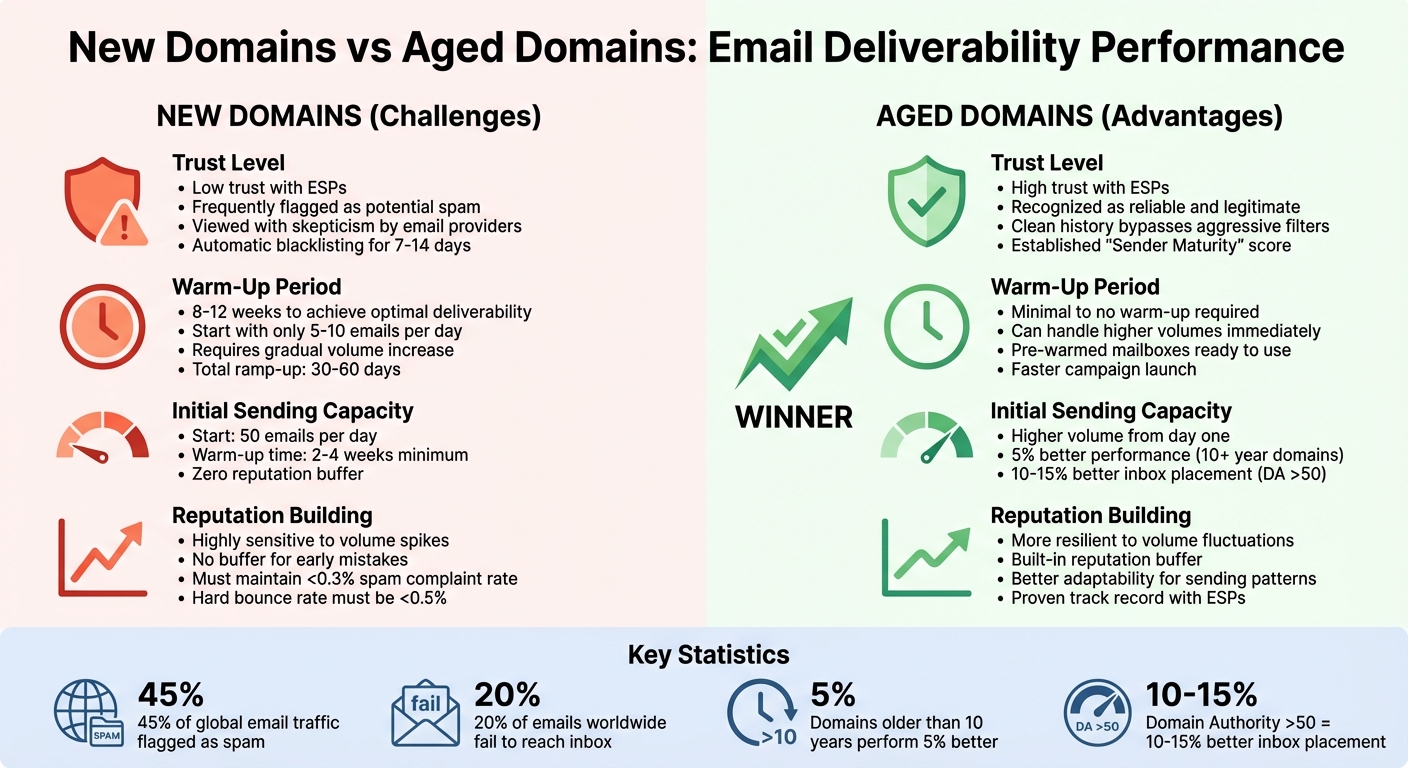
New vs Aged Domains: Email Deliverability Comparison
Now that we’ve covered the hurdles new domains face, let’s explore how aged domains tackle these challenges and offer a distinct edge.
Established Trust with Email Providers
Aged domains bring something new domains simply can’t: a history of reliability. Email service providers (ESPs) rely on a concept called "Sender Maturity", as defined by Cisco Talos. This metric evaluates a domain’s past activity from multiple data sources to gauge its trustworthiness. Think of it as your email domain’s version of a credit score.
"The age of your domain can be a signal of reliability to email service providers (ESPs). Older domains are often perceived as more trustworthy because they’ve been active without significant issues, such as spam flags." – Cedric, Developer, LeadWarm
This trust is earned through positive interactions, such as recipients replying to your emails, marking them as important, or moving them out of the spam folder. With about 45% of global email traffic flagged as spam, aged domains have a better shot at bypassing aggressive spam filters due to their proven track record. ESPs reward this consistent behavior with higher inbox placement rates, as opposed to new or dormant domains, which can trigger spam filters if they exhibit sudden spikes in email volume. This trust factor also feeds into better sender reputation and improved response rates.
Better Sender Reputation and Response Rates
Building on their established trust, aged domains enjoy a stronger sender reputation, which has a direct impact on email deliverability. These days, ESPs prioritize domain reputation over IP reputation when deciding whether an email lands in the inbox or the spam folder. Essentially, your domain’s engagement history acts as a credit score for email delivery.
Aged domains come with a built-in reputation that filters recognize and reward. This makes them more adaptable when you need to tweak your sending patterns. Reputation is critical – more than 20% of emails worldwide fail to reach the inbox, often due to poor sender reputation. Aged domains with a clean history avoid this pitfall by consistently demonstrating legitimate sending behavior.
| Trust Level | Filter Response | Reputation Building |
|---|---|---|
| New Domains | Low; frequently flagged as potential spam | Highly sensitive to sudden volume spikes |
| Aged Domains | High; seen as reliable due to clean history | More resilient to volume fluctuations |
Faster Campaign Scaling
The trust and reputation of aged domains don’t just improve deliverability – they also allow for quicker scaling of email campaigns. New domains have to start small, typically sending around 50 emails per day and spending 2–4 weeks warming up. Aged domains, on the other hand, can handle higher sending volumes right out of the gate.
"The longer your domain has been operational, the more likely it is to be recognized as legitimate by both ESPs and recipients." – Cedric, Developer, LeadWarm
While new domains require a slow ramp-up period of 30–60 days with gradual volume increases, aged domains with a strong reputation can scale campaigns much faster. That said, even with aged domains, it’s important to increase volume gradually – no more than 100% per day – to maintain natural activity patterns.
For bulk senders using platforms like Google or Yahoo, keeping spam complaint rates below 0.3% is crucial. Aged domains, with their established reputation, are better equipped to meet this standard while scaling. Consistency is key: maintaining a steady cadence, predictable volume, and structured emails helps preserve the reputation that filters favor. Tools like Google Postmaster Tools can assist in monitoring your domain reputation and catching potential issues early.
sbb-itb-36f7bf9
Using Zapmail for Aged Domain Benefits
Zapmail makes it easy to tap into the power of aged domains with tools like pre-warmed mailboxes, automated DNS setup, and smooth integrations. These features work together to improve email deliverability right from the start, offering a quick and effective way to boost your outreach efforts.
Pre-Warmed Mailboxes Ready to Go
One of Zapmail’s standout features is its pre-warmed mailboxes, which eliminate the typical 2–4 week warmup period. By leveraging the trust that aged domains already have, these mailboxes help dodge spam filters and get your emails into inboxes faster. Zapmail has handled over 330,000 domains and set up more than 1 million mailboxes, with an average setup time of just 10 minutes – much faster than the 48 hours it can take with traditional providers. Each workspace is equipped with US-hosted IPs and managed domains to ensure optimal inbox placement.
"They also now offer pre-warmed inboxes that give us the ability to jump in and get aged accounts." – Mohan Muthoo, Founder, Spring Drive
In 2025, Mike Black, founder of Talent Stream, used Zapmail to scale an investor outreach campaign. By purchasing 24 domains and 72 mailboxes for $527, he boosted his daily outreach capacity from 270 to 1,350 contacts after just two weeks of warming up. Zapmail’s workspace-level isolation, which assigns one domain per workspace with full admin access, also safeguards sender reputations by preventing cross-contamination when scaling campaigns.
Automated DNS Setup and Domain Protection
Zapmail takes care of the technical heavy lifting by automating the setup of SPF, DKIM, and DMARC records. This ensures the credibility of aged domains during high-volume campaigns.
"Zapmail.ai for Gmail/M365… Instant email infra setup (SPF/DKIM/DMARC, routing, masking) zero human error, all done by software." – Enoch Chang, Co-Founder, Cymate
This automation not only guarantees compliance with strict email service provider (ESP) rules but also helps bulk senders maintain spam complaint rates below 0.3%, avoiding long-term deliverability issues. Additionally, domain masking within Zapmail’s dashboard uses dedicated sending domains to protect your main business domain’s reputation. Roman Hipp, Co-Founder of BetterContact, shared how switching from a manual GoDaddy setup to Zapmail allowed him to configure mailboxes in "just a few clicks." Beyond simplifying DNS management, Zapmail’s AI-driven features make email operations even easier.
Smart AI Tools and Seamless Integrations
Zapmail also offers AI tools that streamline your email setup. It can suggest professional, brand-ready domain names and email handles, while its Persona Snapshots feature creates polished profile images for email signatures, adding a layer of trust for recipients.
With integrations for over 50 outreach tools, you can export data with a single click to your preferred platform. For example, in 2024, Alex Loughlin, founder of altbound.com, used Zapmail mailboxes warmed via Instantly.ai to build a workflow. By combining lead enrichment from Clay and verification with ZeroBounce, he generated a $198,000 sales pipeline in just two weeks.
Zapmail also simplifies managing large-scale campaigns with features like bulk editing and multi-workspace management. These tools make it easy to handle hundreds of mailboxes and multiple domains at once, amplifying the efficiency and benefits of aged domains for your outreach campaigns.
Steps to Implement Aged Domains
Buy and Verify Clean Aged Domains
To leverage the advantages of aged domains, start by purchasing domains with strong reputations. Focus on extensions like .com, .io, or .co.uk, and steer clear of cheaper or less trusted options like .xyz or .biz, as well as domains with hyphens or numbers, which can trigger spam filters.
Before making a purchase, dig into the domain’s history. Tools like MxToolbox or Spamhaus can help you check for blacklisting issues. Additionally, review the domain’s sender reputation on SenderScore.org. Avoid domains previously associated with high-risk industries like gambling or adult content, as these can harm your reputation. Domains older than ten years often perform about 5% better than those under three years, and domains with a Domain Authority above 50 can boost inbox placement rates by 10–15%.
Once acquired, set up Google Postmaster Tools and verify the domain in Google Search Console. To protect your main business reputation, consider using a dedicated sending domain (e.g., getcompany.com) instead of your primary business domain.
Configure Email Authentication Records
Proper email authentication is critical for showing that your emails are legitimate. Set up SPF, DKIM, and DMARC records:
- SPF: Specifies which servers can send emails on your behalf.
- DKIM: Adds a digital signature to verify email integrity.
- DMARC: Tells receiving servers how to handle emails that fail authentication.
"Implementing SPF, DKIM, and DMARC protocols is essential for maintaining the security and deliverability of your email communications, especially with the recent changes announced by Google and Yahoo." – Groove Knowledge Base
Keep your SPF record under the 10-DNS-lookup limit by using the include mechanism for third-party services. For DKIM, use 2048-bit keys and rotate them every 6–12 months. When setting up DMARC, start with a p=none policy for 30 days to monitor results. Once stable, move to p=quarantine and eventually to p=reject. After implementing these measures, monitor your key metrics regularly to maintain deliverability.
Monitor Performance and Scale
With reliable aged domains and authentication in place, the next step is to closely monitor performance metrics to maintain your reputation. Focus on these key deliverability goals:
| Metric | Target Goal |
|---|---|
| Hard Bounce Rate | < 0.5% |
| Spam Complaint Rate | < 0.1% (max 0.3%) |
| Unsubscribe Rate | < 1.0% |
| Click-Through Rate | > 2.0% |
Use tools like Google Postmaster Tools and Microsoft SNDS to track your domain and IP reputation in real time.
When scaling, keep sending limits realistic to mimic natural patterns. For example, send emails from only 2–3 accounts per domain, with a maximum of 50 emails per account daily. Regular maintenance is crucial – conduct weekly bounce reviews, clean your email lists monthly, and audit DNS records quarterly. To avoid spam filters, use spintax to create unique email variations instead of repeating the same template. Lastly, maintain a pool of pre-warmed backup accounts to switch to if deliverability issues arise.
Conclusion
Why Aged Domains Matter
Starting fresh with a new domain can be a hassle. It often means weeks of warming up and dealing with strict spam filters that scrutinize new senders. Aged domains, however, sidestep these challenges entirely. Their established history means better deliverability and inbox placement, avoiding the "new sender" red flags that spam filters tend to target. Email Service Providers already recognize them as reliable, making them a trusted choice for your campaigns.
This trust translates into faster scaling of your email campaigns, skipping the usual 30–60 day warm-up phase. Plus, using dedicated aged domains for outreach safeguards your primary business domain. If any deliverability hiccups occur, your core business communications and brand reputation remain unaffected. These benefits make aged domains a smart, low-risk option for launching email campaigns quickly and effectively.
How to Get Started with Aged Domains
Zapmail makes it easy to tap into the advantages of aged domains. With Zapmail, you get pre-warmed Google and Microsoft mailboxes built on aged domains, eliminating the need for manual warm-up. The platform takes care of all the technical setup, including DNS configuration and proper authentication through SPF, DKIM, and DMARC records – right from day one.
Zapmail also offers AI-powered naming tools, workspace-level domain isolation, and smooth integrations with over 50 outreach platforms. Plans start at just $39/month for 10 pre-warmed mailboxes. Ready to simplify your email outreach? Head over to zapmail.ai and get started today.
FAQs
Why are aged domains seen as more reliable by email providers?
Aged domains tend to earn more trust from email providers because they come with a history that shows responsible usage. Over the years, these domains build a reputation by steering clear of spam activities and sticking to best practices, which signals reliability to email service providers (ESPs).
This trustworthiness plays a big role in getting past spam filters and boosting email deliverability rates. Providers are more inclined to trust domains with a solid track record, making aged domains a valuable asset for businesses aiming to improve their email outreach efforts.
How does Zapmail simplify using aged domains for better email deliverability?
Zapmail simplifies the process of transforming aged domains into powerful email platforms. By utilizing domains with established histories, Zapmail helps create trust signals that email service providers value. Domains with longer registration histories often achieve higher inbox placement rates, making them a smart choice for effective email campaigns.
The platform takes care of essential tasks like DNS setup, including SPF, DKIM, and DMARC authentication, ensuring your domain is properly verified and avoids spam filters. Once the setup is complete, Zapmail pre-warms Google and Microsoft mailboxes, gradually building a strong sender reputation through consistent and reliable sending patterns. This increases the likelihood of your emails landing in recipients’ inboxes.
Zapmail also offers advanced features like real-time DNS management and domain isolation to safeguard your domain’s reputation. Plus, it seamlessly integrates with over 50 outreach platforms, making it a versatile tool for email marketers. From initial setup to ongoing performance optimization, Zapmail handles the technical challenges of aged domains, letting you focus on creating impactful email campaigns.
What challenges can arise when using new domains for email outreach?
When a domain is brand new, email deliverability can be a tough hurdle. Email service providers (ESPs) often view new domains as less reliable, which can lead to more emails landing in spam folders, fewer making it to the inbox, and, in some cases, outright blocks.
Building a solid domain reputation takes time and consistent effort. Tools like Zapmail make this process easier by providing pre-warmed, trusted mailboxes. These help boost deliverability and reduce the common risks that come with using a new domain.