By 2026, email filters have become smarter, and inbox competition is fiercer than ever. To succeed, you need a systematic approach to ensure your emails are delivered, opened, and acted on. This 12-step checklist covers the essentials, from setting up email authentication to crafting personalized, effective messages.
Key Takeaways:
- Email Infrastructure: Set up SPF, DKIM, and DMARC to establish credibility. Pre-warm mailboxes and gradually scale sending volumes.
- List Validation: Define your Ideal Customer Profile (ICP), source verified leads, and validate email addresses to maintain a bounce rate below 2%.
- Personalization: Use specific subject lines and concise, tailored email copy to boost open and reply rates.
- Testing: Monitor key metrics like reply rates (target: 5–8%) and spam complaints (<0.1%) to fine-tune your campaigns.
Why It Matters:
Without proper preparation, even the best-written emails won’t make it past spam filters. Follow these steps to build trust with email providers, improve deliverability, and maximize engagement.
Ready to start? Let’s dive in.
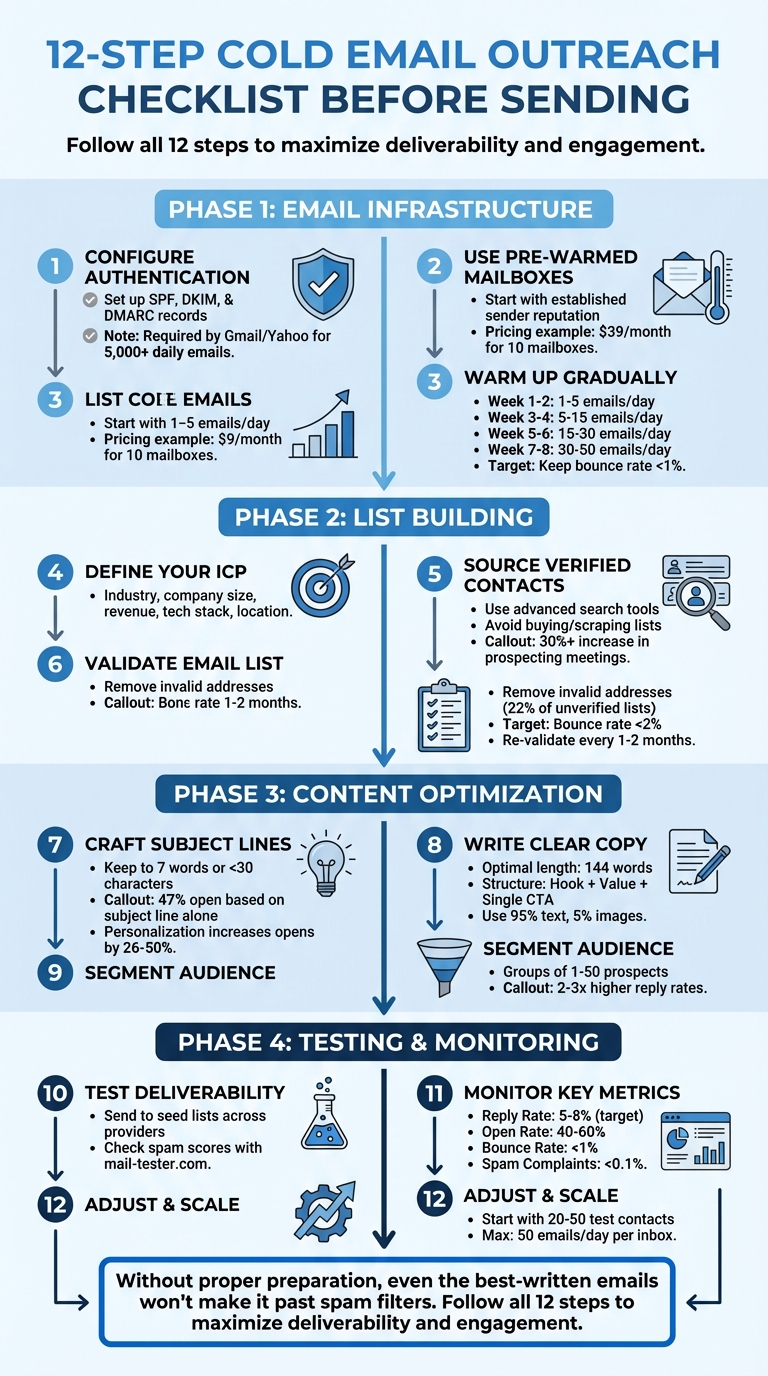
12-Step Cold Email Outreach Checklist for 2026
Cold Email Deliverability Guide (2025): Land in Inbox Every Time
Step 1: Set Up Your Email Infrastructure
Before you start sending cold emails, it’s crucial to establish your credibility by setting up proper authentication protocols like SPF, DKIM, and DMARC. These are no longer optional – starting February 1, 2024, Google and Yahoo will require all bulk senders (those sending over 5,000 emails daily) to have these configurations in place.
Configure SPF, DKIM, and DMARC Records
SPF (Sender Policy Framework) is essentially a way to let receiving servers know which IPs are authorized to send emails on behalf of your domain. To configure it, add a TXT record to your DNS. For example:
- Google Workspace:
v=spf1 include:_spf.google.com ~all - Microsoft 365:
v=spf1 include:spf.protection.outlook.com -all.
DKIM (DomainKeys Identified Mail) helps ensure your email hasn’t been tampered with during transit. It works by attaching a digital signature to your email headers. To set it up, generate a public key in your email provider’s admin tools and add it as a TXT or CNAME record in your DNS.
DMARC (Domain-based Message Authentication, Reporting & Conformance) dictates how receiving servers should handle emails that fail SPF or DKIM checks. Add a TXT record (e.g., _dmarc.yourdomain.com) with a policy like p=quarantine or p=reject. Avoid p=none since it only monitors without offering any real protection.
"A DMARC policy of p=reject is fast becoming the industry standard for trustworthy senders."
- Sujan Patel, Founder, Mailshake
Once you’ve set up these records, verify them using tools like MXToolbox or DMARCLY to ensure they’re correctly propagated. After authentication, focus on building your sender reputation by using pre-warmed mailboxes.
Use Pre-Warmed Mailboxes
Even with proper authentication, a brand-new mailbox with no history can raise red flags with email providers. That’s where pre-warmed mailboxes come in. These mailboxes already have a positive track record, making it easier to achieve better deliverability from the start.
For example, Zapmail offers pre-warmed mailboxes as part of its plans:
- Starter plan: $39/month for 10 pre-warmed Google mailboxes with US/EU IP accounts.
- Growth plan: $99/month for 30 mailboxes.
- Pro plan: $299/month for 100 mailboxes, including priority support and API access.
Each mailbox is ready to send immediately, helping you bypass the initial hurdles.
In 2022, Ramzi Malas from Lux Sales Consulting used a structured warm-up tool to improve email deliverability. By combining proper authentication with a warm-up strategy, his team boosted open rates by 30% to 50%.
Warm Up Domains Gradually
Even with pre-warmed mailboxes, it’s important to scale your sending volume slowly. Sending too many emails too soon – like jumping to 100 emails on day one – can trigger spam filters.
Start small:
- Week 1: Send 5 emails per day.
- Gradually increase to 15 daily emails by week three and 30 daily emails by week five.
- Avoid doubling your volume overnight; keep increases gradual to mimic natural activity.
Here’s a general guideline for warming up your domain:
| Warmup Phase | Daily Volume | Duration |
|---|---|---|
| Weeks 1–2 | 1–5 emails | 2 weeks |
| Weeks 3–4 | 5–15 emails | 2 weeks |
| Weeks 5–6 | 15–30 emails | 2 weeks |
| Weeks 7–8 | 30–50 emails | 2 weeks |
Always use a dedicated subdomain for cold outreach, like reach.company.com, instead of your primary domain (company.com). This way, if the outreach domain gets flagged, your main business email remains unaffected.
Lastly, keep your bounce rate below 1%. A high bounce rate can damage your sender reputation, making it harder to land in inboxes.
Step 2: Build and Validate Your Prospect List
Sending emails to invalid addresses can seriously hurt your email deliverability, no matter how well you’ve prepared your domain. Here’s how to avoid that.
Define Your Ideal Customer Profile (ICP)
Your Ideal Customer Profile (ICP) outlines the type of company that gains the most from your solution. Focus on characteristics like industry, company size, revenue, tech stack, and location.
Start by reviewing your current customer base. Identify your most profitable and loyal clients, then pinpoint the traits they share. These shared traits, or firmographics, become the backbone of your ICP.
"If all your efforts target the wrong audience, you’ll not close any deals."
- Habib Benabdeslam, Datablist
Use a two-step filtering approach to refine your list. First, identify the right companies based on your ICP. Then, zero in on the decision-makers within those companies. Keep in mind that in many B2B settings, decisions are made by a "buying committee", which can include champions, decision-makers, influencers, end-users, and gatekeepers.
For more specific ICPs, consider niche sources like 10times for event-based leads, EdSurge for EdTech companies, or BuiltWith for identifying tech stacks. These can be more precise than generic databases.
Once your ICP is clearly defined, the next step is to find and verify leads that fit your criteria.
Source Verified Email Contacts
Avoid buying, scraping, or renting email lists. These often contain spam traps and invalid addresses, which can harm your sender reputation. Instead, focus on obtaining leads with clear professional relevance.
Use advanced search tools that let you filter by domain, company name, or social media profiles to locate decision-makers who align with your ICP. Browser extensions can also help you collect verified leads directly from company websites or LinkedIn profiles.
For example, over a 12-month period ending in 2024, Digital Media Stream used email finder tools to optimize their prospecting process. Co-founder Simon Leeming noted that these tools cut prospecting time by 10% to 20% per representative and boosted prospecting meetings by more than 30% during that year.
Once you’ve gathered your contacts, the next critical step is to validate them.
Run Bulk Email Validation
Before launching your email campaign, validate your list to weed out invalid, risky, or duplicate addresses. Studies show that roughly 22% of email addresses on an unverified list could be invalid.
Upload your prospect list as a CSV file to a validation tool. These tools check for syntax errors, domain health, and mailbox existence. They can also detect hard bounces, spam traps (honeypots used to catch spammers), and disposable email addresses.
Pay particular attention to catch-all (accept-all) addresses, which accept all mail regardless of whether the mailbox exists. These can be risky, so use specialized validators to assess them or remove them entirely if your sender reputation is weak.
"The small cost per email [for verification] is insignificant compared to the reputational cost of sending to invalid addresses."
- Sujan Patel, Founder, Mailshake
To maintain a healthy sender reputation, keep your bounce rate below 2%. Re-validate your list every one to two months or right before a major campaign, as email data tends to decay at a rate of about 2% per month.
Additionally, implement a sunset policy to remove contacts who haven’t opened or responded to your last five to seven emails over a six-month period. This helps keep your list active and ensures strong engagement signals for spam filters.
sbb-itb-36f7bf9
Step 3: Personalize and Optimize Your Email Content
Now that your prospect list is polished and ready, it’s time to craft emails that truly connect with your audience.
Write Clear Subject Lines
Did you know that 47% of people decide whether to open an email based solely on the subject line? That makes it your one shot to grab their attention.
Keep it brief. Subject lines with exactly 7 words tend to perform best, and those under 30 characters can increase open rates by 35% to 37% compared to longer ones. For example: "Forecasting accuracy in 2 weeks?"
Go beyond just using their first name. Reference something specific, like a recent funding round, a shared connection, or a challenge they’re facing. Emails with personalized subject lines are 26% to 50% more likely to be opened. Example: "Your Series A + RevOps scaling" – this shows you’ve done your research.
Steer clear of spam triggers like ALL CAPS, excessive punctuation, or misleading prefixes like "RE:" when no prior conversation exists. Avoid tired phrases such as "Quick question" or "Following up."
Here are some subject line approaches that work:
| Subject Line Formula | Example | Why It Works |
|---|---|---|
[Pain Point] + [Timeframe] |
"Forecasting accuracy in 2 weeks?" | Creates urgency with a clear outcome |
[Mutual Connection] + [Soft Ask] |
"Quick question via Sarah Chen" | Builds trust through a shared connection |
[Specific Trigger] + [Value] |
"Your Series A + RevOps scaling" | Shows relevance to their current situation |
[Question About Them] |
"Struggling with CRM adoption?" | Encourages engagement (10% higher open rates) |
To keep things fresh and avoid spam filters, try spin syntax (e.g., {Hi|Hello|Hey}) to vary your subject lines.
Structure Short and Clear Email Copy
Once someone opens your email, you’ve got about 11 seconds to make your point. The sweet spot for email length is around 144 words – anything longer risks being skimmed or ignored.
Follow this simple three-part structure:
- Start with a personalized hook.
- Present a concise value proposition backed by social proof.
- End with a single, low-effort call-to-action.
Stick to plain-text emails with minimal signatures. Plain-text feels more personal – like a genuine one-on-one conversation – and is less likely to get flagged as spam. Aim for a 95% text to 5% image ratio.
When it comes to your call-to-action (CTA), keep it simple. Instead of asking for scheduling details, try something easy to answer, like: "Is this something your team is focused on?" A straightforward yes or no makes it easier for prospects to reply.
"A confused prospect does not take action. Your call-to-action has to be clear and easy to fulfill."
- Sujan Patel, Founder of Mailshake
Every sentence in your email should answer one question: "What’s in it for me?"
Segment Your Audience for Targeted Messaging
Mass emails rarely hit the mark. Instead, break your list into smaller groups of 1–50 prospects based on criteria like job title, industry, or specific pain points. Targeted campaigns can generate reply rates 2–3 times higher than generic blasts.
For instance, a VP of Sales at a 500-person SaaS company has very different challenges compared to a Sales Operations Manager at a 50-person startup. Tailor your message to reflect their unique situations.
Dynamic content tools can help you scale personalization. Use liquid syntax to adjust greetings based on time zones, or spin syntax to rotate intro lines for larger lists. This makes even bulk emails feel more personal.
While the average cold email reply rate in 2025 is 5.1%, those who focus on segmentation and personalization can see reply rates between 10% and 20%. By tailoring your approach, you’re building on the work you’ve done in Steps 1 and 2, ensuring every email feels relevant and valuable to the recipient. And that’s what drives engagement.
Step 4: Test and Monitor Before Scaling
Now that you’ve set up your infrastructure, validated your contact list, and crafted personalized emails, it’s time to test everything before scaling your outreach efforts.
Test Deliverability and Spam Scores
Before going live with your campaign, make sure your emails are landing in the right place. Send test emails to seed lists that include inboxes from providers like Gmail, Outlook, Yahoo, and others. This will help you see whether your messages land in the Primary inbox, the Promotions tab, or the dreaded Spam folder.
Start by double-checking your technical setup. Free tools like mail-tester.com can help you confirm that your SPF, DKIM, and DMARC records are properly configured. These protocols ensure you’re authorized to send emails from your domain and protect your messages from being tampered with.
Scrutinize your email copy for potential spam triggers. Avoid overusing capital letters, overly promotional language, or misleading subject lines. Emails that mimic plain-text, one-on-one messages often perform better because they feel more personal and less like mass marketing.
Check your domain and IP reputation using tools like Google Postmaster Tools and Microsoft SNDS. Gmail, for instance, blocks 99.9% of spam before it even reaches users. To avoid triggering promotional filters, disable open tracking pixels and instead focus on reply rates as your primary success metric.
Once you’ve ensured your emails are landing where they should, start monitoring your initial campaign performance.
Monitor Initial Campaign Metrics
After testing deliverability, send a small batch of emails (20–50 contacts) to identify and resolve any issues before they escalate and harm your sender reputation.
Keep a close eye on these key metrics:
| Metric | Target Benchmark | What It Indicates |
|---|---|---|
| Reply Rate | 5% – 8% | Indicates strong engagement and that your message is resonating |
| Open Rate | 40% – 60% | Reflects effective subject lines and good inbox placement |
| Bounce Rate | Under 1% | Shows your list is high-quality and properly validated |
| Spam Complaints | Below 0.1% | Confirms your content is relevant and well-targeted |
Among these, reply rate is the most critical.
"The real currency of deliverability is positive engagement signals, and the king of them all is a reply." – Nicolas Olaya, Laya Consulting
Keep bounce rates under 1% – anything higher can severely damage your domain’s reputation. Always validate your list right before sending to minimize risks.
During this initial phase, monitor your reputation dashboards on a weekly basis. If you notice a dip in domain health or an uptick in spam complaints, pause your campaigns immediately and address the issues.
Use the data you gather to fine-tune your approach and gradually ramp up your sending volume.
Adjust Strategy Based on Data
Leverage the insights from your initial tests to refine your strategy. For instance, if your open rates are falling below 40%, experiment with different subject line styles. If your reply rates are under 5%, take another look at your value proposition or targeting.
For campaigns with low engagement, consider switching to simpler calls-to-action (CTAs). Instead of asking for a major commitment, try yes-or-no questions like, "Is this something your team is focused on?" These low-friction CTAs can make it easier for recipients to respond and increase engagement.
Make it a habit to re-validate your contact list regularly. Apply your sunset policy to remove inactive contacts and keep your list clean.
Once your metrics consistently hit the benchmarks across multiple small batches, you can start scaling. That said, avoid sending more than 50 emails per day per inbox to maintain long-term deliverability.
Conclusion
Cold email outreach isn’t just about crafting better emails – it’s about creating a system that ensures your messages are seen, understood, and acted upon. The 12 steps outlined in this checklist work together to help you hit inboxes, connect with recipients, and spark genuine replies.
Preparation is everything. Without proper email infrastructure, even the best-written emails can end up in spam. As Zapmail puts it, "If emails don’t reach the inbox, nothing else matters". Scaling your domains gradually helps protect your sender reputation and keeps your outreach efforts on track.
Personalization shows you’re real. In 2026, AI filters don’t just scan for keywords – they evaluate context and intent. Referencing specific projects, recent news, or other tailored details demonstrates that your message is a genuine one-to-one communication, not a mass email. Even personalized subject lines make a difference, significantly increasing the chances of your email being opened. This level of detail not only improves open rates but also sets the stage for better tracking and performance.
Tracking performance keeps you in control. Metrics like bounce rates, reply rates, and spam complaints are essential for spotting problems early. By staying on top of these numbers, you can fix issues before they harm your domain’s reputation. Steps 1 through 4 in the checklist highlight how critical this is to long-term success.
Each part of this process strengthens the next, creating a solid framework for effective outreach. Tools like Zapmail simplify the technical side – handling domain setup, DNS configuration, and authentication protocols – so you can focus on building targeted prospect lists and writing emails that start meaningful conversations.
FAQs
What are SPF, DKIM, and DMARC, and why do they matter for cold email outreach?
SPF, DKIM, and DMARC are key email authentication protocols designed to safeguard your email domain and boost deliverability. Here’s a quick breakdown of what each one does:
- SPF (Sender Policy Framework): Defines which mail servers are permitted to send emails on behalf of your domain, helping to verify the sender’s identity.
- DKIM (DomainKeys Identified Mail): Attaches a digital signature to your emails, ensuring they remain unaltered during transit.
- DMARC (Domain-based Message Authentication, Reporting, and Conformance): Provides instructions to email providers on how to handle messages that fail SPF or DKIM checks, reducing the risk of phishing and spoofing.
Using these protocols is crucial for building credibility with email providers, avoiding spam filters, and ensuring your emails land in the right inbox.
How can I keep my email list clean and reduce bounce rates?
To keep your email list in good shape and reduce bounce rates, it’s important to regularly verify your contacts. Remove any invalid, inactive, or hard-bouncing email addresses. This ensures your messages are sent to the right people and improves your email deliverability.
You can also use tools designed to check email validity and carry out routine list maintenance. A well-maintained list doesn’t just cut down on bounces – it also strengthens your sender reputation, making it more likely that your emails will land in your audience’s inboxes.
How can I personalize and improve my cold email content for better results?
To make your cold emails grab attention, focus on personalization and relevance. Start by including specific details about the recipient, like their company, recent milestones, or even a mutual connection. For example, you could open with something like: "I saw that [Company] just launched [Product], and I have an idea that could help increase adoption by 15%." This kind of tailored message shows you’re paying attention and can significantly boost your chances of getting a reply.
Break your audience into smaller groups based on factors like industry, job title, or common challenges, and tweak your message to fit each group. For instance, a SaaS founder might appreciate being offered a free trial, while a sales leader could be more interested in a short case study that highlights clear, measurable results. Always include a straightforward call-to-action, such as: "Would you be available for a quick 15-minute call next Tuesday at 10:00 AM EST?" – this makes it easy for the recipient to respond.
Don’t forget to optimize your email for deliverability and engagement. Keep your subject lines short (under seven words) and focused on what the recipient stands to gain. Use a clean balance of text and images, and test your email on different platforms to avoid formatting hiccups. Experiment with A/B testing for personalization techniques to see what resonates best with your audience.