Feedback loops are tools used by email providers to notify senders when their emails are marked as spam. They help protect your domain’s reputation by identifying and removing problematic recipients, improving engagement, and reducing spam complaints. Here’s what you need to know:
- What They Do: Alert senders about spam complaints to prevent damage to sender reputation.
- Why They Matter: High complaint rates harm email deliverability, while feedback loops improve open rates by up to 199%.
- How Providers Differ: Gmail offers aggregate data, while Microsoft and Yahoo provide individual reports.
- Key Requirements: Proper email authentication (SPF, DKIM, DMARC) is mandatory for accessing feedback loop data.
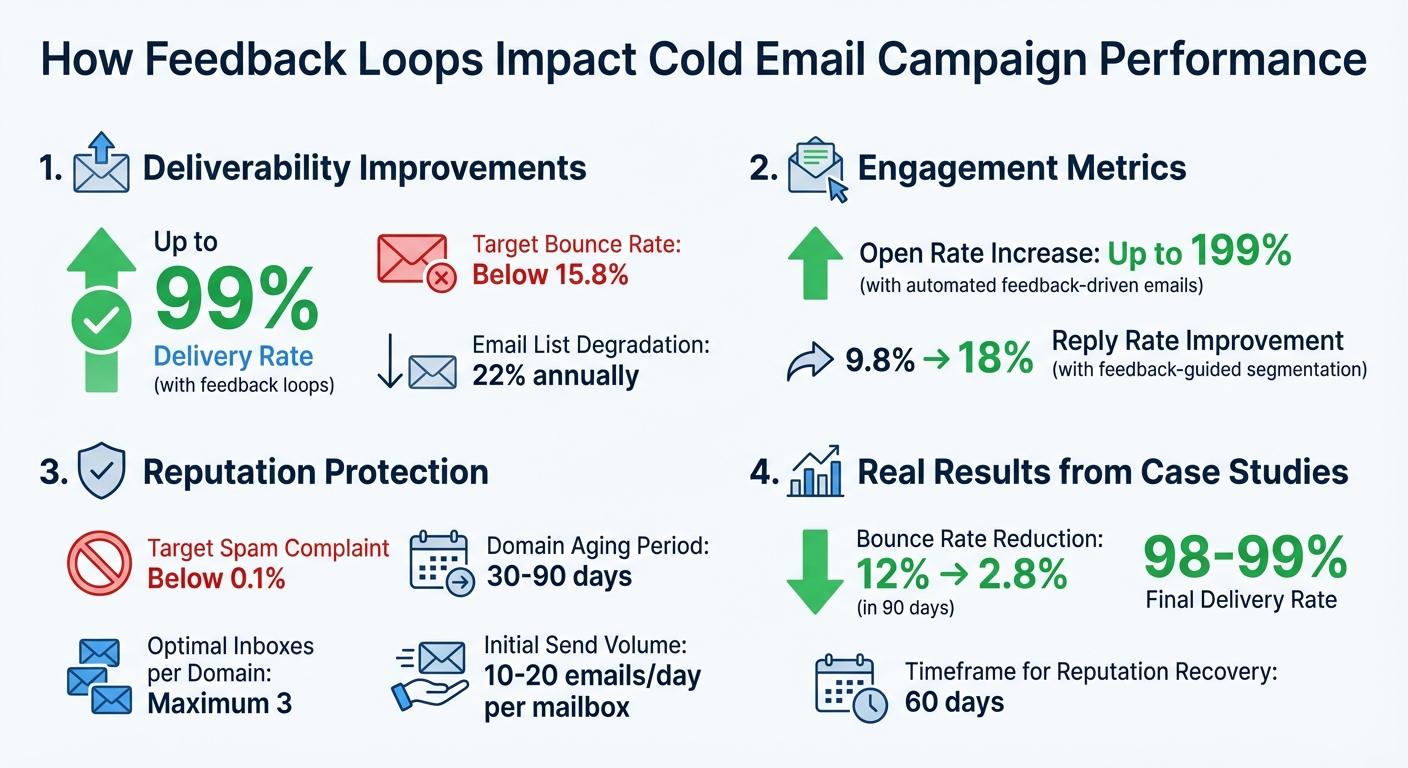
Feedback Loops Impact on Email Campaign Performance: Key Metrics
How Feedback Loops Affect Email Deliverability
Research Data on Deliverability Rates
Email campaigns that leverage feedback loops can achieve delivery rates as high as 99%. This level of performance is crucial for ensuring your outreach efforts reach their intended audience.
Monitoring feedback loops actively helps you avoid spam complaints and maintain a strong sender reputation. Additionally, keeping your email list clean plays a big role. By managing bounce rates to stay below 15.8%, you signal to Internet Service Providers (ISPs) that your list is engaged and well-maintained. These numbers highlight just how important feedback loops are for keeping your email deliverability on track.
Lowering Spam Complaints with Feedback Loop Data
Feedback loops do more than just improve delivery rates – they also help reduce spam complaints. When a recipient marks your email as spam, a notification is generated. This allows you to quickly remove that address from your list before additional complaints occur. Not only does this process minimize the impact of individual complaints, but it also provides valuable insights into potential issues with your campaign. Whether it’s sending emails too frequently, targeting the wrong audience, or delivering content that doesn’t meet expectations, feedback loop data can help you address these problems and refine your approach.
Effects on Open Rates and Engagement
Using feedback loop data to weed out uninterested recipients can lead to a noticeable boost in open rates. Higher engagement creates a positive cycle: when recipients open emails, click links, or reply, mailbox providers recognize these actions as good signals. This strengthens your sender reputation, which in turn improves inbox placement for future campaigns. By removing disengaged recipients, you not only enhance your reputation but also set the stage for better overall deliverability.
Case Studies: Feedback Loops in Action
Case Study 1: Lowering Bounce Rates with List Cleaning
A mid-sized agency was grappling with a 12% email bounce rate, which put them at risk of being blocked by ISPs. Instead of relying on a quick fix, they adopted an ongoing, feedback-driven approach to clean their email lists.
The team set up a detailed process that included:
- Real-time mailbox verification using AI
- Data updates to track job changes
- Removing high-risk, role-based addresses (like info@ or support@)
- Assigning confidence scores to contacts
- Breaking lists into priority tiers
- Deduplicating across all lists
- Performing a final check before each campaign launch
In just 90 days, they slashed their bounce rate from 12% to 2.8%, well under the 5% mark needed for healthy email deliverability. This not only safeguarded their domain reputation but also pushed their delivery rates to an impressive 98%.
"Reducing email bounce rates is the foundation of any successful cold outreach campaign." – Nicholas Verity, CEO, Cleverly
One key takeaway? Email lists naturally degrade by about 22% annually as people switch jobs or domains shut down. By tackling bounce rates, the agency laid the groundwork for stronger audience engagement.
Case Study 2: Boosting Engagement Through Audience Segmentation
An outbound sales team was stuck with flat engagement metrics, even though their email delivery rates were solid. To address this, they leaned into feedback loop data to segment their audience more effectively.
They used this feedback to guide segmentation and A/B testing, focusing on actual replies to uncover objections rather than just tracking reply rates. When negative feedback highlighted doubts about the legitimacy of their offer, they revamped their messaging to directly address those concerns.
The result? Their reply rate surged from 9.8% to 18% after tweaking their approach based on feedback-guided insights. This highlights how feedback loops can reveal deeper audience behaviors, leading to meaningful improvements in campaign performance. While segmentation drove better engagement, maintaining sender reputation remained crucial – a challenge tackled in the next case.
Case Study 3: Safeguarding Domain Reputation with Authentication
A B2B company faced declining deliverability due to poor email authentication. Without proper SPF, DKIM, and DMARC configurations, they couldn’t access critical feedback loop data.
To fix this, they implemented full authentication protocols and signed up for Yahoo’s Complaint Feedback Loop and Microsoft’s Junk Mail Reporting Program. These programs required specific setups, like a DKIM selector, to receive individual complaint reports in ARF format. They also established a dedicated abuse@ email address to process complaints and automated the suppression of contacts who filed complaints.
Additionally, the company used a subdomain (mail.company.com) for cold outreach, protecting the reputation of their primary domain. Within 60 days, their spam complaint rate dropped below 0.1%, a critical threshold for maintaining a strong sender reputation. Their delivery rate stabilized at 99%, and transactional emails saw better inbox placement as well.
"A high number of complaints damages this reputation, which increases the risk of your emails being blocked or marked as spam." – Isabel Sabadi, Demand Gen Manager
This case underscores how proper email authentication is essential for feedback loops to function effectively. With real-time data at their disposal, the company refined their sender reputation and improved campaign outcomes.
How to Use Feedback Loops with Zapmail
Setting Up Feedback Loops with Google and Microsoft
Zapmail simplifies the process by automatically configuring SPF, DKIM, and DMARC during setup, making it easier to register feedback loops with Google and Microsoft.
For Google, you’ll need to embed a Feedback-ID header in your emails. The format is a:b:c:SenderId, where SenderId is a string of 5–15 characters. Then, register your domains in Google Postmaster Tools. Keep in mind, detailed data will only appear after you reach a certain email volume threshold.
For Microsoft, there are two programs to consider:
- Junk Email Reporting Program (JMRP): This forwards individual complaint reports directly to you.
- Smart Network Data Services (SNDS): This provides insights into your IP reputation and traffic volume.
To get started, register your sending IPs through Microsoft’s Sender Support portal. You’ll also need to activate both [email protected] and [email protected] email addresses to receive verification messages.
| Provider | Program | Data Type | Key Requirement |
|---|---|---|---|
| Postmaster Tools / FBL | Aggregated spam rates | Feedback-ID header & DKIM |
|
| Microsoft | JMRP | Individual complaint reports | IP registration & active abuse@ email |
| Microsoft | SNDS | IP reputation & traffic volume | IP ownership verification |
Once your feedback loops are in place, Zapmail’s infrastructure can help you fine-tune your email deliverability.
Enhance Deliverability with Zapmail’s Pre-Warmed Mailboxes
Zapmail offers pre-warmed mailboxes that immediately improve your sender reputation. These mailboxes use the same IP address for warming and sending, ensuring seamless recognition by email providers. Additionally, Zapmail employs adjacent domains – slight variations of your main domain (e.g., getcompany.com instead of company.com) – with 301 redirects to protect your main domain’s reputation while capturing traffic.
For new domains, allow them to "age" for 30–90 days before ramping up your email volume. Start by sending 10–20 emails per day per mailbox, gradually increasing based on engagement metrics. This slow and steady approach ensures mailbox providers see consistent, legitimate activity, which is especially important before detailed feedback loop data becomes available.
"With Zapmail, domain setup, DNS, and authentication are handled automatically – so your foundation is ready from day one." – Zapmail
Keep your setup efficient by using no more than 3 inboxes per domain. This limits the impact of spam reports on your overall domain reputation. Also, don’t stop the warming process once your campaigns are live. Instead, adjust the ratio of warming emails to outbound emails to maintain healthy mailbox activity.
Once your mailboxes are running smoothly, you can shift focus to streamlining list management with Zapmail’s automation tools.
Automating List Management with Zapmail
With feedback loops active, Zapmail makes it easy to automate list cleaning. Use complaint data to suppress any email address that generates a feedback loop complaint. This keeps your spam rate low and protects your sender reputation.
Zapmail’s Inbox Testing tools allow you to monitor placement results, showing whether feedback loop insights are improving your email delivery. Automated emails triggered by specific user behaviors can achieve up to 199% higher open rates compared to traditional mass mailings – provided you promptly remove complainers.
To maintain a bounce rate below 15.8%, combine feedback loop data with email verification tools. It’s also worth noting that email lists degrade by about 22% annually, so continuous monitoring and cleaning are essential for long-term success, rather than relying on one-off cleanups.
sbb-itb-36f7bf9
Conclusion
Why Feedback Loops Matter
Feedback loops act like an early warning system for your email campaigns. They notify you when recipients mark your emails as spam, allowing you to quickly remove those contacts and protect your sender reputation. This not only keeps your email list clean but also helps maintain low complaint rates. Since providers like Gmail and Microsoft closely track these metrics, having a solid sender reputation boosts the chances of your emails landing in the primary inbox instead of the spam folder.
They also help you fine-tune your strategy. By identifying which campaigns lead to complaints, you can tweak your messaging, adjust how often you send emails, or refine your audience segmentation to better align with recipient preferences. These insights are essential for building effective email campaigns, which Zapmail is designed to make easier.
How Zapmail Enhances Your Campaigns
Zapmail takes the technical headaches out of email outreach by automatically setting up SPF, DKIM, and DMARC authentication. This ensures smooth integration with feedback loop services from major providers like Google and Microsoft.
"With Zapmail, domain setup, DNS, and authentication are handled automatically – so your foundation is ready from day one." – Zapmail
Zapmail also provides pre-warmed mailboxes and high-reputation domains, giving your campaigns a strong sender score right from the start. Combined with advanced inbox testing tools, it keeps bounce rates below 15.8%, paving the way for successful cold email outreach.
Feedback Loop Explained – Tutorial by Mailtrap
FAQs
How do feedback loops help improve cold email open rates?
Feedback loops are a goldmine of information from email providers like Gmail and Outlook. They let you know when recipients mark your emails as spam or move them to the junk folder. By analyzing this feedback, you can act fast – removing disengaged addresses or re-segmenting your list. This helps keep your spam-complaint rate low and protects your sender reputation. And a strong sender reputation? That’s the key to landing more emails in inboxes and improving open rates.
You can also use this data to fine-tune your email campaigns. Think better subject lines, smarter send times, and cleaner email lists. For those using Zapmail’s pre-warmed Google and Microsoft mailboxes, feedback loop monitoring is already built in. Combined with automated domain and DNS management, it ensures better inbox placement and stronger engagement for your cold email efforts.
How does email authentication influence access to feedback loop data?
Email authentication protocols such as SPF, DKIM, and DMARC are essential for gaining access to feedback loop (FBL) data. These protocols confirm that your emails are sent from an approved source, helping mailbox providers recognize you as a trustworthy sender.
If authentication isn’t set up correctly, mailbox providers might block access to FBL reports. They depend on these protocols to ensure spam complaint data is shared only with verified senders. By implementing authentication, you not only improve your sender reputation but also secure the ability to track and act on valuable feedback loop insights.
How can feedback loop data help improve audience segmentation in cold email campaigns?
Feedback loop (FBL) data offers a clear window into how recipients interact with your cold emails. It tracks actions like opening, clicking, unsubscribing, or marking emails as spam. By examining these behaviors, you can organize your audience into specific segments. For example, recipients who often mark emails as spam can be classified as a high-risk group, while those who regularly open and respond can form a high-engagement segment – perfect for more tailored follow-ups.
These segments can guide your outreach strategy. For high-risk groups, you might need to adjust your approach or reduce the frequency of emails. On the other hand, high-engagement recipients can benefit from carefully timed messages or improved content. Tools like Zapmail’s pre-warmed mailboxes make this even easier by automating smarter email routing and helping safeguard your sender reputation. Regularly refreshing your audience segments with updated FBL data keeps your campaigns sharp, boosting both deliverability and response rates over time.