Did you know that 85% of emails land in spam folders, and 19% never reach their destination? The reason is often misconfigured DNS records like SPF, DKIM, and DMARC. These email authentication protocols are essential for ensuring your emails are delivered securely and reliably. Yet, 40% of senders make setup errors, leading to lost emails and risks like domain spoofing.
Here’s the issue:
- SPF ensures only authorized servers send emails for your domain but fails if you exceed 10 DNS lookups.
- DKIM verifies email integrity with digital signatures but is prone to manual setup mistakes.
- DMARC enforces email authentication policies but can block valid emails if not configured correctly.
Manual DNS setup is time-consuming and error-prone, especially for multiple domains. Automation tools like Zapmail simplify this process, reducing setup time from hours to 10 minutes while improving email deliverability to 98–99%. With features like automatic SPF flattening, DKIM key generation, and DMARC monitoring, Zapmail eliminates errors and scales effortlessly across domains.
Bottom line: Automating DNS configuration saves time, minimizes errors, and ensures your emails land in inboxes. Visit Zapmail.ai to learn more.
How to Automate your Cold Email Domain & Account Setup
What Are SPF, DKIM, and DMARC Records?
Think of email authentication as a security checkpoint. SPF ensures only authorized senders can use your domain, DKIM verifies that your email’s content hasn’t been tampered with, and DMARC dictates how to handle emails that fail these checks.
These protocols are configured as DNS TXT records, which are publicly available for receiving mail servers to verify your emails’ authenticity. Together, they create a multi-layered defense against email spoofing and fraud.
"DKIM and SPF can be compared to a business license or a doctor’s medical degree displayed on the wall of an office – they help demonstrate legitimacy. Meanwhile, DMARC tells mail servers what to do when DKIM or SPF fail." – Cloudflare
With over 90% of email attacks involving spoofing, skipping these safeguards leaves your domain open to abuse and increases the chances of your legitimate emails being flagged as spam. Let’s break down how each protocol works to protect your email communications.
SPF (Sender Policy Framework)
SPF is like a whitelist for email servers. It specifies which servers are allowed to send emails on your domain’s behalf.
When an email arrives, the receiving server checks the SPF record to confirm that the sender’s IP is authorized. If the IP matches your list, the email passes. If not, it may be flagged as suspicious or rejected outright.
An SPF record begins with v=spf1 and uses qualifiers to define rules:
+means the server is authorized.-marks it as unauthorized.~(soft fail) allows the email through but flags it as suspicious.?(neutral) applies no strict policy.
However, SPF has a limitation: it allows only 10 DNS lookups. Exceeding this cap causes SPF checks to fail – even for legitimate senders. This can become a headache if you use multiple email services or manage several domains.
DKIM (DomainKeys Identified Mail)
DKIM works by adding a digital signature to your email headers, acting as a "seal of authenticity."
Your mail server uses a private key to sign outgoing emails, while the receiving server verifies the signature using a public key published in your DNS. If the signature matches, the email is considered legitimate and unaltered. If not, it fails the check.
DKIM records are stored as DNS TXT entries under a selector (e.g., selector._domainkey.yourdomain.com). For better security, opt for 2048-bit keys if supported by your DNS host, as they are much harder to crack than 1024-bit keys. Experts also suggest rotating your DKIM keys every six months to maintain security.
A 2023 study of 500,000 DKIM records revealed that about 16,000 contained critical errors. These issues often stem from manual setup mistakes, such as misconfigured selectors, copying keys incorrectly, or forgetting to publish the public key in DNS.
DMARC (Domain-based Message Authentication, Reporting, and Conformance)
DMARC acts as the enforcer, unifying SPF and DKIM under one policy. It tells receiving servers how to handle emails that fail authentication and provides detailed reports on email activity.
"DMARC unifies the SPF and DKIM authentication mechanisms into a common framework and allows domain owners to declare how they would like email from that domain to be handled if it fails an authorization test." – Mailshake
A DMARC record starts with v=DMARC1 and includes a policy tag:
p=none: Emails are delivered normally, but reports are generated for monitoring.p=quarantine: Suspicious emails are sent to the spam folder.p=reject: Emails that fail checks are blocked entirely.
Major providers like Gmail and Yahoo! require bulk senders (5,000+ emails daily) to have a DMARC record for successful delivery.
DMARC also introduces domain alignment, meaning the domain in the visible "From" address must match the domain validated by SPF or DKIM. This alignment prevents attackers from spoofing your domain even if they bypass one of the checks.
To implement DMARC effectively, experts recommend a phased approach:
- Start with
p=nonefor 2–4 weeks to monitor reports and identify legitimate senders. - Move to
p=quarantineto redirect failing emails to spam. - Finally, switch to
p=rejectto block unauthorized emails entirely.
This gradual rollout minimizes the risk of accidentally blocking legitimate emails.
SPF vs. DKIM vs. DMARC
Each protocol plays a unique role, but together they create a strong email authentication system:
| Protocol | Purpose | Record Format |
|---|---|---|
| SPF | Authorizes specific servers or IPs to send emails for your domain. | DNS TXT record (starts with v=spf1). |
| DKIM | Adds a digital signature to verify sender identity and message integrity. | DNS TXT record (uses a selector). |
| DMARC | Defines how to handle failed SPF/DKIM checks and provides reporting. | DNS TXT record (starts with v=DMARC1). |
SPF confirms the sender’s source, DKIM ensures the message’s integrity, and DMARC enforces authentication policies. Combined, they enhance email security and ensure better deliverability.
Manually setting these records can be tricky and prone to errors. Studies show that 75–80% of domains using DMARC face challenges when trying to enforce strict policies. This complexity highlights the importance of automation, which we’ll explore next.
Problems with Manual DNS Record Setup
Setting up SPF, DKIM, and DMARC records manually is a challenging process prone to errors. As we’ve mentioned earlier, missteps in configuration are common and can have a serious impact on email deliverability.
The stakes are high when things go wrong. IT downtime caused by configuration errors can cost businesses an estimated $5,600 per minute. And when emails don’t make it to inboxes, the losses go beyond missed messages – you could be losing revenue, potential leads, and even customer trust.
Let’s break down some of the key problem areas.
SPF Lookup Limits
SPF records come with a strict limit of 10 DNS lookups. Go beyond that, and the SPF check fails, creating persistent authentication issues. This becomes a headache if you’re using multiple email services. Tools like Google Workspace, Salesforce, Mailchimp, and SendGrid each add their own lookup entry, with every "include:" statement counting toward the limit.
Once you hit the cap, you’re left with manual SPF flattening – substituting hostnames with actual IP addresses. While this workaround avoids lookup failures, it requires constant IP tracking and updating. This not only consumes time but also impacts email deliverability and makes scaling your infrastructure harder. Automation becomes essential to avoid these pitfalls.
DKIM Key Generation Mistakes
DKIM relies on generating a public/private key pair for each domain. The private key stays on your mail server, while the public key is published in your DNS as a TXT record. Sounds straightforward, right? Unfortunately, manual errors are all too common.
Issues like extra spaces or line breaks when copying the public key, using an incorrect selector name, or mismatched keys can derail the setup. Additionally, outdated 1024-bit RSA keys should be replaced with 2048-bit ones for better security. To maintain security, keys should be rotated every six months – or every three months if you’re still using 1024-bit keys. These errors weaken email authentication and harm your inbox placement rates.
DMARC Configuration Errors
DMARC acts as the glue that ties SPF and DKIM together, but it’s also a frequent source of problems. One major mistake is jumping straight to a strict p=reject policy without proper testing. This can block legitimate emails, including those from your own team. Many organizations struggle to enforce DMARC policies effectively, often because they skip the critical monitoring phase.
Another common issue is domain alignment. If the domain in your "From" header doesn’t match the domain authenticated by SPF or DKIM, the DMARC check will fail. And then there’s the problem of duplicate DMARC records. Since only one DMARC record is allowed per domain, adding a second one can break authentication entirely. These errors not only disrupt deliverability but also weaken email security.
Managing DNS Changes Across Multiple Domains
Updating DNS records manually for a single domain is tedious but doable. However, when you’re managing 10, 50, or even 200 domains, it becomes a logistical nightmare. Each domain needs its own SPF record, DKIM keys, and DMARC policy. This involves logging into multiple DNS provider dashboards and waiting 48–72 hours for changes to propagate globally.
A single missed update – like an outdated SPF record after switching email providers, a wrongly applied DKIM key, or an overlooked DMARC policy – can wreak havoc. Misconfigurations can block up to 19% of emails. The more domains you manage, the higher the risk of errors, making manual updates impractical and underscoring the need for automated solutions.
Manual DNS configuration simply doesn’t scale, and the margin for error is razor-thin. These challenges highlight why automation is no longer optional for effective email management.
sbb-itb-36f7bf9
How Zapmail Automates DNS Configuration
Zapmail simplifies the often tedious process of DNS configuration, taking the hassle out of setting up SPF, DKIM, and DMARC records. Instead of spending 30 minutes – or even up to 48 hours through resellers – Zapmail automates the entire setup in about 10 minutes. By creating US-hosted Google and Microsoft mailboxes with all DNS records correctly configured from the start, it eliminates the need for manual key copying and avoids common issues like DNS lookup limits. As Enoch Chang, Co-Founder of Cymate, explains:
"Instant email infra setup (SPF/DKIM/DMARC, routing, masking) zero human error, all done by software."
This streamlined process isn’t just quick; it’s scalable. Zapmail currently manages over 330,000 domains and has set up more than 1 million mailboxes. From initial setup to ongoing DNS management, the platform lets you focus on building your outreach instead of troubleshooting technical issues.
Automatic SPF Flattening
Zapmail ensures your SPF records stay compliant with the strict 10 DNS lookup limit. Each workspace is assigned a dedicated domain with its own isolated SPF record, so you won’t run into cascading lookup issues as your email infrastructure grows.
Automatic DKIM Key Generation
Setting up DKIM is no longer a headache. Zapmail automatically generates public/private key pairs, publishes the public key as a TXT record in your DNS, and ensures selectors are correctly aligned. Using industry-standard 2048-bit RSA keys, the system also handles key rotation seamlessly, removing the chance for manual errors.
DMARC Setup and Monitoring
Building on the solid foundation of SPF and DKIM, Zapmail deploys DMARC policies to enforce alignment and monitor deliverability. These policies ensure that your "From" header aligns with the domains authenticated by SPF and DKIM. The platform also provides deliverability insights, helping you spot and resolve issues before they affect your emails’ ability to reach inboxes.
DNS Management for Multiple Domains
Managing large-scale outreach with hundreds of domains becomes much easier with Zapmail’s multi-workspace interface. From a single dashboard, you can handle DNS records, forwarding, and domain masking across all your domains. Bulk editing tools make large-scale updates a breeze. For example, in 2025, a client significantly boosted daily contact rates by quickly scaling domain and mailbox capacity through Zapmail.
Zapmail also integrates seamlessly with over 50 outreach platforms, including Instantly, Smartlead, and ReachInbox. Once DNS is configured, mailboxes are automatically exported via OAuth connections, eliminating the need for manual app password setups. This one-click integration saves time and ensures your outreach tools are ready to go.
Benefits of Automated DNS Configuration
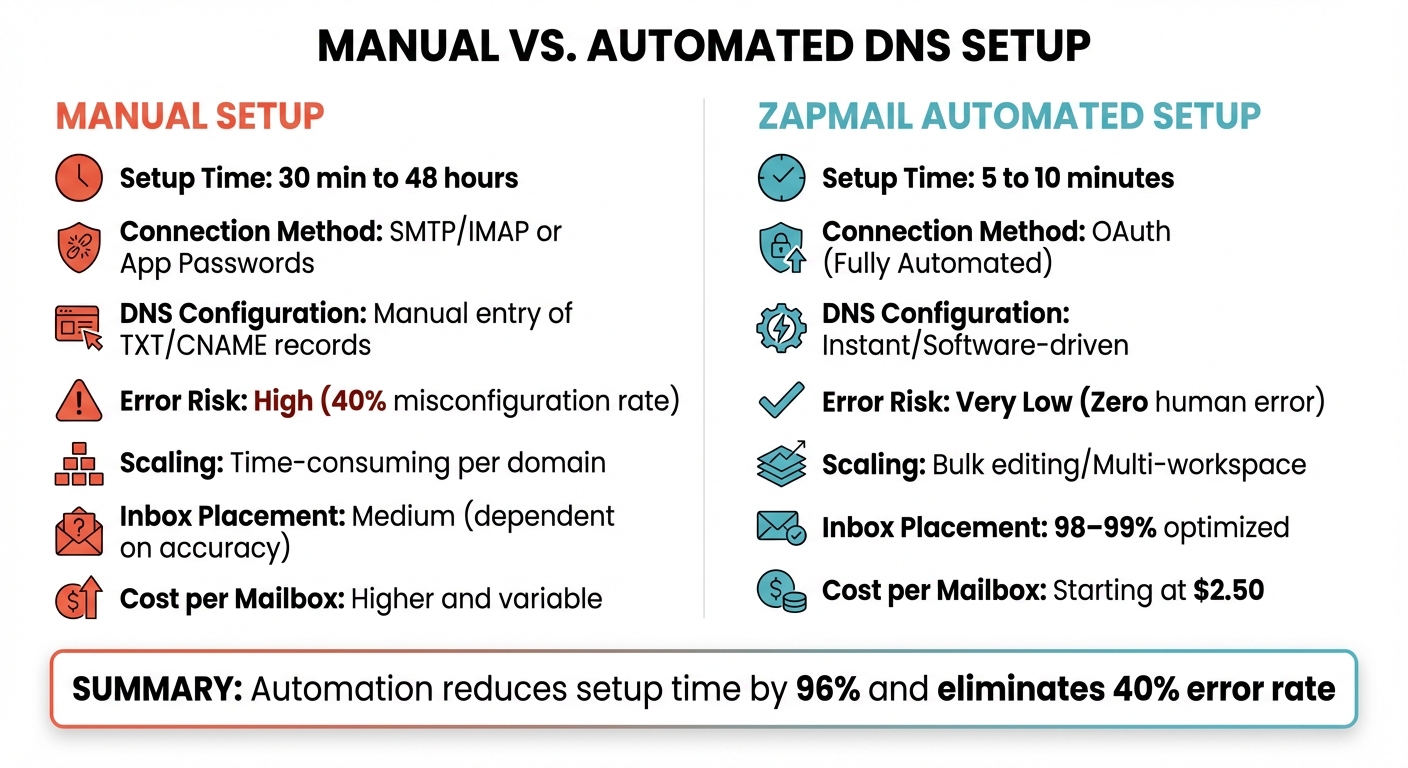
Manual vs Automated DNS Setup: Time, Cost, and Error Rate Comparison
Automating DNS management takes the hassle out of manual processes, saving time and reducing errors. These changes not only simplify operations but also significantly improve email deliverability.
Reduced Setup Time
Manual DNS setup can drag on for up to 48 hours. With automation, that time shrinks to just 5–10 minutes. No more juggling multiple logins, entering TXT records by hand, or waiting for propagation. When managing several domains, what could take days manually is done in a matter of minutes.
Fewer Configuration Errors
Mistakes in DNS configuration are surprisingly common – 40% of email senders misconfigure SPF or DKIM records when setting them up manually. These errors can seriously impact email deliverability, with 19% of emails failing to land in inboxes due to poor DNS setups. Zapmail’s automated system eliminates human error by handling everything: generating DKIM keys, formatting SPF strings, and aligning DMARC policies with authentication records. Karlo Binda from Leadsnack.co shared his experience:
"Procedures that usually took hours (setting DKIM, SPF, etc. records) for multiple domains, now take a few minutes."
With automation, inbox placement rates jump to 98–99%, a stark improvement over the 85% spam flag rate caused by misconfigured setups. Considering that IT downtime can cost businesses about $5,600 per minute, automation isn’t just efficient – it’s a smart financial move.
Easier Scaling for Multiple Domains
Managing DNS records for multiple domains manually can be a tedious process. Each domain demands its own login credentials, record updates, and propagation checks. Zapmail simplifies this with bulk editing tools, letting you apply changes across many domains at once. This approach not only protects your primary domain’s reputation by spreading email volume across secondary domains but also boosts your outreach capacity. Tasks that could take hours manually are completed in approximately 30 minutes with automation.
Manual Setup vs. Automated Setup
The differences between manual and automated DNS setups are striking, as shown in the comparison below:
| Feature | Manual Setup | Zapmail Automated Setup |
|---|---|---|
| Setup Time | 30 minutes to 48 hours | 5 to 10 minutes |
| Connection Method | SMTP/IMAP or App Passwords | OAuth (Fully Automated) |
| DNS Configuration | Manual entry of TXT/CNAME records | Instant/Software-driven |
| Error Risk | High (40% misconfiguration rate) | Very Low (Zero human error) |
| Scaling | Time-consuming per domain | Bulk editing/Multi-workspace |
| Inbox Placement | Medium (dependent on accuracy) | 98–99% optimized |
| Cost per Mailbox | Higher and variable | Starting at $2.50 |
This comparison highlights the operational and financial benefits of automation. While manual setup costs increase with each additional domain, automated solutions can reduce costs by as much as 46% on a larger scale.
Conclusion
Setting up DNS records manually is a time-consuming process that often leads to costly mistakes. Consider this: 40% of senders misconfigure SPF or DKIM records, and 19% of emails fail to reach inboxes due to poor DNS setups. What could take up to 48 hours to configure by hand can be done in just about 10 minutes with automation.
Zapmail addresses these challenges head-on by automating tasks like SPF flattening, DKIM key generation, and DMARC configuration. This eliminates the risk of manual errors, simplifying a process that, when done incorrectly, can lead to delivery issues and misconfigurations. With over 330,000 domains managed and 1 million mailboxes successfully configured, Zapmail has proven its ability to handle operations at scale.
The results speak for themselves: automated configurations deliver inbox placement rates of 98–99%, compared to the 85% spam flag rate caused by misconfigurations. Enoch Chang from Cymate highlights the benefits perfectly:
"Instant email infra setup (SPF/DKIM/DMARC, routing, masking) zero human error, all done by software."
Whether you’re managing a few domains or hundreds, Zapmail’s workspace-level isolation and bulk editing tools make the process smooth and efficient. Starting at just $2.50 per mailbox, it’s a smart investment that saves time, reduces costs, and protects your sender reputation.
Take the hassle out of email authentication – visit Zapmail.ai and automate your DNS setup today.
FAQs
How does automating DNS records help improve email deliverability?
Automating DNS records takes the guesswork out of setting up SPF, DKIM, and DMARC, ensuring they’re configured correctly and kept current. This reduces the chances of errors that might cause your emails to end up in the spam folder.
By removing the risk of manual mistakes, automation ensures proper email authentication, which builds trust with email providers and boosts inbox placement rates – sometimes as high as 98–99%.
Beyond just saving time, this approach strengthens the reliability of your email campaigns, helping your messages consistently land where they’re supposed to: in your recipients’ inboxes.
What are common mistakes when setting up SPF, DKIM, and DMARC manually?
Manually configuring SPF, DKIM, and DMARC records can often result in mistakes that affect both email deliverability and domain security.
Here are some common pitfalls:
- SPF challenges: Going over the 10 DNS-lookup limit, forgetting to include third-party services, or using the wrong qualifiers (like
~allinstead of-all). - DKIM mishaps: Using outdated 1024-bit keys, publishing the private key instead of the public one, or neglecting regular key rotation.
- DMARC errors: Jumping straight to a strict
p=rejectpolicy without testing, skipping reporting addresses (rua/ruf), or failing to align subdomains properly.
Zapmail removes the hassle by automating the creation and configuration of DNS records. It ensures SPF, DKIM, and DMARC records are properly formatted, uses secure 2048-bit DKIM keys, and adjusts DMARC policies based on real-time reporting. This keeps your domain safe and ensures your emails land where they’re supposed to.
Why should DNS management for multiple domains be automated?
Automating DNS management is a game-changer for anyone juggling multiple domains. It helps cut down on the risk of costly mistakes, like incorrect SPF or DKIM setups, which can mess up email authentication and hurt your inbox placement rates. By automating, you save time, reduce human error, and maintain consistent, high-performing email configurations across the board.
This is especially helpful for businesses managing a large number of domains. It simplifies workflows, boosts security, and ensures dependable email outreach – without the headaches of manual updates or constant troubleshooting.