Cold emails can be effective, but only if they comply with laws like CAN-SPAM, GDPR, and CCPA. Non-compliance risks penalties of up to $53,088 per email under U.S. law or €20 million under GDPR. Beyond legal risks, non-compliance can hurt deliverability, trust, and engagement.
Here’s how to stay compliant and improve results:
- Include sender details: Use accurate "From" and "Reply-To" fields, plus a valid physical address.
- Honest subject lines: Avoid misleading or clickbait titles.
- Unsubscribe options: Provide clear, easy ways to opt out and honor requests within 10 business days.
- GDPR rules: Get explicit consent before emailing EU residents.
- Avoid spam triggers: Steer clear of spammy phrases, excessive formatting, and too many links.
- Technical setup: Use SPF, DKIM, and DMARC protocols to authenticate emails and improve deliverability.
Staying compliant isn’t just about avoiding fines – it ensures your emails reach inboxes and build trust. Tools like Zapmail can simplify setup and improve your email outreach results.
Can You Run B2B Cold Email Lead Generation Campaigns without Breaking GDPR Guidelines in 2025?
Legal Frameworks for Cold Email Compliance
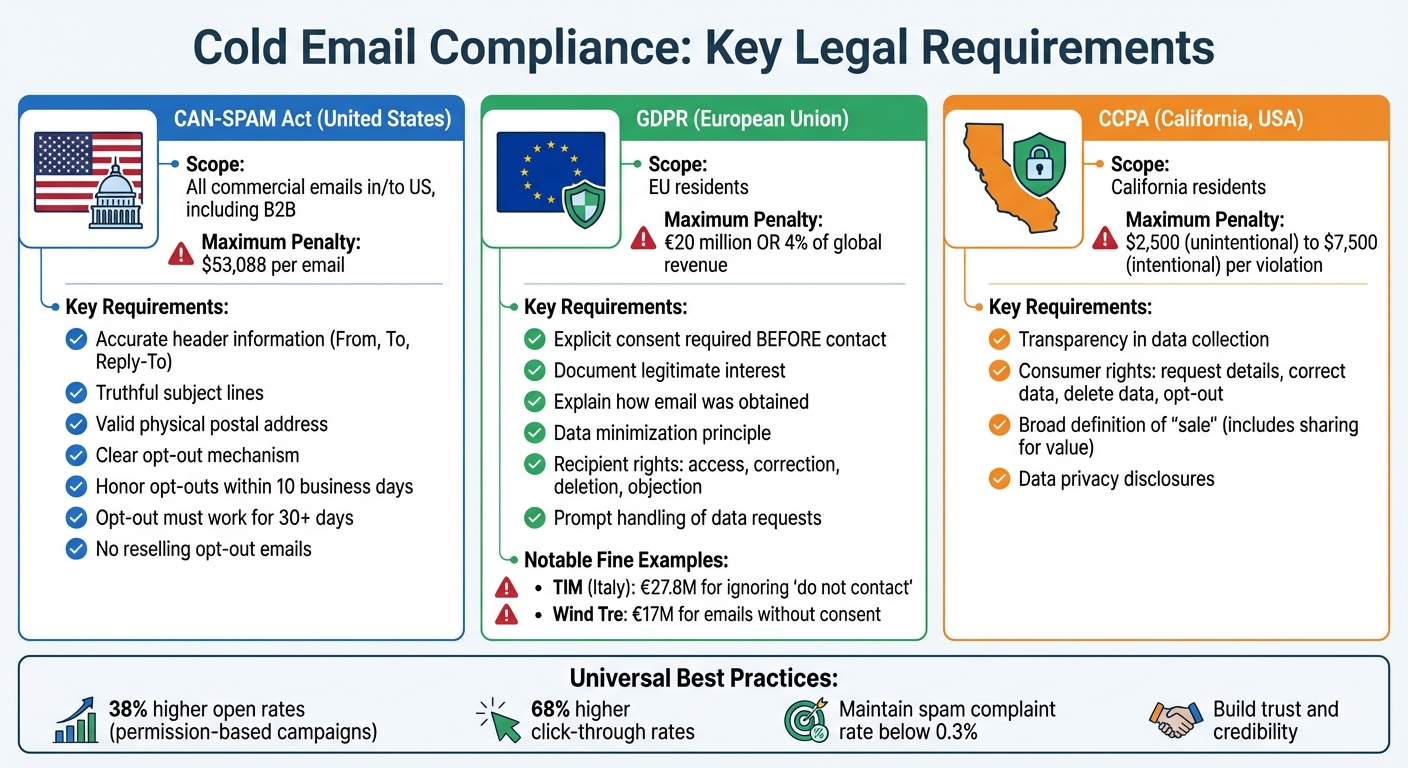
Cold Email Compliance: CAN-SPAM vs GDPR vs CCPA Requirements Comparison
Navigating the legal landscape for cold email outreach is crucial to avoid penalties and maintain trust. In the United States, the CAN-SPAM Act sets the rules for commercial emails. The European Union’s GDPR requires an opt-in approach, while California’s CCPA gives residents more control over their personal data. Let’s break down the key points of each regulation.
CAN-SPAM Act Requirements
The CAN-SPAM Act applies to all commercial emails sent within or to the United States, including business-to-business (B2B) communications. According to the Federal Trade Commission:
"The law makes no exception for business-to-business email. That means all email – for example, a message to former customers announcing a new product line – must comply with the law".
Here’s what the law requires:
- Accurate Header Information: The "From", "To", and "Reply-To" fields must clearly identify the sender.
- Truthful Subject Lines: Avoid misleading or clickbait subject lines; they must reflect the email’s content.
- Physical Address: Include a valid postal address, which could be a street address, P.O. Box, or a registered private mailbox.
- Opt-Out Mechanism: Every email must provide a clear way for recipients to unsubscribe. Opt-out requests must be honored within 10 business days, and the opt-out option must remain functional for at least 30 days after the email is sent.
- No Reselling of Opt-Out Emails: Once someone opts out, their email address cannot be sold or transferred, except to a service provider assisting with compliance.
GDPR Consent and Data Protection Rules
Unlike the CAN-SPAM Act, GDPR requires explicit consent before you can email EU residents. This means you need clear permission or a documented legitimate interest to contact someone. Additionally, you must explain how you obtained their email and only collect essential personal data. As Dan Vanrenen, Managing Director at Taskeater, notes:
"Under the GDPR, the personal data you collect should be adequate and relevant to the purpose of its processing (Principle c: Data Minimisation)".
Recipients under GDPR have several rights, including:
- Accessing their personal data.
- Correcting inaccuracies.
- Requesting data deletion.
- Objecting to data processing.
Your systems must be equipped to handle these requests promptly. Non-compliance can lead to severe penalties. For instance, in 2020, Italian telecom provider TIM was fined €27.8 million for ignoring "do not contact" requests and processing data without valid consent. Similarly, Wind Tre faced a €17 million fine for sending marketing emails without proper consent.
CCPA Privacy Rights for US Recipients
The California Consumer Privacy Act (CCPA) focuses on transparency and consumer control over personal data, including email addresses. California residents have the right to:
- Request details about their data.
- Correct or delete their information.
- Opt out of data sharing.
As Iga Wójtowicz explains:
"The CCPA defines ‘sale’ broadly – it includes sharing data with third parties in exchange for value, not just monetary transactions".
Violations of the CCPA can result in fines ranging from $2,500 for unintentional violations to $7,500 for intentional ones. Beyond avoiding penalties, compliance is essential for building trust, especially since nearly half of consumers have switched companies over concerns about data policies.
How to Write Compliant Cold Email Content
Creating cold emails that not only comply with legal standards but also build trust and encourage engagement is essential. By adhering to legal requirements like those outlined in the CAN-SPAM Act, you can ensure your emails meet compliance standards while fostering better connections with your audience. Let’s break down how to handle key elements like sender details, subject lines, and unsubscribe options.
Include Sender Information and Physical Address
Transparency starts with identifying yourself properly in the "From", "To", and "Reply-To" fields. This step isn’t just about following the law – it’s about building credibility. Avoid using fake names or email addresses, as they harm both your reputation and your compliance standing.
Every email must also include a valid physical postal address. This could be a street address, a P.O. Box, or a registered private mailbox. Most businesses include this information in the email footer or signature, keeping it accessible without cluttering the main message.
Here’s why compliance pays off: campaigns that are permission-based see 38% higher open rates and 68% higher click-through rates compared to those that aren’t.
Write Honest and Clear Subject Lines
Once sender information is in place, the next step is crafting subject lines that are both clear and honest. Your subject line should give recipients an accurate idea of what the email contains. Misleading or deceptive subject lines are not only bad practice but also explicitly prohibited by the CAN-SPAM Act.
Avoid clickbait tactics and ensure there’s a logical connection between the subject line and the email body. This helps reduce spam complaints and keeps you on the right side of the law.
Jeremy Chatelaine, Founder of QuickMail, emphasizes this point:
"The subject line is your first impression, and its clarity is key to establishing a trustworthy relationship with your recipients. Ensure your subject lines precisely reflect the content of your email".
The numbers back this up: 47% of recipients decide whether to open an email based solely on the subject line. To make your subject lines more inviting, write them in sentence case or lowercase for a conversational tone. Personalization also makes a difference – emails with personalized subject lines are 22% more likely to be opened.
Provide Unsubscribe Options and Handle Opt-Outs
Every commercial email must include a clear and simple way for recipients to opt out of future messages. Under the law, unsubscribe mechanisms must remain functional for at least 30 days after the email is sent, and opt-out requests must be processed within 10 business days.
To make it easy for recipients, place the unsubscribe link in the email footer and label it clearly, such as "Unsubscribe". A one-click unsubscribe option is ideal, but if you use text-based methods, keep the instructions straightforward. For example, a line like "P.S. Reply with ‘Stop’ if you’d prefer I don’t contact you again" adds a conversational touch while giving recipients control.
Never make it difficult for people to unsubscribe. Complicated processes or broken links can lead to compliance risks, including penalties as high as €20 million or 4% of global revenue under GDPR. Major email providers like Gmail and Yahoo also favor simple, one-click unsubscribe processes.
Finally, maintain a suppression list to ensure you don’t contact anyone who has opted out. Once someone unsubscribes, their email address cannot be sold, transferred, or reused – except by a service provider helping you stay compliant.
How to Avoid Spam Triggers in Email Copy
Ensuring your emails land in the inbox – not the spam folder – requires more than just following legal guidelines. Modern spam filters analyze the overall intent and context of your email, rather than just scanning for specific "spammy" keywords. To improve deliverability, your emails should feel like genuine, one-on-one conversations rather than generic marketing blasts. Let’s dive into the key triggers to avoid and how to craft emails that pass these filters.
Words and Phrases That Trigger Spam Filters
Certain words and phrases can make your email look like promotional content to spam filters. Phrases such as "Act now", "Risk-free", "Guarantee", "Winner", or "No cost" are red flags. Over-the-top formatting – like excessive bold text, all-caps, multiple colors, or repeated exclamation marks – can also raise suspicion. Even emojis, when overused, can hurt your email’s chances of getting through.
Another important factor is the balance of text and images. A good rule of thumb is to maintain a 95/5 text-to-image ratio, which helps your email look more natural and less like a flashy promotion.
Your subject line matters, too. Avoid misleading subject lines designed to mimic ongoing conversations. Tricks like these not only increase the likelihood of being flagged as spam but also damage your sender reputation over time.
As Sujan Patel, Founder of Mailshake, explains:
"If your email reads like it was generated by a machine, it likely was, and both the AI filter and the human recipient will discount its value."
Personalize Emails Without Misleading Recipients
Personalization goes beyond just using a recipient’s name. To truly connect, reference specific details such as a recent project, a podcast they appeared on, or a company announcement. This shows you’ve done your homework and adds relevance to your message.
Kyle Coleman, CMO of Copy.ai, emphasizes this point:
"The word ‘personalization’ is the most overused word in all of sales. I’d like to take this opportunity to change it to ‘Relevance in the first line.’"
Data backs this up: multi-point personalization – mentioning role-specific challenges and recent achievements – can increase reply rates by 142% and improve call-to-action (CTA) performance by 202%. Keep your emails brief and conversational, with an ideal length of around 144 words. Instead of pushing for a lengthy demo right away, use low-pressure CTAs like, "Is this something your team is currently focused on?" or "Mind if I send over a one-pager with more details?" These approaches feel less intrusive and encourage engagement.
Finally, how you handle links and attachments can make or break your email’s deliverability.
Use Links and Attachments Safely
Links and attachments are common spam triggers, so they require careful consideration. Public URL shorteners like bit.ly or tinyurl are often flagged by spam filters because they obscure the destination of the link. Instead, use full, direct HTTPS links that are easy for both recipients and filters to verify.
"Stay away from public URL shorteners like bit.ly or tinyurl like the plague. Spam filters are immediately suspicious of them because they hide the final destination of the link." – InboxKit
Limit your email to one relevant link. Instead of displaying raw URLs or generic phrases like "Click here", use natural language for hyperlinks, such as "Read the case study."
Attachments are another common issue. Avoid including them in your initial outreach emails, as they can trigger malware filters. Instead, ask for permission to send additional information, such as, "Mind if I send over a one-pager with more details?" This not only improves your sender reputation but also builds trust with your recipient.
For enhanced deliverability, consider setting up a custom tracking domain (e.g., track.yourcompany.com) through a CNAME record in your DNS settings. Shared tracking links are used by many senders, and if one of them gets flagged, it can hurt your reputation. A custom domain isolates your sender reputation, giving you greater control.
| Link/Attachment Element | Risk Level | Best Practice Alternative |
|---|---|---|
| Public URL Shorteners | High | Use full, direct URLs |
| HTML Buttons | Medium | Use plain-text hyperlinks |
| Shared Tracking Links | Medium | Use a custom tracking domain |
| File Attachments | High | Ask permission first |
| Multiple Links | Medium | Include only one relevant link |
Major providers like Google and Yahoo require bulk senders to maintain a spam complaint rate below 0.3%. Every detail of your email – from the words you use to how you format links – affects both your compliance and your ability to connect with your audience. By focusing on these best practices, you can improve both deliverability and engagement.
sbb-itb-36f7bf9
Email Infrastructure for Compliance and Deliverability
To ensure your cold emails not only adhere to regulations but also make it to recipients’ inboxes, having a solid technical setup is non-negotiable. Even the most thoughtfully written email won’t succeed without the right back-end configuration. Your email infrastructure – covering domains, authentication, and mailboxes – plays a key role in determining whether your messages are delivered or filtered out. Let’s break down the authentication protocols that form the backbone of this setup.
Domain Authentication Protocols
Authentication protocols are like your email’s ID card – they prove your messages are legitimate. Here’s how the three key protocols work:
- SPF (Sender Policy Framework): This defines which IP addresses are authorized to send emails on behalf of your domain.
- DKIM (DomainKeys Identified Mail): It adds a cryptographic signature to your email, ensuring the message hasn’t been tampered with.
- DMARC (Domain-based Message Authentication, Reporting, and Conformance): This unifies SPF and DKIM, giving instructions to email servers on how to handle messages that fail authentication checks.
Ziemek Bućko, Cold Email Evangelist at Hunter.io, highlights their importance:
"SPF, DKIM, and DMARC boost your deliverability before your message is even analyzed."
Without these protocols, sending an email is like mailing a letter without a return address – your message is likely to get lost. Gmail, for instance, blocks 99.9% of spam before it even reaches users, and authentication is the first hurdle your email must clear. By 2024, providers like Google and Yahoo have made SPF, DKIM, and DMARC configurations mandatory.
To start, use a DMARC policy set to p=none to monitor how your emails are treated. Over time, you can switch to p=quarantine and eventually p=reject to block fraudulent emails. Keep in mind, SPF has a limit of 10 DNS lookups; exceeding this will cause your email to fail authentication.
For cold outreach, it’s a good idea to use secondary domains (e.g., getcompany.com instead of company.com) to shield your main domain from potential blacklisting. Additionally, distribute your sending volume across multiple mailboxes, capping each at 50 emails per day to maintain a natural sending pattern.
How Zapmail Supports Compliant Email Outreach
While setting up these protocols is crucial, managing them at scale can quickly become overwhelming. That’s where Zapmail steps in. Zapmail automates the technical setup, including DNS configurations for SPF, DKIM, and DMARC, saving time and reducing errors. With over 96,000 domains and 210,000 mailboxes managed, Zapmail cuts the average setup time to just 9.2 minutes – far less than the 24–48 hours it typically takes with other providers.
One standout feature is pre-warmed mailboxes. Normally, new domains require 30–90 days of gradual email activity to build trust with ISPs. Zapmail eliminates this waiting period by providing mailboxes that are ready to use immediately, while still maintaining a strong sender reputation.
Carlos R., founder of a marketing agency, shares his experience:
"Zapmail made setting up 750 Google Workspace mailboxes super easy. Our emails are getting delivered better than ever."
Zapmail also simplifies domain isolation. By automating the creation of secondary domains for cold outreach, the platform ensures your primary domain remains unaffected. This is a critical safeguard – teams without such measures often see their deliverability rates plummet from 95% to below 50% within just a few months of scaling.
For added flexibility, Zapmail integrates with over 50 outreach tools and offers API access for businesses needing programmatic control over their email infrastructure. Whether you’re sending a handful of emails or managing campaigns for multiple clients, Zapmail removes the technical obstacles, enabling teams to stay compliant while achieving consistent deliverability. This robust infrastructure becomes the backbone of your outreach strategy, ensuring your efforts remain effective and scalable.
How to Maintain Compliance Over Time
Staying compliant isn’t a one-and-done task. It requires constant vigilance, regular audits, and adjustments as regulations, email provider policies, and your own infrastructure evolve. What worked yesterday might not cut it tomorrow.
Track Recipient Complaints and Engagement Metrics
A solid email infrastructure is just the start. To maintain compliance, you need to keep a close eye on how recipients respond to your emails. Engagement metrics like spam complaints and open rates reveal how your emails are being received – not just by your audience but by providers like Google and Yahoo as well. These providers enforce a strict spam complaint rate threshold of 0.3%, meaning no more than three complaints per 1,000 emails sent. Exceed that, and your messages may get blocked at the server level.
Tools like Google Postmaster Tools can help you monitor your domain reputation and complaint rates. Keep an eye out for sudden dips in open or click-through rates – these can be red flags that your emails are landing in spam folders. Compliant campaigns, on average, perform much better, with 38% higher open rates and 68% higher click-through rates compared to non-compliant ones.
Automating opt-out management is another critical step. Unsubscribe requests should be handled instantly – tagging contacts as “do not contact” and maintaining a suppression list to check against before every campaign.
It’s also smart to have a "kill switch" protocol in place. If your domain reputation takes a hit or you find your IP blacklisted, pause all campaigns immediately to limit further damage.
Conduct Regular Compliance Audits
Compliance audits are your safety net. Schedule them at least once a year, but if you’re a high-volume sender or handle sensitive data, consider doing them every 3–6 months. These audits help you stay ahead of regulatory updates and resolve any issues before they affect your email deliverability.
Focus on key areas during your audits: consent methods, opt-out processes, data storage practices, and authentication protocols like SPF, DKIM, and DMARC. Email lists also need attention. Addresses decay quickly – what was valid a few months ago could now be a hard bounce or even a spam trap. Always verify your lists before launching a campaign.
Bruce Merrill, a compliance expert, puts it into perspective:
"Email rules are about to get stricter, and the stakes have never been higher. Non-compliance with CAN-SPAM or GDPR can hit your business with fines as high as $43,792 per email or up to €20 million in the EU."
Stay informed about regulatory updates. For CAN-SPAM, follow the Federal Trade Commission, and for GDPR, monitor announcements from EU data protection authorities. Starting in 2024, authentication protocols like SPF, DKIM, and DMARC are no longer optional – they’re mandatory for bulk senders. By weaving these auditing practices into your overall email strategy, you can ensure that compliance remains a cornerstone of your outreach efforts.
Conclusion
Following regulations like CAN-SPAM, GDPR, and CCPA is the backbone of effective cold email outreach. These laws aren’t just legal requirements – they help establish trust with recipients and signal to email providers that you’re a credible sender. This trust translates into better engagement rates and keeps you clear of hefty penalties, which can reach up to $53,088 per email or €20 million.
But compliance alone isn’t enough. Your technical setup plays a huge role too. Using authentication protocols like SPF, DKIM, and DMARC not only confirms your legitimacy as a sender but also helps you navigate AI-driven spam filters. These filters evaluate everything from your email’s intent to its sending patterns, ensuring genuine outreach stands apart from spam.
The challenge is putting these principles into practice. That’s where tools like Zapmail come in. By automating complex tasks like domain setup, DNS configuration, and authentication, Zapmail simplifies the process from day one. Features like pre-warmed mailboxes and domain isolation let you focus on creating personalized, meaningful emails, while the platform takes care of the technical heavy lifting.
Don’t forget to keep an eye on complaint rates, verify your email lists before every campaign, and conduct regular compliance audits. Staying compliant isn’t a one-and-done deal – it’s an ongoing effort that ensures your emails reach the right inboxes, foster engagement, and drive long-term success.
FAQs
What are the main differences between CAN-SPAM, GDPR, and CCPA for cold email compliance?
The CAN-SPAM Act in the U.S. is an opt-out regulation designed to promote transparency in email communication. It requires clear identification of the sender, truthful subject lines, and a working unsubscribe link in every email. The goal is to make it simple for recipients to opt out of future messages.
The GDPR, enforced in the EU, takes a stricter approach by requiring explicit opt-in consent before sending emails. It also demands transparency regarding the use of personal data and grants individuals the right to access, correct, or delete their information.
The CCPA, applicable in California, prioritizes data privacy by requiring businesses to disclose how they collect and use personal information. It empowers consumers with the right to access, delete, or opt out of the sale or sharing of their data. Unlike GDPR, it does not require opt-in consent but focuses on providing clear privacy options and disclosures.
What are the best practices to ensure my cold emails are compliant and avoid spam filters?
To ensure your cold emails land in inboxes and stay compliant with regulations, stick to these essential practices:
- Authenticate your emails using protocols like SPF, DKIM, and DMARC to build sender credibility.
- Send from a trusted, pre-warmed mailbox, such as those offered by Zapmail, to boost deliverability rates.
- Write clear, personalized messages with honest subject lines and body content that resonates with recipients.
- Always include a physical address and an easy-to-spot unsubscribe option to meet legal requirements.
- Steer clear of purchased or scraped email lists – stick with permission-based contacts who’ve opted in.
Following these steps not only keeps you compliant with laws like CAN-SPAM and GDPR but also increases the likelihood of your emails being well-received.
How can I ensure my cold emails remain compliant with regulations over time?
To ensure compliance, make sure your domain is properly authenticated using SPF, DKIM, and DMARC protocols. Use professional, pre-warmed mailboxes for your email outreach efforts. Always send emails to verified, permission-based lists, and include a clear opt-out link in every email. If someone chooses to unsubscribe, honor their request promptly. Additionally, provide accurate sender details, such as your name and a valid physical address, and keep thorough records of your data sources to confirm proper consent where it’s required.
It’s also essential to regularly review your deliverability metrics and campaign performance. This helps you stay aligned with regulations like CAN-SPAM, GDPR, and CCPA. Following these steps not only ensures compliance but also safeguards your email reputation.