Personalizing cold emails at scale is no longer a trade-off between quality and quantity. AI now makes it possible to send hyper-targeted messages that feel personal while reaching thousands of prospects.
Here’s what you need to know:
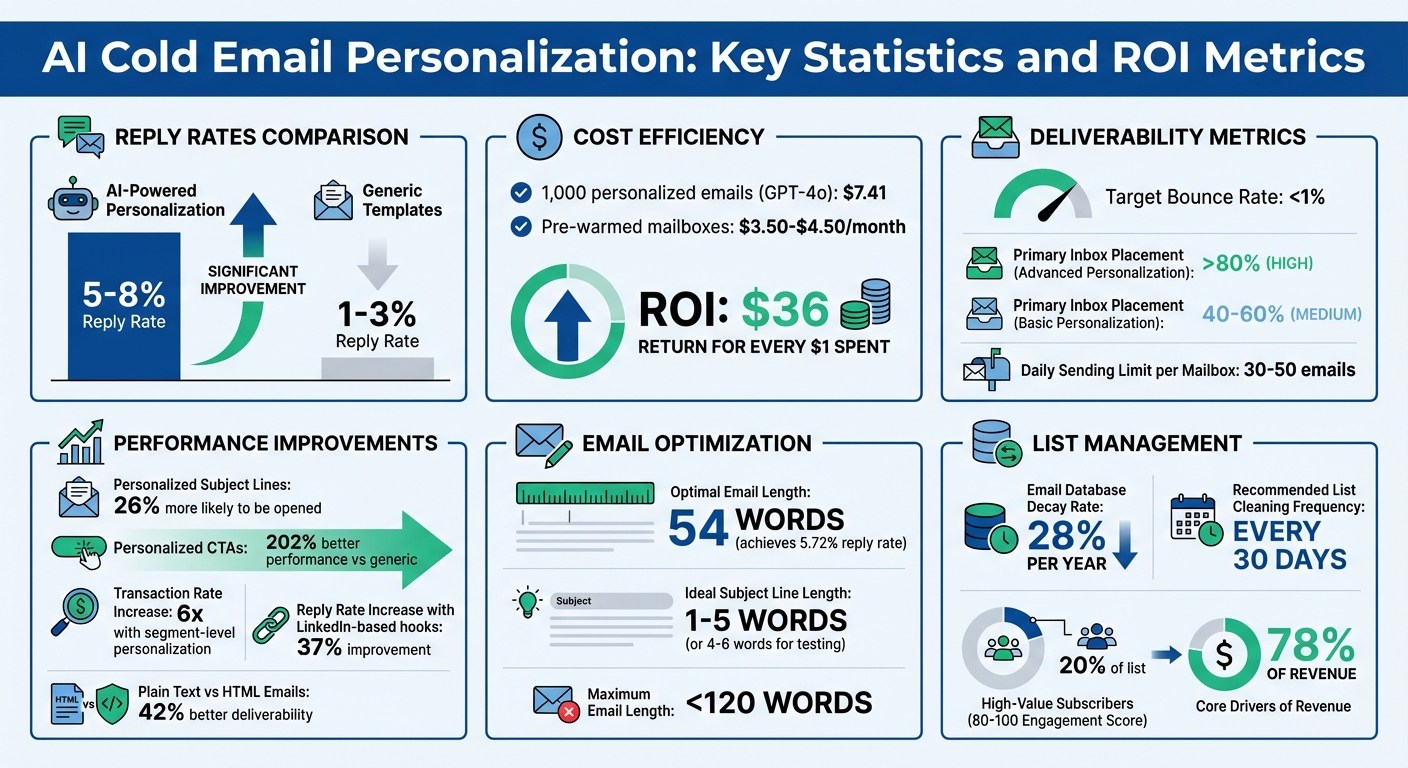
- AI-driven personalization boosts reply rates: Campaigns using AI can achieve reply rates of 5–8%, compared to 1–3% with generic templates.
- Key to success: High-quality, verified data (e.g., LinkedIn activity, company milestones, hiring signals) combined with a strong email setup (SPF, DKIM, DMARC).
- Cost-effective scaling: Generating 1,000 personalized emails costs about $7.41 using tools like GPT-4o. Pre-warmed mailboxes cost $3.50–$4.50/month.
- Deliverability matters: Rotate mailboxes, warm domains, and use spin syntax to avoid spam filters and maintain strong sender reputation.
- AI tools streamline the process: Platforms like Zapmail automate email infrastructure, while tools like Clay and Apollo enrich lead data for personalization.
AI can craft tailored content that references specific details like LinkedIn posts or company news, making emails feel highly relevant. By combining automation with human oversight, you can scale outreach without sacrificing effectiveness.
This guide covers how to integrate AI into your cold email strategy, from sourcing data to maintaining deliverability and scaling campaigns effectively.
AI Cold Email Personalization: Key Statistics and ROI Metrics
I Deep Personalized 1000+ Cold Emails Using THIS AI System – FREE DOWNLOAD
Core Requirements for AI Personalization
To make the most of AI personalization, you need a solid foundation of high-quality data and a reliable technical setup. If your data is outdated, your systems are flawed, or your infrastructure can’t handle the load, even the smartest AI won’t deliver the results you’re aiming for.
Here’s what you need to get AI personalization working effectively.
Where to Source Personalization Data
The backbone of AI personalization is enriched, verified data. Basic details like names and email addresses aren’t enough. To create meaningful, personalized interactions, you’ll need LinkedIn profile data (like recent posts and job responsibilities), company milestones (such as funding rounds or product launches), technographic data (like their current tech stack), and even job board activity that hints at potential challenges they’re facing.
You can gather this information from trusted B2B databases like LinkedIn Sales Navigator, Apollo, or ZoomInfo. For added depth, combine these with manual research from company websites and news outlets. The goal? Arm your AI with enough context to craft messages that feel genuinely relevant and personalized.
Also, don’t underestimate the importance of email verification. Invalid email addresses lead to high bounce rates, which can damage your sender reputation. Aim to keep your bounce rate under 1% by using verification tools. Regularly clean your email lists – removing duplicates and outdated records every 30 days – to maintain a strong sender reputation. Once your data is verified, ensure your technical setup can deliver those emails effectively.
Technical Setup for Email Deliverability
Even the best personalization efforts fall flat if your emails don’t make it to the inbox. Start by setting up proper email authentication through SPF, DKIM, and DMARC records. These ensure your emails are recognized as legitimate. To protect your main domain from potential blacklisting, use secondary domains for outreach.
New domains and mailboxes need a warm-up period of 14 to 30 days. During this time, send low volumes of emails to engaged recipients to build a strong sender reputation.
"In 2025, deliverability is more about precision than creativity." – Vicky Antonenkova, Primeforge
Stick to volume limits – no more than 30 to 50 cold emails per mailbox per day. If you’re targeting 1,000 prospects daily, you’ll need 20 to 30 mailboxes to distribute the workload and avoid triggering spam filters. A well-configured deliverability setup lays the groundwork for automated AI tools to shine.
AI Tools and Infrastructure
For AI personalization to scale, you need a strong infrastructure that can handle research, create unique content, and manage multiple mailboxes without constant manual input.
Content uniqueness is critical. Advanced AI systems use spin syntax (e.g., {{RANDOM|Hi|Hello|Hey}}) to generate varied email content. This approach helps bypass ISP filters that flag repetitive emails, boosting primary inbox placement rates to over 80%, compared to 40–60% with basic personalization.
Managing pre-warmed mailboxes and email infrastructure can be streamlined with tools like Zapmail (https://zapmail.ai). Zapmail offers pre-warmed Google and Microsoft mailboxes, automated DNS configuration (SPF, DKIM, DMARC), domain isolation, and integrations with over 50 outreach platforms. This means your technical setup is ready to go, allowing you to focus on crafting personalized messages instead of wrestling with deliverability issues.
AI personalization is surprisingly affordable. For instance, generating 1,000 personalized emails using GPT-4o costs about $7.41. Pre-configured mailboxes cost around $3.50 to $4.50 per month. The real investment lies in maintaining high-quality data and a strong sender reputation to ensure long-term success.
How to Create AI-Personalized Cold Emails
Once you’ve set up verified data and ensured strong email deliverability, the next step is crafting personalized cold emails using AI. The trick? Provide clear instructions, personalize key details, and continually refine your approach for better results.
Writing Effective AI Prompts
The quality of what you get from AI depends entirely on the clarity of your prompts. Think of AI as an intern – it needs specific, well-defined directions.
Start with a structured prompt that outlines your target audience, the value you’re offering, a relevant case study, and the purpose of your outreach. For example: "You’re writing to SaaS founders who recently hired a senior engineer. Our tool cuts onboarding time by 40%. Mention this case study and reference their recent LinkedIn post about scaling challenges."
Instead of asking AI to draft the entire email, use "complete my sentence" prompts. For instance, start with "I noticed your recent post about…" and let the AI finish based on specific inputs like a LinkedIn update or company news. This gives you more control over tone and structure.
Set clear boundaries in your prompts. Ask the AI to use simple, conversational language with contractions. Keep subject lines to 1–5 words and email bodies concise – around 54 words. Avoid marketing buzzwords; your emails should feel like they’re written by a peer, not a sales bot.
For more reliable outputs, use multiple-choice prompts. For example, provide a list of case studies or pain points and ask the AI to pick the most relevant one for the recipient. This minimizes errors and ensures your messaging stays on-brand.
With these strategies, you can guide AI to create tailored subject lines, openings, and calls-to-action (CTAs) that resonate with your audience.
Personalizing Subject Lines, Openings, and CTAs
Every part of your email plays a role, and AI can help you customize each one using recipient-specific data.
Subject lines should be short and intriguing – 1–5 words is ideal. Personalized subject lines are 26% more likely to be opened. Use AI to include details like the recipient’s name, company, or recent achievements. Examples: "Quick question, [FirstName]" or "[CompanyName] + [YourProduct]."
The opening hook is where personalization makes the biggest impact. Reference something specific about the recipient, like a LinkedIn post, a company milestone, or a recent job listing. Emails with hooks based on LinkedIn insights or hiring signals can see reply rates jump by 37%. For example: "Congrats on hiring a VP of Sales – I can see your team is growing fast!"
When it comes to your CTA, focus on sparking interest rather than locking in a meeting time. Phrases like "Would you like to learn more?" or "Does this sound relevant to you?" work better than rigid requests. Personalized CTAs perform 202% better than generic ones. Keep the email body focused on one key pain point and under 100 words. A 54-word email has been shown to achieve a 5.72% reply rate. Use AI to align your value proposition with the recipient’s industry or role – like sharing a healthcare case study with a hospital executive or a SaaS example with a tech lead.
Testing and Refining Email Content
Once your emails are crafted, testing is crucial to ensure they’re effective. Start with A/B testing, changing one variable at a time – whether it’s the subject line, opening hook, or CTA – to see what performs best. Test on at least 1,000 contacts per variation to get meaningful results.
"The best-performing email campaigns aren’t built on intuition – they’re built on data. A/B testing removes the guesswork by letting teams compare real audience behavior." – Chaviva Gordon-Bennett
Check inbox placement to see if your emails land in the primary inbox, promotions tab, or spam folder. Tools like Instantly can help monitor this using seed accounts. If emails start going to spam, review your authentication settings (SPF, DKIM, DMARC) and consider lowering your sending volume.
Always review AI-generated emails before sending them at scale. Look for unnatural phrasing, formatting errors, or missing details. Use fallback values (e.g., {{firstName|there}}) to ensure the email reads smoothly, even if data is incomplete. Tools like Clay can help fix formatting issues automatically, such as ensuring sentences end properly.
Between June and August 2024, People HR used Reply.io‘s AI SDR to automate outreach to SaaS founders. By tailoring messages based on hiring signals, they secured over 100 meetings and generated $15,000 in new revenue in just three months.
For better deliverability, consider using spin syntax (discussed earlier in the AI Tools and Infrastructure section) to create content variations that bypass ISP filters.
sbb-itb-36f7bf9
Scaling Personalization to Large Campaigns
Once you’ve nailed personalized emails for small batches, the next step is expanding that approach to larger campaigns. The key? Automate your research and content creation while keeping the human element intact.
Automating Lead Research and Email Generation
Scaling personalization effectively means blending automation with a personal touch. A solid strategy involves four key phases: segmenting your lead list, enriching data with AI tools, assembling messages, and executing campaigns with quality checks in place.
Start by grouping your leads into tiers based on their potential value. For Tier 1 (top prospects like VIPs or dream clients), dedicate 10–15 minutes of in-depth research per email. Tier 2 (promising leads) might get 3–5 minutes of AI-assisted research, while Tier 3 (broad outreach) relies on segment-level personalization with a single customized detail.
"The goal isn’t to make your emails sound like they were written by AI, but to use AI so skillfully that recipients believe you spent hours crafting a message just for them." – Uroš Gazvoda, Founder of WriteMail.ai
For data enrichment, use a waterfall approach, pulling information from tools like Clay, Apollo, or LinkedIn Sales Navigator. These can help you find details such as recent milestones, LinkedIn activity, or tech stacks – perfect for creating unique conversation starters.
Next, design modular email templates with zones for personalized snippets like openers, pain points, or CTAs. AI can help clean up raw data (e.g., shortening "Amazon.com, Inc." to "Amazon" or simplifying job titles) to make your emails sound natural and approachable.
To ensure quality, implement spot-checking protocols. Reviewing a random sample – about 5% – of AI-generated emails before sending helps maintain a high standard.
With these systems in place, you can decide how much personalization each lead segment needs.
Segment-Level vs. Individual-Level Personalization
Scaling personalized outreach means balancing segment-level and individual-level tactics, depending on your lead segmentation and research framework.
For campaigns targeting hundreds or even thousands of prospects, segment-level personalization works best. This method customizes emails based on shared traits like industry, role, or company size. For example, SaaS founders might all receive a message about reducing churn, with AI adding their company name and industry-specific pain points. This approach can increase transaction rates by up to six times compared to generic emails.
Individual-level personalization, on the other hand, is reserved for high-value leads. These emails include unique details, such as referencing a recent LinkedIn post, a funding announcement, or a specific job listing. While it requires more time, this strategy can boost reply rates by 3–6 times versus generic templates.
A tiered approach helps you allocate resources wisely: focus deep research on Tier 1, use moderate AI assistance for Tier 2, and apply segment-level personalization for Tier 3. This way, you can engage a broad audience without sacrificing quality where it matters most.
Infrastructure for Large-Scale Operations
Scaling up isn’t just about personalization – it also requires a strong operational setup. For large campaigns, such as sending 1,000 emails daily, distribute your sends across 20–30 mailboxes. This limits each account to 30–50 emails per day, reducing the risk of being flagged as spam.
To protect your primary business domain, use secondary domains (e.g., those ending in .co, .net, or .org). Authenticate these domains with SPF, DKIM, and DMARC protocols, and warm them up over 14–30 days before launching any campaigns.
For agencies managing multiple clients, scalable workspace solutions are essential. Tools like Zapmail provide pre-warmed Google and Microsoft mailboxes, automated DNS setup, and workspace-level domain isolation. They also integrate with over 50 outreach platforms, making it easy to launch new campaigns without technical headaches.
Zapmail offers flexible pricing:
- Starter: $39/month for 10 mailboxes
- Growth: $99/month for 30 mailboxes
- Pro: $299/month for 100 mailboxes with API access
Additional mailboxes cost $3.00–$3.50 each.
Finally, use spin syntax (e.g., {{RANDOM|Hi|Hello|Hey}}) to vary greetings, value propositions, and CTAs. This ensures each email feels unique, boosting inbox placement rates to over 80% and reply rates to 5–8% or more. By combining these strategies with robust infrastructure, you can scale your campaigns without losing effectiveness.
Tracking Performance and Maintaining Deliverability
Creating AI-personalized campaigns is only half the battle – ensuring those emails actually reach your audience is just as important. Keeping an eye on key metrics and safeguarding your sender reputation is essential for successful email campaigns.
Metrics That Matter for Personalized Emails
When it comes to personalized emails, certain metrics can tell you how well your campaigns are performing. For instance, reply rates can jump to 5–8% with advanced AI personalization, compared to just 1–3% with basic methods. Bounce rates are another critical metric – aim for less than 1%, as anything above 2% indicates serious issues with your email list quality. Click-through rates (CTR) and unsubscribe rates also give you insight into how well your messages are resonating with recipients.
Deliverability metrics are equally important. Track inbox placement rates across providers like Gmail, Outlook, and Yahoo. Advanced personalization techniques can push primary inbox placement above 80%, while generic templates often struggle at 40–60%. Make it a habit to verify your sender reputation and ensure proper email authentication.
Some platforms now offer predictive engagement scores (ranging from 0 to 100), which estimate the likelihood of opens and conversions. Interestingly, subscribers scoring between 80 and 100 often account for 78% of email revenue, even though they make up just 20% of your list. These metrics are vital for maintaining a strong sender reputation, which we’ll explore next.
Protecting Sender Reputation
Did you know that 87% of senders skip inbox placement tests? That’s a risky move. To protect your sender reputation, test your emails with seed accounts across major providers to ensure they land in the primary inbox.
Regularly check blacklists using tools like MXToolbox or Spamhaus. Keep spam complaint rates low – Gmail and Yahoo flag rates above 0.3% as problematic, so aim to stay under 0.1%.
"Landing in spam kills more deals than bad copy ever did." – ReachInbox
To avoid spam flags, maintain daily sending limits and distribute emails across multiple mailboxes. Using secondary domains can also shield your primary business domain from potential issues.
Platforms like Zapmail simplify the technical side of email campaigns. For example, their Starter plan (priced at $39/month) includes automated DNS setup, domain isolation, and pre-warmed mailboxes, freeing you to focus on campaign performance rather than infrastructure.
Don’t forget to clean your email lists regularly – every 30 days is a good rule of thumb. Email databases decay by about 28% each year, so regular verification helps prevent damaging bounces.
Once your sender reputation is secure, you can dive into performance data to refine your campaigns further.
Using Data to Improve Future Campaigns
Your data holds the key to better email performance. Analyze what types of personalization lead to the best engagement. For instance, does referencing a LinkedIn post get better results than mentioning a recent funding announcement? Does addressing industry-specific challenges outperform broader segmentation by company size? Testing these elements can reveal what works best.
Subject lines and email length also matter. Test subject lines with 4–6 words and keep emails under 120 words to improve engagement. Another tip: try plain text emails instead of HTML. Plain text often outperforms HTML by 42% in both deliverability and engagement.
Implement a sunset policy to remove unengaged subscribers. Removing contacts who haven’t opened or replied in 30–60 days helps maintain strong engagement signals and protects your sender reputation.
If you’re using multiple mailboxes, monitor warmup health scores. A score above 90 indicates a strong reputation, while anything below 85 suggests you should pause campaigns and address any technical issues.
Lastly, review AI-generated content for errors or awkward phrasing that could lead to spam complaints. A quick human review of sample emails, combined with ongoing monitoring, can catch issues that automated tools might miss. By pairing this data-driven approach with a solid technical foundation, you’ll set yourself up for email success.
Conclusion
AI has redefined the way cold email personalization works, turning it from a numbers game into a strategy focused on meaningful engagement. By leveraging clean data, scalable workflows, and consistent performance tracking, businesses can see reply rates jump to 5–8%, compared to the usual 1–3% with basic personalization techniques.
The process starts with high-quality, enriched data. AI then takes over to create tailored content, schedule emails at optimal times, and rotate mailboxes to maintain sender reputation. This approach has been shown to increase transaction rates by as much as six times and achieve open rates as high as 90%.
As Maria Akhter from Outreach puts it:
"Traditional cold outreach forces a trade-off – quality or quantity, but AI-powered cold outreach neutralizes the equation."
Ensuring your emails reach the inbox is just as critical. Tools like Zapmail streamline essential tasks such as DNS setup, mailbox rotation, and reputation checks. Features like automated DNS configuration and pre-warmed mailboxes, starting at $39 per month, make campaign management far more efficient.
However, AI isn’t a set-it-and-forget-it solution. Human oversight is crucial to fine-tune its performance. Regularly review AI-generated content, experiment with different personalization strategies, and analyze data to improve your approach. When executed effectively, AI-powered campaigns can deliver an impressive return on investment – up to $36 for every $1 spent.
FAQs
How can AI increase reply rates in cold email campaigns?
AI can significantly improve reply rates in cold email campaigns by creating personalized messages that resonate with each recipient. By examining details like job roles, industries, or prior interactions, AI crafts content that feels tailored and relevant, increasing the likelihood of a response.
On top of that, AI tools excel at refining elements like subject lines, email copy, and call-to-action phrases. By testing and fine-tuning these components, AI ensures emails are more compelling and effective. This targeted, data-driven strategy often outperforms generic emails, driving better engagement overall.
What type of data is needed to personalize cold emails using AI?
To write personalized cold emails using AI, you need to start with accurate and detailed data about your prospects. Begin by gathering firmographic and demographic information, such as the company’s size, industry, location, job title, and seniority level. This sets the stage for a targeted outreach. Next, incorporate behavioral and intent signals – think recent news about the company, product launches, or even website visits. These details help make your emails timely and relevant.
Don’t stop there. Adding technographic insights, like the tools they use or challenges they face in their market, along with any known pain points, allows the AI to propose solutions that resonate. And, of course, make sure your contact data is clean and verified. This includes having proper deliverability settings in place – like SPF, DKIM, and DMARC alignment – to ensure your emails land in the inbox, not the spam folder.
By layering these data points, your AI can create emails that feel personal and engaging. Plus, with delivery tools like Zapmail, scaling this process becomes seamless.
How can I make sure my AI-generated cold emails don’t end up in spam?
To ensure your AI-generated cold emails land in inboxes rather than spam folders, start by setting up proper email authentication. This includes configuring SPF, DKIM, and DMARC records, which help verify your emails’ legitimacy. Gradually warm up your domain and email accounts to establish trust and credibility over time. Always use clean, permission-based prospect lists to avoid targeting uninterested recipients.
Craft emails with a personal, conversational tone, steering clear of spam trigger words that might raise red flags. Regularly test your email deliverability to check how well your messages are reaching inboxes. By following these practices, you’ll boost engagement and maintain strong deliverability rates.