Cleaning your email list is the key to successful cold outreach. Why? Sending emails to outdated or invalid addresses hurts your sender reputation, inflates costs, and lands your messages in spam folders. Here’s the gist:
- Email lists degrade fast: 22-30% of addresses go inactive yearly.
- Bounce rates matter: A rate above 2% raises red flags with email providers.
- Spam complaints hurt: Just 0.1% can damage your domain’s reputation.
Steps to clean your list:
- Verify emails: Use tools to check syntax, domains, and mailbox validity.
- Manage bounces: Remove hard bounces and monitor soft bounces (3-5 strikes).
- Re-engage or remove inactives: Run win-back campaigns for disengaged contacts, then trim the list.
- Use list-cleaning tools: Paid tools like NeverBounce or ZeroBounce offer fast, accurate results.
Regular cleaning (every 3-6 months) ensures better deliverability, improved engagement, and lower costs. A clean list means fewer headaches and higher success rates for your campaigns.
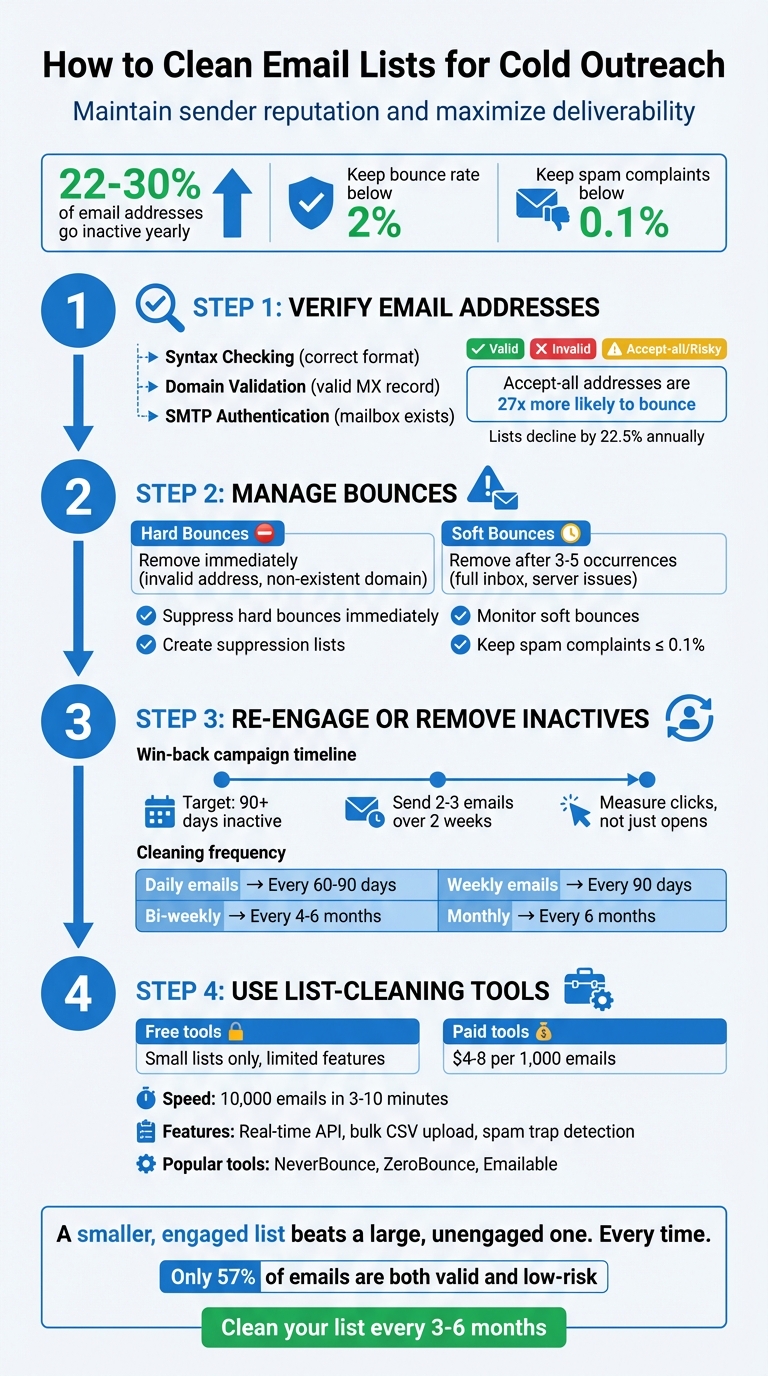
4-Step Email List Cleaning Process for Cold Outreach
How I Clean and Enrich my Leads For Free in 10 seconds
Step 1: Verify Email Addresses
Before hitting "send", take the time to verify every email address on your list. This step isn’t just about reducing bounce rates – it’s crucial for maintaining a strong sender reputation right from the start.
Email verification typically involves three key processes: syntax checking, domain validation, and SMTP authentication. Syntax checking ensures the email address follows the correct format, like "[email protected]." Domain validation confirms that the domain has a valid Mail Exchanger (MX) record, meaning the server can receive emails. Finally, SMTP authentication checks the recipient’s server to verify if the mailbox actually exists.
After verification, email addresses are usually categorized as Valid (safe to send), Invalid (nonexistent), or Accept-all/Risky (where the server accepts all emails, making it tough to confirm if the mailbox is real). Accept-all addresses are 27 times more likely to bounce. Regular verification is essential because email lists degrade over time – about 2% of data goes stale each month, and lists decline by 22.5% annually. If your email list hasn’t been verified in six months, a significant portion of it might now be inactive, putting your deliverability at risk the moment you send a campaign.
Manual Verification Methods
For smaller lists – think fewer than 50 contacts – manual verification can work. Start by checking the syntax. Email usernames can be up to 64 characters long and may include special characters like !#$%&’*+-/=?^_`{|}~. Be on the lookout for common typos, such as "gnail.com" instead of "gmail.com".
Next, use a DNS lookup tool (like MXToolbox) to check if the domain has a valid MX record. You can also use tools like Telnet to verify server responses – codes like 250 indicate a valid address, while 550 signals invalidity.
However, manual methods don’t scale well and often miss disposable email addresses, which can disappear within minutes. If your list exceeds 100 contacts, it’s time to switch to automated bulk verification tools.
Bulk Verification Tools
For larger email lists, automation is a necessity. Bulk verification tools streamline the process by checking domains against databases of disposable email providers, flagging role-based accounts (like info@ or support@), and identifying spam traps that could harm your sender reputation.
Speed is important, but accuracy is even more critical. Research involving six billion emails revealed that only 57% were both valid and low-risk. Verifying your list can help you avoid bounce rates that exceed the critical 2% threshold.
To maintain a clean email list, consider integrating real-time verification APIs into your signup forms. These tools can block disposable addresses and catch typos as users input their information. Keep in mind, verification isn’t a one-and-done task – you should scrub your email lists regularly, ideally every three to six months, to account for job changes and abandoned accounts.
Step 2: Manage Bounces and Remove Risky Contacts
Once you’ve verified your email addresses, the next step is to deal with bounces and risky contacts. This is crucial for protecting your sender reputation and ensuring your emails land in inboxes, not spam folders.
Hard Bounces vs. Soft Bounces
Hard bounces are permanent delivery failures. These happen when an email address is invalid, the domain doesn’t exist, or the recipient is unknown to the server. These contacts should be removed from your list immediately.
Soft bounces, on the other hand, are temporary. They can occur due to issues like full inboxes, server downtime, or emails that exceed size limits. Keep an eye on these. If a contact soft bounces 3–5 times in a row, it’s time to remove them.
"A hard bounce indicates a permanent error… HubSpot excludes these contacts." – HubSpot
If your hard bounce rate exceeds 2% or your overall bounce rate goes above 1%, it’s a red flag. High bounce rates suggest poor list management, which can lead to emails being marked as spam or, worse, your domain being blacklisted.
Taking these steps will help you maintain a clean list and reduce the chances of deliverability issues.
Creating Suppression Lists
A suppression list acts as your “do not contact” database. It should include the following:
- Hard bounces: Invalid email addresses or domains.
- Unsubscribes: People who’ve opted out of your emails.
- Spam complaints: Recipients who’ve flagged your content as unwanted.
- High-risk addresses: This includes role-based emails (like info@, support@, sales@) and catch-all domains that accept all emails, even if the mailbox doesn’t exist.
Here’s a quick breakdown:
| Category | Reason for Suppression | Action |
|---|---|---|
| Hard Bounces | Invalid domain or non-existent mailbox | Suppress immediately |
| Soft Bounces | Temporary issues (e.g., full inbox, server down) | Suppress after 3–5 occurrences |
| Spam Complaints | Recipient marked email as unwanted | Suppress immediately |
| Role-Based | High risk of complaints (e.g., info@, sales@) | Quarantine or suppress accordingly |
Automate suppression for unsubscribes, hard bounces, and spam complaints. Aim to keep your spam complaint rate at or below 0.1%.
"The fastest way to damage your reputation is to ignore people’s communication preferences." – Mailchimp
Step 3: Re-engage or Remove Inactive Contacts
Once you’ve verified your contacts and managed bounces, it’s time to tackle inactive subscribers. These are the folks who haven’t been engaging with your emails, and keeping them on your list can hurt your sender reputation. Before saying goodbye, try a final re-engagement effort.
Win-Back Campaigns
A well-executed win-back campaign can help you reconnect with inactive subscribers while maintaining your sender reputation. Focus on those who’ve been inactive for 90 days. Send them a series of 2–3 emails over two weeks: start with a "We miss you" message, follow up with an incentive and a deadline, and wrap it up with a final notice about their potential removal.
But don’t rely solely on opens to measure success – aim for both an open and a click to confirm genuine re-engagement. This is especially critical now, as tools like Apple’s Mail Privacy Protection have made open rates less reliable.
"The goal of a re-engagement campaign is to identify which portion of your list you should retain, and which portion you’re better off removing." – Melissa Miller, HubSpot
For better results, segment inactive subscribers based on how long they’ve been disengaged. A contact who’s been inactive for three months is more likely to re-engage than someone who’s been quiet for nine months. Keep an eye on these segments to track bounce and complaint rates.
Regular Engagement Reviews
Even with a clean list, inactivity happens naturally over time. That’s why regular engagement reviews are key. How often you should do this depends on how frequently you send emails. For instance, daily senders should check every 60–90 days, while monthly senders can review every six months.
Automate the process of tracking last engagement to quickly spot inactive contacts. Instead of just focusing on opens, prioritize clicks, website visits, form submissions, and replies for a more accurate picture of engagement.
To keep things running smoothly, establish a sunset policy. This policy should automatically start a re-engagement sequence when a contact reaches the 90-day inactivity mark. If a subscriber doesn’t respond to your win-back campaign, it’s time to remove them to safeguard your sender reputation.
| Email Frequency | Recommended Cleaning Interval |
|---|---|
| Daily | Every 60–90 days |
| Weekly | Every 90 days |
| Bi-weekly | Every 4–6 months |
| Monthly | Every 6 months |
sbb-itb-36f7bf9
Step 4: Choose List Cleaning Tools
Once you’ve re-engaged or removed inactive contacts, the next step is maintaining your list’s quality over time. This is where professional verification tools come into play. These tools handle tasks like checking syntax, validating domains, and spotting spam traps – things that are easy to miss during manual reviews.
Free vs. Paid Verification Tools
Free email checkers can be handy for quick lookups or very small lists, but they’re not designed for large-scale cold outreach. Paid tools, on the other hand, offer a more thorough validation process. They go beyond simple syntax checks to verify MX records, ping SMTP servers, and flag potentially problematic addresses like disposable emails or catch-all domains.
For example, paid tools like NeverBounce and Emailable can process 10,000 emails in just 3 minutes, while ZeroBounce provides detailed diagnostics in about 7–10 minutes. These tools are built for speed and accuracy, making them a solid choice for larger campaigns.
Pricing for these services typically ranges between $4 and $8 per 1,000 emails. Some providers even offer credit rollover options, which is a great feature if you clean your lists less frequently. Look for tools where credits don’t expire – this can save you money in the long run.
Another valuable feature of these tools is real-time API integration. This allows you to validate emails instantly as users enter them into your sign-up forms. For existing databases, bulk CSV uploads make it easy to process large files, with clear status labels like "Deliverable", "Undeliverable", or "Risky."
These tools are essential for keeping your outreach campaigns running smoothly and ensuring that platforms like Zapmail perform at their best.
Zapmail for Email Infrastructure
After verifying and cleaning your email list, the next step is setting up a reliable infrastructure to ensure high deliverability. This is where Zapmail steps in. It simplifies the technical setup by offering pre-warmed Google and Microsoft mailboxes, automated DNS configurations, and domain isolation.
Domain isolation is particularly important for cold outreach. Instead of risking the reputation of your main business domain, Zapmail allows you to create dedicated outreach domains. These domains come with pre-configured SPF, DKIM, and DMARC settings, protecting your primary domain in case of spam complaints.
Zapmail also integrates with over 50 outreach tools, enabling you to seamlessly export verified addresses directly into your campaigns. Pricing starts at $39 per month for 10 pre-warmed Google mailboxes, with additional mailboxes available for $3.50 each. For agencies managing multiple clients, the Pro plan at $299 per month includes 100 mailboxes, API access, and priority support.
"I like that it’s easy to use and to setup. I like the deliverability of the emails." – Mihail M., Verified User
Common Email List Cleaning Mistakes
Keeping your email list in good shape is just as important as verifying and re-engaging with your audience. Yet, even with the best intentions, many businesses make mistakes when cleaning their email lists. These errors can quietly harm your sender reputation and hurt your email deliverability before you even realize there’s an issue.
One major mistake is treating list cleaning as a one-time task. Many businesses only scrub their lists before launching a big campaign and then forget about it. But email lists are constantly changing – people switch jobs, abandon accounts, or move to new email providers. This means list hygiene needs to be an ongoing process, not a one-and-done effort.
Another common misstep is ignoring soft bounces. While soft bounces might seem harmless at first – caused by full inboxes or temporary server issues – they shouldn’t be overlooked. If an email address soft-bounces 3 to 5 times, it’s a sign to remove it. Keeping these addresses can signal to providers like Gmail and Yahoo that your list is outdated. A bounce rate above 2% is a serious red flag for deliverability. Similarly, leaving inactive contacts on your list can create additional problems.
Holding onto inactive subscribers for too long is another trap. If someone hasn’t opened or clicked on your emails in 6 to 12 months, they’re likely dragging down your performance metrics. Worse, they can damage your sender reputation, making it harder to reach the subscribers who do engage.
"A single malformed address can snowball into bounce rates that hurt your whole email marketing platform." – Izabela Harbarczyk, Bouncer
Finally, skipping a final verification check is a critical error. Importing email lists directly from tools like Google Sheets or your CRM without verifying them can introduce typos and risky catch-all addresses. This is especially important given Gmail and Yahoo’s 2024 sender rules, which require spam rates to stay below 0.3%. Achieving that standard is nearly impossible if you send to unverified addresses. Even if you think your list is spotless, always run one last verification pass before sending your emails. It’s a small step that can save you big headaches later on.
Conclusion
Keeping your email list clean isn’t a one-and-done task – it’s an ongoing effort that safeguards your sender reputation and keeps your cold outreach effective. Over time, email lists naturally lose their accuracy as people change jobs or abandon old accounts. Without regular upkeep, your emails risk landing in inboxes that no longer exist – or worse, in spam folders.
The formula for maintaining a healthy list is straightforward: verify email addresses, quickly remove hard bounces, regularly clean out inactive contacts, and keep an eye on your email metrics. Aim for a bounce rate below 1% and a spam complaint rate under 0.1%. These benchmarks are critical for ensuring that major providers like Gmail and Yahoo deliver your emails to the inbox instead of the dreaded spam folder. This consistent attention to list hygiene sets the stage for a strong and reliable email system.
"The core principle is simple – a smaller, engaged list beats a large, unengaged one. Every time." – Daniyal Dehleh, Email Deliverability Expert
But list hygiene is only part of the equation. A solid email infrastructure is just as important for scaling your outreach. Tools like Zapmail can help by providing pre-warmed mailboxes and automated DNS setup, making it easier to scale while staying compliant.
A clean email list doesn’t just improve engagement – it also strengthens your sender reputation and increases the chances of landing in your recipients’ inboxes. By making these practices a regular part of your outreach strategy, you’ll ensure your campaigns consistently reach an audience that’s ready to engage. Treat list hygiene as a priority, and you’ll see results that truly matter.
FAQs
How often should I clean my email list for effective cold outreach?
To keep your email campaigns effective and professional, it’s important to clean your email list on a regular basis. Before launching any cold outreach campaign, take the time to review and update your list. Beyond that, establish a routine – like a monthly check – to remove invalid or unresponsive contacts. This simple practice helps maintain strong deliverability rates and keeps your engagement levels high.
Why is it important to remove inactive contacts from my email list?
Failing to clear out inactive contacts from your email list can seriously hurt your outreach efforts. When bounce rates climb above the 2% mark, your sender reputation takes a hit. This can lead inbox providers to flag your emails as spam, making it harder for your messages to reach the people who actually want to hear from you.
Keeping your email list clean is key to avoiding these issues. A well-maintained list not only protects your sender reputation but also improves engagement rates, ensuring your campaigns perform better. Plus, by focusing on active contacts, you’ll save both time and resources while driving better results from your outreach.
Why is verifying your email list important for protecting your sender reputation?
Verifying your email list is a crucial step to eliminate invalid, inactive, or potentially harmful contacts. Why? Because a high bounce rate can raise red flags with ISPs or activate spam filters, which might damage your domain’s sender reputation and hurt your email deliverability.
A clean email list ensures your messages land in the right inboxes, helping you connect with your audience effectively while steering clear of penalties. Tools like Zapmail make this process easier, helping you maintain a healthy list and protect your email campaigns.