Warming up an email account is crucial for successful cold outreach. Without it, up to 70% of emails from new accounts end up in spam folders, severely limiting your campaign’s effectiveness. The process involves gradually increasing email volume, fostering engagement, and building trust with email providers like Gmail and Outlook.
Key Takeaways:
- Why Warm-Up Matters: New accounts lack a sender reputation. Without warm-up, emails are flagged as spam, leading to low open rates (below 5%). A proper warm-up boosts inbox placement to 95%+ and open rates to 25–40%.
- How to Start:
- Send 5–10 emails/day to trusted contacts.
- Ensure replies and engagement to signal legitimacy.
- Avoid links, attachments, or sudden volume spikes.
- Technical Setup: Use SPF, DKIM, and DMARC protocols to authenticate your domain and prevent deliverability issues.
- Automation Tools: Services like Zapmail offer pre-warmed mailboxes, saving time and ensuring a smooth start.
Skipping warm-up risks spam filtering and wasted effort. A gradual, well-structured approach ensures your emails land where they’re meant to – your recipient’s inbox.
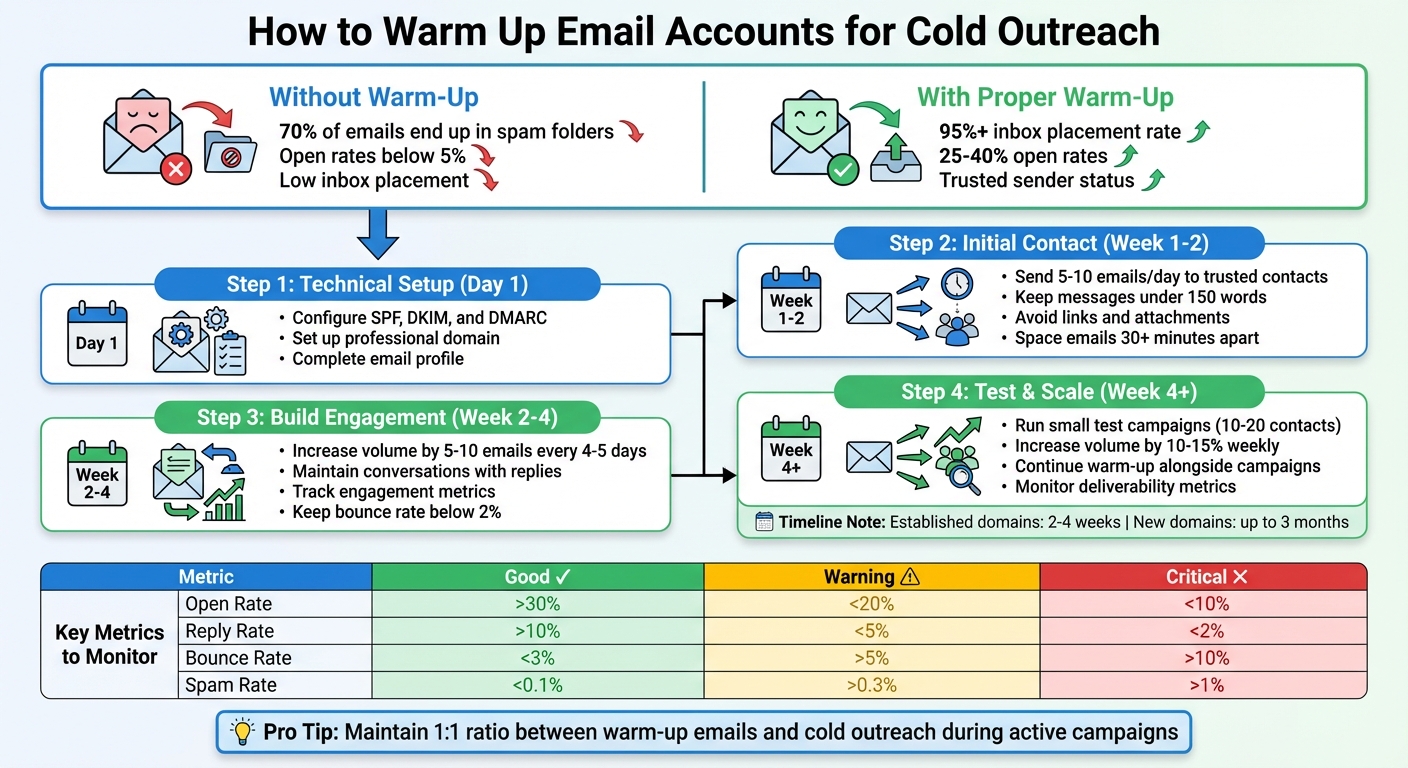
Email Warm-Up Process: Step-by-Step Guide with Key Metrics
What Email Warm-Up Is and Why It Matters for Cold Outreach
What Is Email Warm-Up?
Email warm-up is all about building trust with Email Service Providers (ESPs) like Gmail and Outlook by slowly increasing your email sending volume while maintaining consistent engagement. This process helps establish a positive reputation for your domain, proving to ESPs that you’re a legitimate sender.
The magic lies in mimicking natural human behavior – sending emails at varied times, creating realistic conversations, and encouraging replies and opens. ESPs monitor these patterns closely and assign your domain a sender reputation score, which works like a credit score for your email account.
When you start with a brand-new domain, your reputation score is essentially zero, and ESPs treat you as a high-risk sender. A warm-up process helps shift your domain from "unknown" to "trusted" by showing consistent, predictable behavior over time. For established domains, this typically takes 2–4 weeks, but brand-new domains may need up to 3 months to build a solid reputation. This step is especially important for cold outreach campaigns.
Why Cold Outreach Requires Email Warm-Up
Reaching out to people who’ve never heard from you before can be tricky. ESPs are quick to flag sudden spikes in email volume from new accounts as suspicious activity. The result? Your carefully crafted emails end up in spam folders, never to be seen.
"Mailbox providers treat new senders as ‘guilty until proven innocent.’ Your warm-up process proves your innocence through steady volume patterns and positive engagement signals." – Growleads
A proper warm-up process can make all the difference. With it, you can achieve inbox placement rates of 95% or higher and open rates between 25–40%. Without it, your campaign might fall flat, wasting time and effort.
How Email Warm-Up Improves Deliverability
Email warm-up strengthens your sender identity through protocols like SPF, DKIM, and DMARC, builds your reputation through positive engagement, and ensures consistency with steady sending patterns.
The real game-changer is positive engagement signals. Actions like recipients opening your emails, replying, or marking them as "not spam" send strong signals to ESP algorithms that your content is welcome. Modern ESPs rely on AI to analyze these signals across millions of inboxes, and engagement plays a big role in determining whether your emails land in the inbox or the spam folder.
To get started, send 3–10 emails per day and gradually double the volume over time. Rushing this process can lead to immediate spam filtering or even domain blacklisting.
| Metric | Good | Warning | Critical |
|---|---|---|---|
| Open Rate | > 30% | < 20% | < 10% |
| Reply Rate | > 10% | < 5% | < 2% |
| Bounce Rate | < 3% | > 5% | > 10% |
| Spam Rate | < 0.1% | > 0.3% | > 1% |
Source: InboxKit
Now that you understand the importance of email warm-up, the next step is preparing your email account and domain for a successful warm-up process.
Preparing Your Email Account and Domain for Warm-Up
Set Up a Professional Domain and Configure Authentication
For cold outreach, it’s smart to use a separate domain (e.g., trycompany.com) to keep your primary domain safe. Once you’ve got this new domain, update your DNS settings by enabling SPF, DKIM, and DMARC. These protocols are key for proving domain ownership and ensuring you’re not mistaken for someone trying to impersonate others.
"Authentication tells mailbox providers that: You control the domain; You are not pretending to be someone else; They can safely score you as a sender." – Mailivery
Without these protocols, your emails could head straight to spam. Gmail, for instance, blocks over 99.9% of spam using its AI filters. And by 2025, major email providers like Google and Yahoo will require proper authentication for high-volume senders.
Here’s a quick breakdown of these protocols:
| Protocol | What It Does | Why It Matters |
|---|---|---|
| SPF | Specifies which servers can send emails for your domain | Stops unauthorized parties from using your domain |
| DKIM | Adds a digital signature to verify the email’s integrity | Ensures messages aren’t tampered with in transit |
| DMARC | Provides instructions if SPF or DKIM checks fail | Shows a commitment to secure email practices |
Once authentication is in place, the next step is making your email account look professional and credible.
Complete Your Email Profile Setup
To make your email account appear genuine, start by personalizing it. Add a professional profile photo – this is especially important for Gmail users. Include a signature that lists your full name, job title, company name, website, and physical address. Keep the signature’s HTML minimal to avoid triggering spam filters. Also, set your account’s time zone to match your actual location to maintain natural sending behavior.
Don’t forget to turn off auto-responders and vacation replies, as they can make your account look unnatural during outreach.
Use Zapmail for Pre-Warmed Mailboxes
Setting up domains and configuring DNS records can be tedious. Zapmail simplifies the process by offering pre-warmed Google and Microsoft mailboxes that are ready for outreach immediately.
With Zapmail, you get automated DNS setup, realistic mailbox names, and domain isolation through ZapShield. Plans start at $39 per month for 10 pre-warmed Google mailboxes with US/EU-based IP accounts.
This service eliminates the need for weeks of manual warm-up, allowing you to kick off your outreach campaigns faster while keeping your domain secure.
How to Warm Up Email Accounts Step by Step
Start by Sending Emails to Trusted Contacts
Begin the warm-up process by sending 5–10 manual emails each day to trusted contacts across various platforms like Gmail, Yahoo, and Outlook.
Keep your messages short – around 150 words or less – and make them conversational and natural. Ask questions or request feedback to encourage replies. Avoid including attachments or multiple links, as these can trigger spam filters.
Spread your emails out over 2–3 batches, with at least 30 minutes between each batch. This mimics natural email behavior and helps build trust with email providers.
Track your progress in a spreadsheet by logging details like dates, recipients, open rates, replies, and any instances of emails landing in spam. If an email does end up in a spam folder, ask the recipient to move it to their primary inbox and mark it as "important." This signals to email providers that your messages are legitimate.
Once you start receiving responses, focus on maintaining those interactions to build ongoing engagement.
Build Engagement Through Replies
After establishing initial contact, shift your focus to maintaining and deepening engagement. Reply to every response you receive to show genuine interaction.
As Hugo Pochet highlights, a gradual warm-up process is key to building a strong sender reputation. For the first two weeks, keep conversations going by asking open-ended questions that invite replies. Encourage recipients to engage further by clicking on links or interacting with your content.
Increase your email volume slowly – add no more than 5–10 extra emails every 4–5 days. Avoid doubling your daily email count overnight, as sudden spikes can raise red flags with email providers. Keep your bounce rate below 2% and spam complaints under 0.1% to maintain a positive sender reputation.
Run Small Test Campaigns
Once you’ve established consistent manual engagement, it’s time to test automated sending. After 1–2 weeks of manual warm-up, launch a small campaign targeting 10–20 trusted contacts who are likely to open and reply. Use your actual outreach copy to test how email filters respond.
Include a seed email address (like one from Mail-Tester) to verify proper authentication. Spread your test emails throughout the day using long delivery windows to avoid triggering activity spikes. Stick to sending 10–20 emails daily, and if your metrics look good, increase your volume by only 10–15% each week.
Continue manual warm-up efforts alongside your automated tests. This helps balance the "cold" signals from automation and ensures your engagement-to-outreach ratio stays strong, meeting the expectations of email providers.
Warm Up Guide on Instantly
sbb-itb-36f7bf9
Automating Email Warm-Up with Zapmail
Zapmail takes the tedious manual email warm-up process and makes it faster and easier to scale.
Integrate Zapmail for Efficient Warm-Up
Zapmail eliminates the need for the usual 2–4 week manual warm-up process by using pre-warmed Google and Microsoft mailboxes. These accounts are ready to go, complete with SPF, DKIM, and DMARC configurations.
The platform handles the technical setup in just 5–10 minutes, covering DNS settings, custom tracking domains, and domain masking. By automating these steps, it reduces the risk of human mistakes that often lead to deliverability problems.
Zapmail also integrates seamlessly with over 50 outreach tools. For example, Mike Black, Founder of Talent Stream, leveraged this feature to scale his investor outreach from 270 contacts per day to 1,350 contacts per day. He achieved this by purchasing 24 domains and 72 inboxes for $527 and directly connecting them to his outreach tool.
"Zapmail.ai for Gmail/M365: Instant email infra setup (SPF/DKIM/DMARC, routing, masking) zero human error, all done by software." – Enoch Chang, Co-Founder, Cymate
Once set up, scaling your email campaigns becomes straightforward.
Gradually Increase Sending Volume with Zapmail
Start small – send 10–20 emails per day per mailbox, and then increase your volume by 20–50% weekly while keeping engagement levels high. This gradual approach mimics natural email behavior, which helps maintain trust with email providers.
Keep a close eye on your metrics: your bounce rate should stay below 2%, and spam complaints should remain under 0.1%. Tools like Gmail Postmaster Tools, Microsoft SNDS, and Zapmail’s dashboard make it easy to monitor these numbers daily.
During your first month, maintain a 1:1 ratio between warm-up emails and cold outreach. This balance protects your sender reputation as you ramp up. Even after launching your campaigns, don’t stop the warm-up process – keeping it running at a lower level ensures your reputation remains strong, especially during periods of heavy sending.
For higher email volumes, it’s better to add new accounts rather than overloading existing ones. This horizontal scaling strategy minimizes risks and ensures consistent deliverability across your entire setup.
Advanced Features for Domain Safety
Zapmail’s ZapShield feature isolates each workspace with its own domain, reducing potential risks. If one domain faces issues, your other campaigns remain unaffected. This setup is crucial for maintaining a strong sender reputation across large-scale operations.
Mohan Muthoo, Founder of Spring Drive, uses this feature to manage high-volume client campaigns. His agency successfully maintains stable deliverability by keeping domains separate.
"Only 1 domain per workspace gives us absolute risk control and this is the best way to segment a large infra." – Mohan Muthoo, Founder, Spring Drive
Zapmail also offers API access, enabling programmatic mailbox provisioning and deliverability tracking. This is particularly useful for SaaS platforms and AI-driven SDR tools. To date, the platform has set up over 1,000,000 mailboxes and manages 330,000+ domains. Users report an average deliverability rate of 95%, even while sending 2 million cold emails monthly across more than 5,000 accounts.
For a more resilient email infrastructure, diversify your accounts: use 50% Google, 40% Outlook, and 10% SMTP. This mix ensures your campaigns remain stable, even if one provider updates its filtering algorithms.
Monitoring Progress and Maintaining Sender Reputation
Track Key Deliverability Metrics
The process of warming up your email sender reputation doesn’t end once you start sending emails. Keeping an eye on critical metrics is essential to ensure your reputation remains strong. Aim for open rates above 30%, reply rates over 10%, and bounce rates below 3%. Emails with higher engagement are 440% more likely to land in the inbox compared to those with lower engagement.
Pay close attention to your spam complaint rate – it should stay below 0.1%. Major providers like Google and Yahoo expect rates under 0.3%, while top performers aim for around 0.08%. Tools such as Google Postmaster Tools and Microsoft SNDS can provide valuable insights into how email recipients and providers view your sending behavior.
Here are the key metrics to monitor during your campaigns:
| Metric | Good | Warning | Critical |
|---|---|---|---|
| Open Rate | > 30% | < 20% | < 10% |
| Reply Rate | > 10% | < 5% | < 2% |
| Bounce Rate | < 3% | > 5% | > 10% |
| Spam Rate | < 0.1% | > 0.3% | > 1% |
| Unsubscribe Rate | < 0.5% | > 1% | > 2% |
Source:
Regularly reviewing these metrics allows you to catch potential issues early and adjust your strategy before they impact your deliverability.
Avoid Common Warm-Up Mistakes
Ramping up your email volume too quickly can seriously harm your sender reputation. Malik Shamsuddin, Founder of Mailivery, explains:
"Email providers do not trust new senders. And they definitely do not trust senders who ramp volume too fast."
Here’s what to avoid during the warm-up process:
- Adding links or attachments too soon: During the initial weeks, avoid including links or attachments in your emails. These can increase the perceived risk of your messages and trigger spam filters.
- Burst sending patterns: Sending a large number of emails in a short period (e.g., 100 emails within an hour) followed by long pauses raises red flags. Instead, space emails 3–5 minutes apart during business hours.
- Using unverified email lists: Always clean your email lists with data validation tools before launching a campaign. High bounce rates are a major red flag for spam filters, and research shows that about 85% of deliverability issues stem from improper warm-up practices.
- Continuing to email unresponsive prospects: Stop reaching out to prospects who haven’t opened your last 3–5 emails. These inactive recipients can lower your overall engagement rates and hurt your reputation.
By steering clear of these mistakes, you can build and maintain a stronger sender reputation throughout your campaigns.
Continue Warm-Up During Active Campaigns
Even after you start a cold outreach campaign, it’s essential to continue your warm-up efforts. One common misstep is stopping warm-up activities as soon as outreach begins. Keep your automated warm-up running in parallel with your campaigns. Maintaining a 1:1 ratio between warm-up emails and cold outreach emails helps balance your sender reputation, offsetting the lower engagement rates typical of cold prospects.
Platforms like Zapmail simplify this process by offering real-time deliverability tracking across all your accounts. Their dashboard ensures you can monitor metrics while keeping warm-up activities operational in the background. If you’re scaling up, consider adding new mailboxes instead of overloading existing ones. This horizontal scaling approach spreads the risk and helps maintain consistent deliverability.
Conclusion
Getting email warm-up right is a game-changer for cold outreach success. Studies reveal that many deliverability issues stem from skipping or mishandling this critical step, making a thoughtful approach essential.
Email providers are naturally cautious with new senders, especially when they notice sudden spikes in email volume. To build trust, you need to start with a solid technical setup – think SPF, DKIM, and DMARC. From there, gradually ramp up your email activity, beginning with just 5–10 emails a day. Genuine interactions, like replies and positive engagement, help establish credibility. And even after your campaigns are live, continuing the warm-up process is key.
Zapmail takes the hassle out of this process by automating it for you. With pre-warmed mailboxes ready to go, automated warm-up, and real-time tracking, you can skip the manual work and focus on crafting emails that connect with your audience.
Nailing the email warm-up process sets the stage for consistent and effective outreach.
FAQs
What happens if I don’t warm up my email account before starting cold outreach?
Failing to properly warm up your email account can cause major setbacks for your cold outreach campaigns. Without this step, there’s a high chance your emails will land in spam folders, your domain could get blacklisted, or worse, your email account might be suspended altogether.
On top of that, your open rates could plummet to under 5%, and your sender reputation could take a hit that’s tough to recover from. This damage can make it increasingly difficult to get your emails into inboxes down the road. Taking the time to warm up your email account is a critical step to ensure your campaigns run smoothly and your emails actually get delivered.
What are SPF, DKIM, and DMARC, and how do they help with email deliverability?
When it comes to protecting your domain and ensuring your emails land where they’re supposed to, SPF, DKIM, and DMARC are your go-to tools.
- SPF (Sender Policy Framework): This protocol checks if an email is being sent from a server that’s authorized to send on behalf of your domain. Think of it as a gatekeeper that verifies the sender’s legitimacy.
- DKIM (DomainKeys Identified Mail): With DKIM, your emails are stamped with a secure digital signature, acting like a tamper-proof seal to ensure the message remains unchanged during delivery.
- DMARC (Domain-based Message Authentication, Reporting, and Conformance): DMARC ties everything together. It works with SPF and DKIM to give email providers clear instructions on what to do with unauthorized emails – whether they should be rejected, quarantined, or allowed through.
Using all three protocols not only protects your domain from misuse but also boosts your sender reputation. This means fewer emails ending up in spam folders and better chances of connecting with your audience.
Why is engagement important during email warm-up for sender reputation?
Engagement is crucial when it comes to establishing a solid sender reputation during the email warm-up phase. Actions like replies, opens, and other interactions show email providers that your account is reliable and that your messages matter to the people receiving them.
These interactions play a big part in improving deliverability. They lower the risk of your emails being marked as spam and help ensure they land in the recipient’s inbox. By consistently encouraging engagement, you create a positive reputation for your email account, paving the way for effective cold outreach efforts.