API-based mailbox verification ensures email addresses are valid, active, and safe to use without sending an actual email. It goes beyond basic checks like syntax validation to verify domains, mailboxes, and risks in real time. This process helps reduce bounces, protect sender reputation, and improve email campaign performance.
Key Benefits:
- Validates email addresses in seconds.
- Reduces bounces and spam complaints.
- Flags risky addresses (e.g., disposable, role-based, or catch-all).
- Improves email deliverability and database quality.
How It Works:
- Syntax Check: Ensures the email format is correct.
- Domain Verification: Confirms the domain is active with valid MX records.
- Mailbox Check: Verifies the mailbox exists using an SMTP ping.
- Risk Assessment: Identifies disposable, role-based, or spam-trap addresses.
Integration Steps:
- Sign up for an API key.
- Use REST HTTP requests to verify emails.
- Analyze results (valid, invalid, risky) to clean lists.
For large email lists, bulk verification and automated tools like Zapmail can streamline the process. Clean email lists lead to better engagement, fewer bounces, and stronger sender reputation.
Real-time email validation: Verifying emails with API or Zapier
Steps in API-Based Mailbox Verification
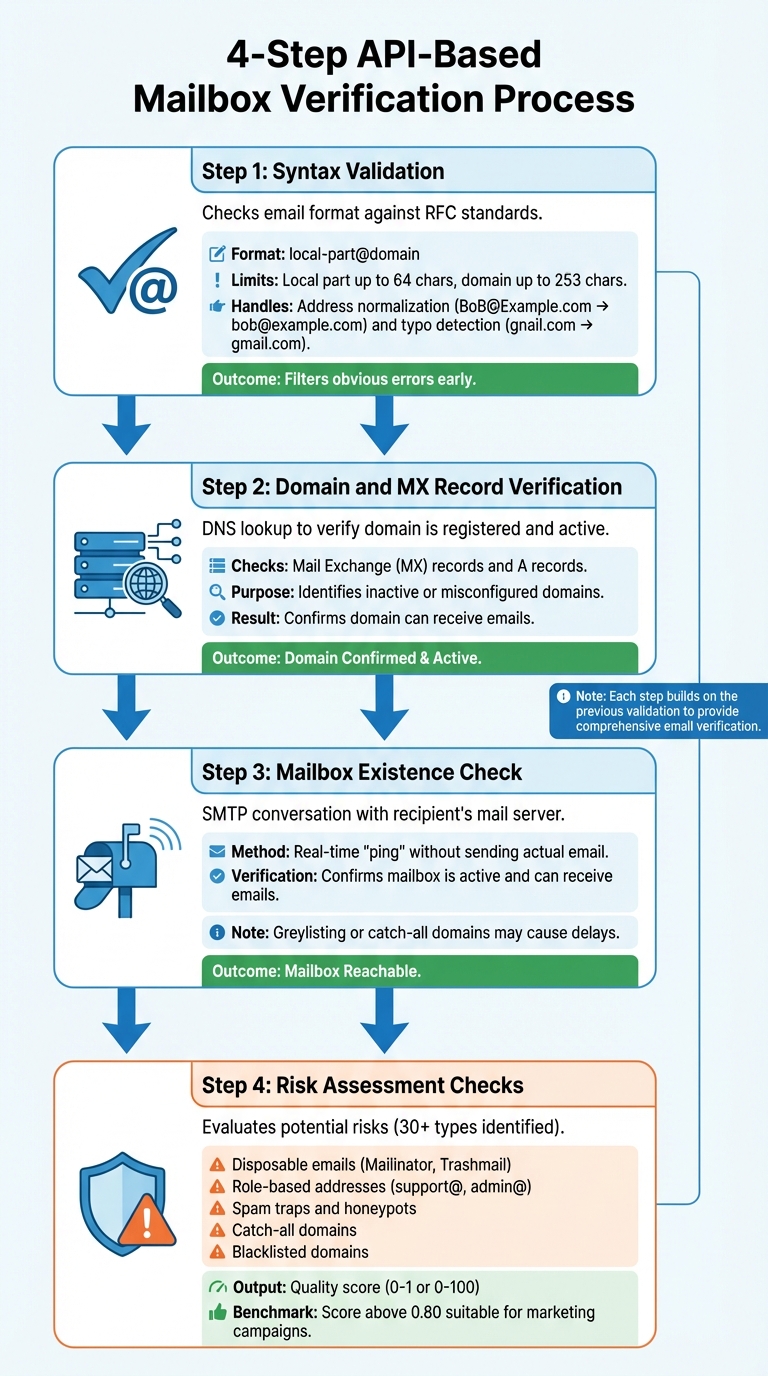
4-Step API-Based Email Verification Process Flow
Syntax Validation
The first step in verifying an email address involves checking its syntax against regex patterns established by RFC 5322, RFC 5321, and RFC 3696. This ensures the email adheres to the correct local-part@domain format, where the local part can have up to 64 characters, and the domain can have up to 253 characters.
APIs also handle address normalization – converting entries like [email protected] to [email protected] – and identify common typos, such as "gnail.com" instead of "gmail.com".
This step filters out obvious errors early, avoiding unnecessary checks for invalid addresses. If an email fails syntax validation, there’s no need to move on to domain or mailbox verification.
Once syntax is confirmed, the next step is to verify the domain’s legitimacy.
Domain and MX Record Verification
After confirming the format, the API performs a DNS lookup to check if the domain is registered and active. It looks for Mail Exchange (MX) records, which specify where emails should be delivered. In some cases, the API also validates A records to ensure the domain’s host is functional.
This step identifies domains that are inactive or misconfigured. Without valid MX records, a domain cannot receive emails, rendering it useless for communication or campaigns.
Mailbox Existence Check
With the domain verified, the next step is to confirm the existence of the mailbox. The API initiates an SMTP conversation with the recipient’s mail server to verify the mailbox without actually sending an email. This "ping" checks whether the server accepts messages for the specific mailbox. It’s a real-time process that ensures the mailbox is active and capable of receiving emails.
However, certain factors like greylisting or catch-all domains can delay responses or result in false positives.
Risk Assessment Checks
The final stage evaluates the potential risks associated with an email address. Even if an address is technically valid, it might pose challenges for your sender reputation. Advanced APIs can identify over 30 types of risky email addresses. Here are some common risks they assess:
- Disposable emails: Addresses from services like Mailinator or Trashmail, often used to bypass subscriptions.
- Role-based addresses: Generic addresses like support@ or admin@, which are not tied to individuals and typically have lower engagement rates.
- Spam traps and honeypots: These are set up to catch senders who fail to maintain proper list hygiene.
The system also flags catch-all domains, which accept all emails but make it hard to verify individual mailboxes. Additionally, it checks for domains listed on blacklists due to malicious activity.
Many APIs provide a numeric quality score (e.g., 0 to 1 or 0 to 100) that reflects the overall deliverability and reputation of the email address. Generally, a score above 0.80 is considered suitable for marketing campaigns.
| Verification Status | Common Reasons | What It Means |
|---|---|---|
| Valid | Verified, Accepted | Passed all checks – safe to send emails |
| Invalid | Invalid Syntax, Mailbox Not Found | Incorrect format or non-existent mailbox |
| Risky | Disposable, Role-Based, Catch-All | Valid but could harm sender reputation |
| Undeliverable | Mailbox Full, No DNS Entries | Server exists but cannot receive messages |
| Unknown | Timeout, No Connect | Unable to determine status during the check |
These layers of verification work together to provide a thorough evaluation of an email’s deliverability and reliability.
How to Integrate an Email Verification API
Setting Up API Access
To get started, sign up for access to your API dashboard. This dashboard lets you manage settings and monitor usage.
Once registered, generate your API key. This key is essential for authenticating your requests. Most services display the key immediately after registration – make sure to store it securely. Avoid hardcoding it in client-side code or exposing it in public repositories.
You’ll also need an active credit balance. Most email verification APIs work on a pay-per-use basis, where each verification deducts a credit. If your balance runs out, you may encounter "403 Forbidden" errors that prevent further requests.
Keep in mind that most providers require HTTPS connections to ensure secure data transmission. Additionally, be aware of rate limits – for example, some services allow up to 10 requests per second. Planning your usage accordingly will help you avoid issues.
Once everything is set up, you’re ready to start sending verification requests.
Sending Verification Requests
Email verification APIs accept REST HTTP requests with two key inputs: the email address and your API key.
You can authenticate in one of two ways: either append the API key as a query parameter in the URL (e.g., ?key=YOUR_API_KEY) or include it as a Bearer token in the authorization header (e.g., Authorization: Bearer YOUR_API_KEY).
For single email checks – like verifying an address during a registration process – a simple GET request is sufficient. If you’re handling bulk verifications, use POST requests with JSON arrays to process multiple addresses at once.
Some APIs offer optional parameters to enhance verification. For instance, adding an ip_address parameter can help assess the risk of a sign-up, while enabling a catch_all mode provides deeper analysis, though it may slow down response times. Also, make sure your SPF, DKIM, and DMARC records are configured correctly to avoid unnecessary failures during automated checks.
Reading API Responses
After submitting a verification request, the API will return a JSON response with detailed results.
The status field provides the main outcome, indicating whether the email is "deliverable", "undeliverable", "risky", or "unknown." This gives you a quick understanding of whether the email address is safe to use.
Pay attention to the quality score, which ranges from 0.0 to 1.0. For marketing emails, aim for scores above 0.80. For transactional emails, a score of 0.65 or higher is generally acceptable.
The response also includes several boolean flags, such as format_valid, mx_found, smtp_check, catch_all, and disposable, which provide additional insights. If the API detects a typo, the did_you_mean field may suggest corrections, like changing "gnail.com" to "gmail.com."
It’s important to design your system to handle standard HTTP error codes. For example, a 401 error indicates unauthorized access, a 403 error means you’ve exceeded your quota, and a 429 error signals that you’ve hit the rate limit. If you’re working with bulk verifications, consider using webhook listeners to receive results asynchronously instead of constantly polling the API for updates.
sbb-itb-36f7bf9
Using Verification Results in Email Campaigns
Understanding Verification Results
After completing the verification process, the next step is to put those results to work in your email campaigns. Verification results categorize email addresses into four main types: valid, invalid, risky, or disposable.
- Valid: These are active email addresses with confirmed mailboxes. You can safely include them in your primary email lists.
- Invalid: These refer to addresses with non-existent mailboxes or domains that fail MX checks. They should be removed immediately to avoid hard bounces.
- Risky or Catch-all: These addresses belong to domains that accept all incoming mail, making it impossible to verify specific mailboxes. While technically deliverable, they come with uncertainties.
- Disposable: Temporary addresses, like those from Mailinator, created for one-time use. These offer little engagement value and should be avoided.
Here’s a quick summary of how to handle each type:
| Classification | Meaning | Action |
|---|---|---|
| Valid | Active mailbox | Send emails |
| Invalid | Non-existent mailbox | Remove from lists |
| Risky / Catch-all | Domain accepts all mail | Use segmentation |
| Disposable | Temporary address | Block immediately |
Understanding these classifications allows you to take precise, targeted actions in your campaigns.
Handling High-Risk Addresses
Managing high-risk email addresses is crucial to protecting your sender reputation and maintaining deliverability.
- Catch-all domains: Avoid including these in large-scale email blasts. Instead, segment them into smaller groups and monitor their performance closely. If bounce rates increase, stop sending to these addresses immediately.
- Disposable emails: Block these addresses at the point of capture. Use API tools to flag and reject them during sign-up.
- Role-based addresses: Emails like info@ or support@ often go to multiple recipients and typically have lower engagement rates.
To keep your campaigns healthy, aim for a bounce rate below 2%. Gmail also requires bulk senders to maintain spam complaint rates under 0.3% in Postmaster Tools. Removing high-risk emails before sending plays a big role in meeting these thresholds.
Scaling Verification for Large Lists
For larger email lists, scalable API solutions make verification more efficient. Use asynchronous API endpoints with webhooks to manage list processing. Instead of checking the server repeatedly, let the API notify you when the verification is complete.
Caching can also save costs and improve performance. Cache stable results – like invalid syntax or disposable domains – for 7 to 30 days. For uncertain cases, such as greylisted or unknown addresses, re-verify them every 7 days.
Regular maintenance is key because email lists naturally decay over time.
"Email databases naturally degrade by about 22.5 percent per year, which means unverified lists pick up invalid and risky contacts over time."
- Instantly.ai
To combat this, run bulk verifications every quarter. This ensures your lists stay clean as subscribers change jobs or abandon old accounts. Automatically move invalid or high-risk addresses to suppression lists to protect your sender reputation.
Zapmail API for Mailbox Verification
Zapmail API Features
Zapmail’s API streamlines the setup of mailboxes and DNS configurations, taking care of technical details like SPF, DKIM, DMARC, and MX records. This automation helps avoid common spam filtering issues.
The API also supports programmatic provisioning, meaning you can create and manage mailboxes, workspaces, and DNS records without lifting a finger. With over 1 million mailboxes configured and 330,000+ domains managed for more than 35,000 businesses globally, Zapmail has demonstrated its ability to handle large-scale operations.
One standout feature is workspace-level isolation. By enforcing a one-domain-per-workspace policy, Zapmail ensures that deliverability issues are contained. As Mohan Muthoo, Founder of Spring Drive, explains:
"Only 1 domain per workspace gives us absolute risk control and this is the best way to segment a large infra."
Zapmail also offers pre-warmed Google and Microsoft mailboxes hosted on US-based servers. This eliminates the usual multi-week warm-up period, allowing you to start sending emails right away. Plus, the platform integrates with over 50 outreach tools, including Instantly, Smartlead, ReachInbox, Lemlist, and Woodpecker.
Benefits for Email Deliverability
Zapmail’s infrastructure is designed to maximize email deliverability. Automated DNS setups and high-reputation, US-hosted accounts contribute to deliverability rates as high as 95%. Even better, fully configured and authenticated mailboxes can be ready to use in about 5 minutes.
Dominique Michel, Co-Founder of Clayground, emphasizes the platform’s reliability:
"Zapmail.ai… own nearly 100% of the infra. No sketchy GSuite or blackhat resellers."
Zapmail also provides tools to monitor and maintain email performance. Features like domain health scores and placement tests give you real-time insights, helping ensure your emails consistently land in inboxes.
Getting Started with Zapmail’s API
Getting started with Zapmail is straightforward and budget-friendly. Pricing begins at $39/month, with plans tailored to different needs:
- Starter Plan: $39/month for 10 mailboxes, with additional mailboxes at $3.50 each.
- Growth Plan: $99/month for 30 mailboxes, with additional mailboxes at $3.25 each.
- Pro Plan: $299/month for 100 mailboxes, with additional mailboxes at $3.00 each. This plan also includes priority support and full API access.
Mailboxes start at $2.50 each, and domains are available for around $13 for .com extensions.
Zapmail has earned a 4.5/5 rating on Trustpilot, with users frequently praising its quick setup (under 10 minutes) and dependable US-hosted infrastructure. Shivam Kumar, Founder of ColdStory, captures the sentiment well:
"Zapmail makes email deliverability easy. Buy domains, set up your email accounts fast, and manage everything from one simple dashboard."
Conclusion
Key Takeaways
Using an API for mailbox verification is a smart way to safeguard your email campaigns. It works by validating email syntax, checking domain MX records, and confirming mailbox existence through SMTP pings. This process helps weed out undeliverable addresses before they can harm your sender reputation.
Advanced verification APIs go a step further by leveraging machine learning and analyzing data from billions of emails to flag risky addresses. This multi-layered approach keeps your bounce rates low, ensures strong deliverability, and minimizes the chances of being blacklisted – all while keeping your sender reputation intact.
Cleaning up your email lists before launching campaigns also improves efficiency. You avoid wasting time and resources on invalid accounts, allowing you to focus on real prospects. This leads to better open rates and a stronger ROI. Whether through real-time verification during signups or bulk list cleaning, maintaining clean email lists keeps your infrastructure running smoothly.
Next Steps
Ready to put these benefits into action? Start by testing an email verification API with sample requests. Most providers offer simple REST endpoints where you can validate email addresses and review detailed responses, including validation scores and SMTP results. Integrating this into your CRM or outreach workflow can automate the process of keeping your lists clean.
As your email campaigns grow, a reliable API becomes essential. For a scalable solution that combines email verification with advanced deliverability tools, consider Zapmail’s API. It offers pre-warmed Google and Microsoft mailboxes ready in just five minutes, automated DNS setup for SPF, DKIM, and DMARC records, and seamless integration with over 50 outreach platforms. With features like strict domain isolation and risk control, Zapmail ensures your campaigns scale without compromising quality.
Verified email lists and a well-optimized infrastructure are the backbone of successful campaigns. Zapmail offers plans starting at $39/month, making it an affordable way to build a professional email system that delivers results.
Check out Zapmail to explore API features designed for teams that prioritize email performance. Clean email lists and top-notch infrastructure can make a noticeable difference in your campaign outcomes.
FAQs
What are the benefits of using API-based mailbox verification for email deliverability?
API-based mailbox verification takes email deliverability to the next level by instantly spotting and filtering out invalid, disposable, or non-existent email addresses. This helps cut down on bounce rates, protects your sender reputation, and boosts the chances of your emails reaching the intended inbox.
With automation at its core, these solutions streamline the verification process, delivering precise results quickly. It’s a smart way to keep your email list clean and dependable without wasting time.
What risks can be identified during API-based mailbox verification?
Mailbox verification through APIs helps pinpoint risks that can harm email deliverability. Here are some common issues flagged during the process:
- Invalid email formats: Addresses with syntax or formatting mistakes that don’t meet standard validation rules.
- Domain problems: Domains missing MX records or failing DNS lookups, which make the mailbox unreachable.
- SMTP errors: Problems like "mailbox full" or "user unknown", signaling potential delivery failures.
- Catch-all domains: Domains that accept all emails but may not deliver them consistently.
- Role-based addresses: Generic emails like info@ or sales@ that tend to have higher bounce rates.
- Disposable or free-provider addresses: Temporary or free email services often associated with lower-quality contacts.
By identifying these issues, mailbox verification APIs help you flag or filter questionable addresses, boosting the effectiveness of your email campaigns.
How do I integrate an email verification API into my system?
To set up an email verification API, the first step is generating an API key through your provider’s dashboard. Make sure to store this key securely – use your server’s environment variables or configuration files to keep it safe and out of client-side code.
Once you have the key, send a request to the API endpoint, including the email address you want to verify and the API key as parameters. Depending on the provider, this request could be a GET or POST call. The API will respond with the email’s status – common results include deliverable, undeliverable, or risky. Use this feedback to decide whether to accept, reject, or flag the email for further review.
After testing the API, integrate it into your processes, such as validating emails during form submissions or in real-time workflows. Keep an eye on your usage to avoid exceeding rate limits, handle errors gracefully, and stay aware of costs – many providers charge per verification, often around $0.004 per lookup. If you’re working with Zapmail, the process is similar, allowing you to streamline email verification within your outreach efforts.